5
INSTALLATION
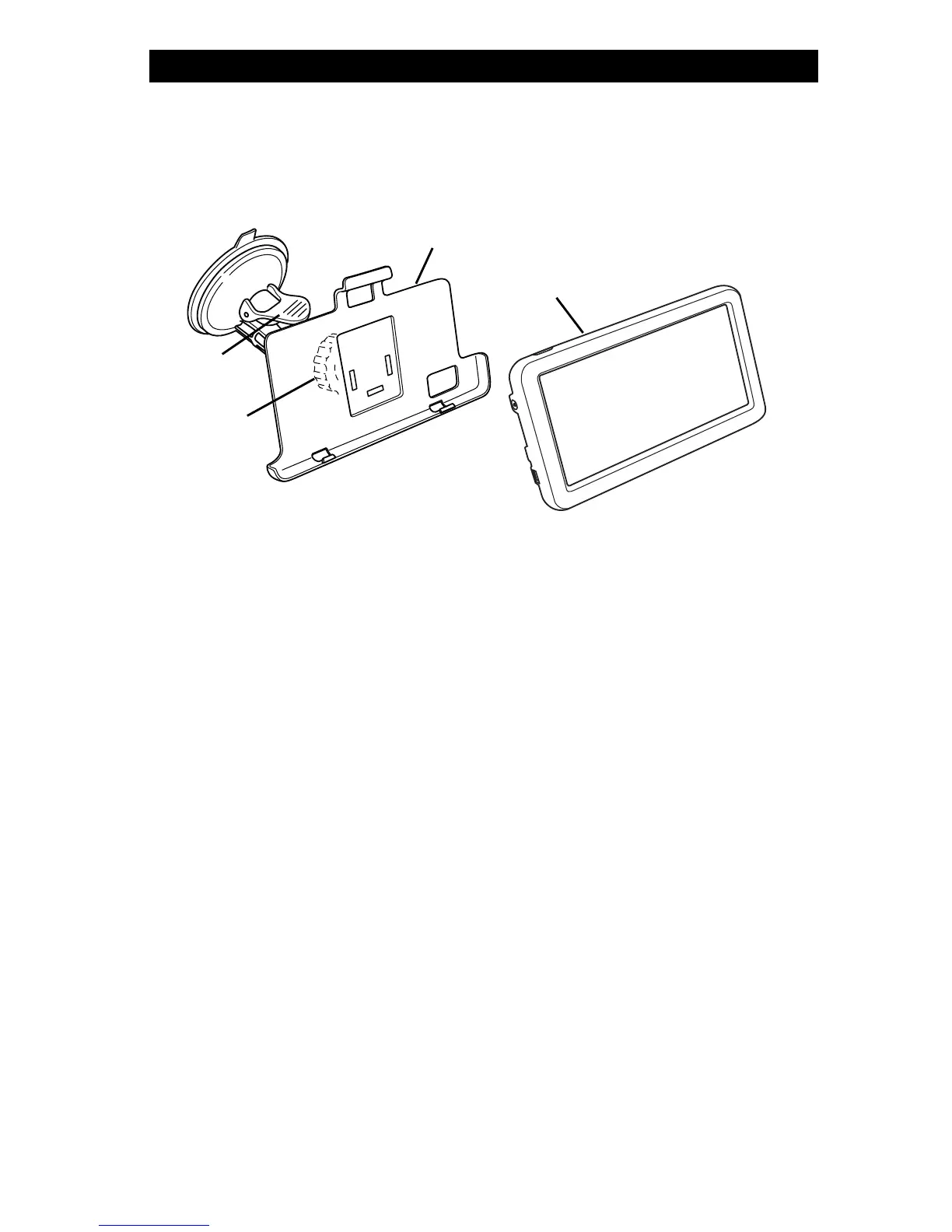
1. Install the mounting bracket onto the suction mounting arm by slipping it over the tabs and then
sliding it to lock into place.
2. Find a smooth mounting surface inside the vehicle for the display monitor where it can be easily
seen, but not in a position where it can obstruct your vision when driving.
NOTE: To maximize the effectiveness of the suction mount, the mounting location surface
temperature should be between 70° and 100°F (21° and 38°C); avoid application below 50°F
(10°C). Do not perform application in direct sunlight.
3. Clean and dry the mounting surface.
Legend
1. Mounting Bracket
2. Display Monitor
3. Suction Mounting Arm
4. Suction Lock Lever
4. Press the suction mount against the mounting surface and push the suction lock lever down.
Make sure it is attached securely.
NOTE: After mounting, protect the mounting surface from direct sunlight for 24 hours.
5. Place the display monitor on the mounting bracket and push on the top of the monitor to snap it
in place.
6. Plug in the 12-volt DC power adapter/charger into a cigarette lighter/accessory socket. When
there is power, the green light will be lit.
NOTE: The power adapter plug must be plugged into an unswitched cigarette lighter/accessory
socket or the key switch must be on. Check your vehicle’s owner’s manual to determine what your
vehicle has.
7. Route and secure all wires as needed.
2
3
4



 To Next Page