1-24 Chapter 1: Product introduction
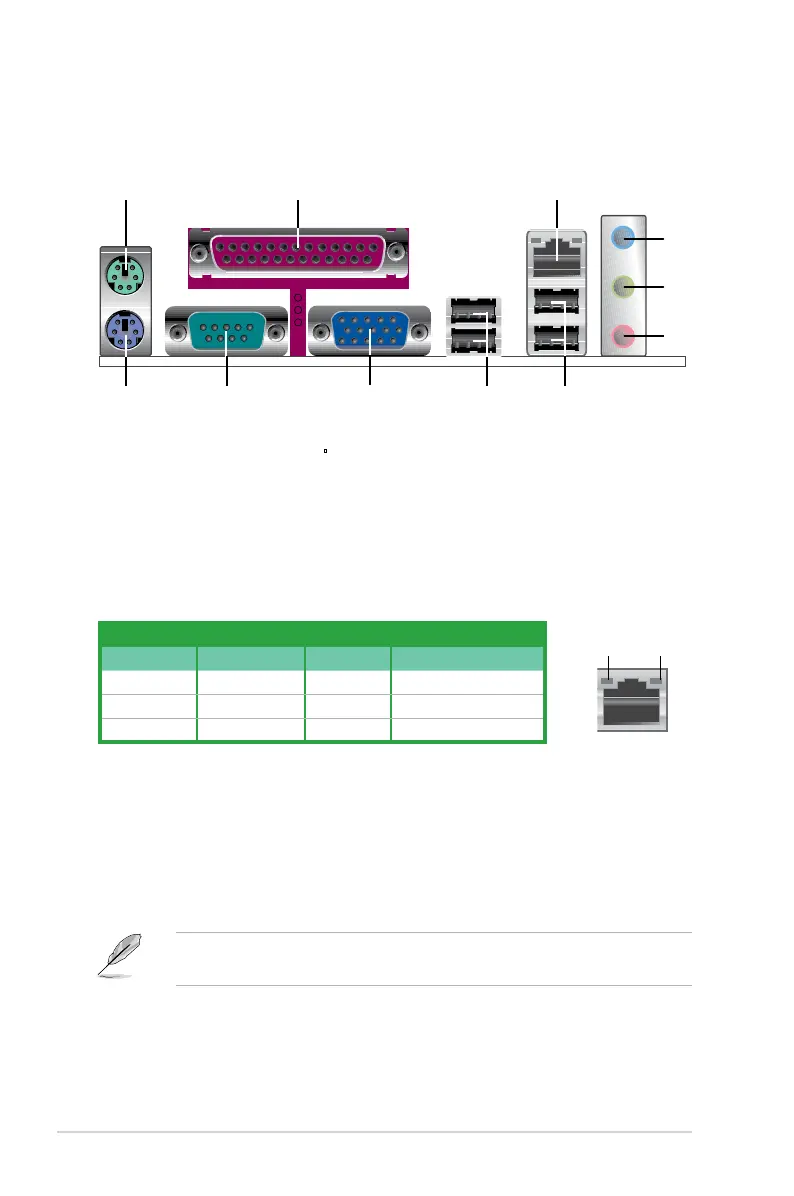
1.10 Connectors
1.10.1 Rear panel connectors
Activity/Link LED Speed LED
Status Description Status Description
OFF No link OFF 10 Mbps connection
ORANGE Linked ORANGE 100 Mbps connection
BLINKING Data activity GREEN 1 Gbps connection
LAN port LED indications
SPEED
LED
ACT/LINK
LED
LAN port
4. Line In port (light blue). This port connects a tape, CD, DVD player, or other
audio sources.
5. Line Out port (lime).
This port connects a headphone or a speaker. In 4-
channel, and 6-channel conguration, the function of this port becomes Front
Speaker Out.
6. Microphone port (pink). This port connects a microphone.
Refer to the audio conguration table on next page for the function of the audio
ports in 2, 4, or 6-channel conguration.
1. PS/2 mouse port (green). This port is for a PS/2 mouse.
2.
Parallel port. This 25-pin port connects a parallel printer, a scanner, or other
devices.
3. LAN (RJ-45) port.
Supported by Gigabit LAN controller, this port allows
Gigabit connection to a Local Area Network (LAN) through a network hub.
Refer to the table below for the LAN port LED indications.



 To Next Page