30 31|
GETTING STARTED
GETTING STARTED
CONNECTING TO THE INTERNET
y Select your Wi-Fi
®
network and enter the password. Tap Connect.
y If a Wi-Fi network is not available, you can connect to a wired network. Use an adapter
to connect an Ethernet cable to the network port on the back of the touchscreen.
The Tread will connect to the network automatically.
y To turn off Wi-Fi, tap the upper right corner of the touchscreen and select Wi-Fi. On the
Wi-Fi screen, toggle the radio button at the upper right.
LOGGING IN
y When logging in for the rst time, please have available your Subscription Activation Key
or the login information you set up when you purchased the Peloton Tread.
y Once a subscription is activated and associated with this Tread, any user can log in and
access subscription content.
CAUTION: Ethernet cable must not pass underneath the Tread or touch the
running surface.
INCLINE
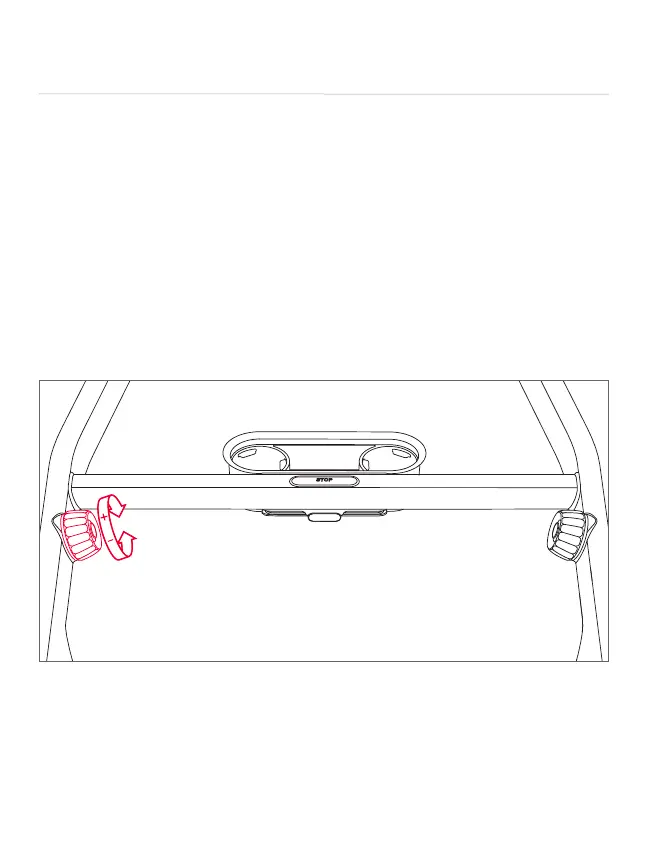
y Turn the incline knob forward to increase incline in increments of 0.5 percent grade.
y Turn the knob backward to decrease incline in increments of 0.5 percent grade.
y Press the jump button at the center of the knob to increase incline speed to the next
whole percent grade.
y Tap Incline to change your incline using on-screen shortcuts. Tap the screen and select
Customize Shortcuts to put in your own shortcut incline settings.
USING THE TREAD CONTINUED



 To Next Page