32 33|
GETTING STARTED
GETTING STARTED CONTINUED
SELECTING A CLASS
y Select live classes from the schedule or choose from on-demand classes.
y Filter by instructor, class length, class type, and more.
y Your instructor will guide you through your workout. If the workout does not include a
warmup and cooldown, warmup and cooldown classes are available separately.
y Select More for a Scenic Run or Just Run experience.
CLASS TYPES
Peloton’s schedule includes a variety of different kinds of classes. Class types may
include the following:
y Running/Walking: cardio-focused classes taking place entirely on the Tread.
y Bootcamp: a combination of cardio segments taking place on the Tread and strength
segments taking place off the Tread.
y Strength/Yoga/Cardio: classes taking place off the Tread.
y For more information on classes, go to onepeloton.co.uk/tread/classes.
ADDING A PROFILE
To let another person use your Tread, tap the icon next to your username at the lower left
of the screen and select Add/Remove Proles. The new user can log in with an existing
Peloton account or tap Create an Account to set up a new one.
TREAD LOCK
WARNING: Hide the Tread Lock passcode from people under the age of 16 or
persons with reduced physical, sensory or mental capabilities that impair the safe
use of the equipment.
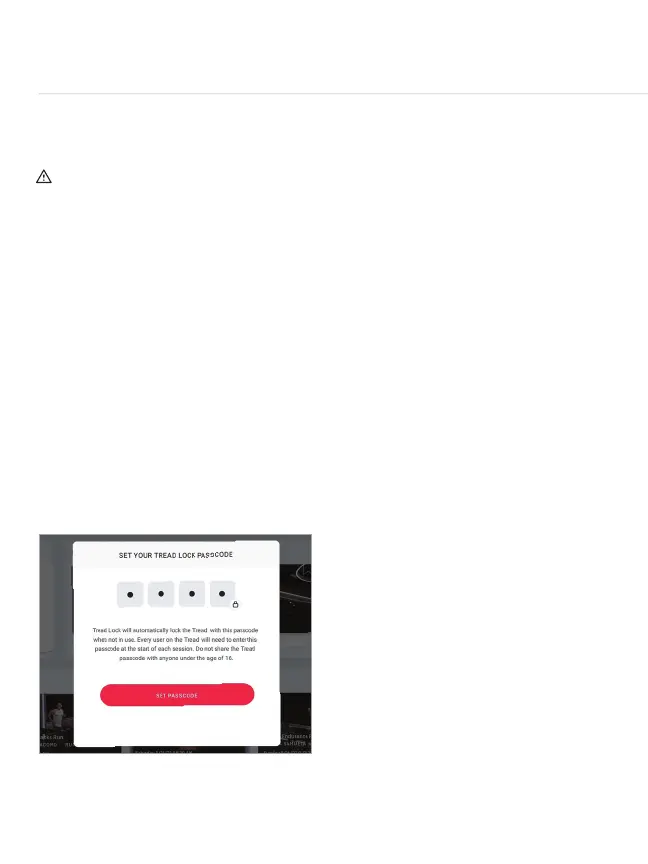
y Tread Lock is an additional safety feature that requires a passcode to unlock the Tread.
y Setting up a 4-digit passcode will be required when using your Tread for the rst time.
All users will be required to enter this passcode after 45 seconds of inactivity except
during a workout.
NOTE: all user proles associated with the Tread will be required to enter the same 4-digit
passcode.To change an existing passcode:
y Tap the
...
icon at the bottom right of the home screen and select Tread Lock.
y Follow the prompts to reset the 4-digit passcode.
y If you forget the Tread Lock passcode, you can reset it by going to
support.onepeloton.com and following the instructions for passcode reset.



 To Next Page