EasyManua.ls Logo

Pentair COLORVISION - User Manual

Pentair COLORVISION
40 pages
Print Icon
To Next Page IconTo Next Page
Loading...
COLORVISION Light Installation and User’s Guide
1
IMPORTANT SAFETY INSTRUCTIONS
READ AND FOLLOW ALL INSTRUCTIONS
SAVE THESE INSTRUCTIONS
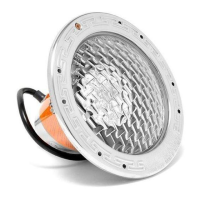
COLORVISION™ UNDERWATER COLOR
CHANGING LED LIGHT
FOR POOL AND SPA
INSTALLATION
AND
USER’S GUIDE

Table of Contents

Questions and Answers

  • J
    jasonwilliamsJul 28, 2025
    How to troubleshoot Pentair COLORVISION Swimming Pool Lighting that won't illuminate?
    • S
      Sara JohnsonJul 28, 2025
      If your Pentair Swimming Pool Lighting is not working, ensure that AC power is correctly supplied to the light. Inspect the light wiring connection at both the junction box by the pool and the AC power switch.
  • J
    John MccoyAug 7, 2025
    What to do if Pentair COLORVISION doesn't illuminate?
    • W
      williamnixonAug 7, 2025
      If your Pentair Swimming Pool Lighting is not working, check the ground fault wiring and reset it if needed. Also, check the light wiring connection to the junction box at the pool side and the main circuit breaker. Make sure the light is receiving proper AC power.
  • R
    Rebecca SimpsonAug 17, 2025
    Why are both LEDs flashing on my Pentair COLORVISION Swimming Pool Lighting?
    • S
      Summer WrightAug 17, 2025
      If both LEDs on your Pentair Swimming Pool Lighting are flashing, it means the IntelliBrite Controller has detected that the load has exceeded the maximum allowable wattage or the output is shorted. To resolve this: 1. Switch the IntelliBrite Controller OFF. Remove the excessive load or short. 2. Press the IntelliBrite Controller power switch to power on the unit. Check to ensure the LEDs are no longer flashing.

Summary

Important Safety Warnings and Instructions

Electrical Safety and High Voltage Risks

Critical warnings about high voltage and required safety precautions during installation and servicing.

ColorVision Light Operation and Control

Operating Lights via Wall Switch and Automation

Control methods for ColorVision lights using wall switches or automation systems.

Light Control Modes and Features

Guide to selecting light shows, fixed colors, and using hold/recall features.

IntelliBrite Controller Operation

Using the IntelliBrite controller for advanced light selection and effects.

ColorVision Light Installation Guide

Niche Installation in Gunite;Concrete Pools

Steps for installing the light niche in gunite or concrete pools.

Niche Installation in Fiberglass Pools

Procedures for installing the light niche in a fiberglass pool.

Niche Installation in Vinyl Pools

Guide for installing the light niche in a vinyl liner pool.

GloBrite Assembly and Light Replacement

Installing the GloBrite Light Assembly

Instructions for installing the GloBrite light assembly after niche setup.

Replacing the ColorVision Light Assembly

Procedures for removing and replacing the ColorVision light assembly.

Maintenance and System Connectivity

Winterizing and Pressure Testing Procedures

Steps for winterizing and pressure testing the light assembly.

Connecting to Automation Control Systems

Wiring ColorVision lights to Pentair automation control systems.

Connecting to IntelliBrite Controller

Wiring ColorVision lights to the IntelliBrite controller.

Troubleshooting and Appendix Information

Troubleshooting ColorVision Light Issues

Common issues and solutions for the ColorVision light.

Accessories, Charts, and Dimensions

Information on accessory installation, technical charts, and niche dimensions.

Pentair COLORVISION Specifications

General IconGeneral
TypeLED Pool Light
Voltage12V
Wattage30W
Lens MaterialPolycarbonate
Warranty1 Year
Color OptionsMultiple Colors

Related product manuals