77420 - 4/107 -
4-3. Setting for Master body and Master lens
①Set the mode dial to [M].
②Set the focus mode lever to [MF].
③Set SR function [OFF].
④Attach the master lens and F8 set ring to the body.
⑤Set the master lens aperture to [F8 position]
4-4. Procedure for calibration
①Connect the AC adaptor to the master body.
②Connect to PC with USB cable.
③Turn ON the power and confirm that the camera is recognized by PC.
④Set the light source to [LV12].
Surely set the camera and lens toward center of light window and cover the whole camera and light
window by using a dark curtain
⑤Double crick the adjusting software[K-r_ SLR_MTest.exe] in [K-r_ MTest] folder to start-up.
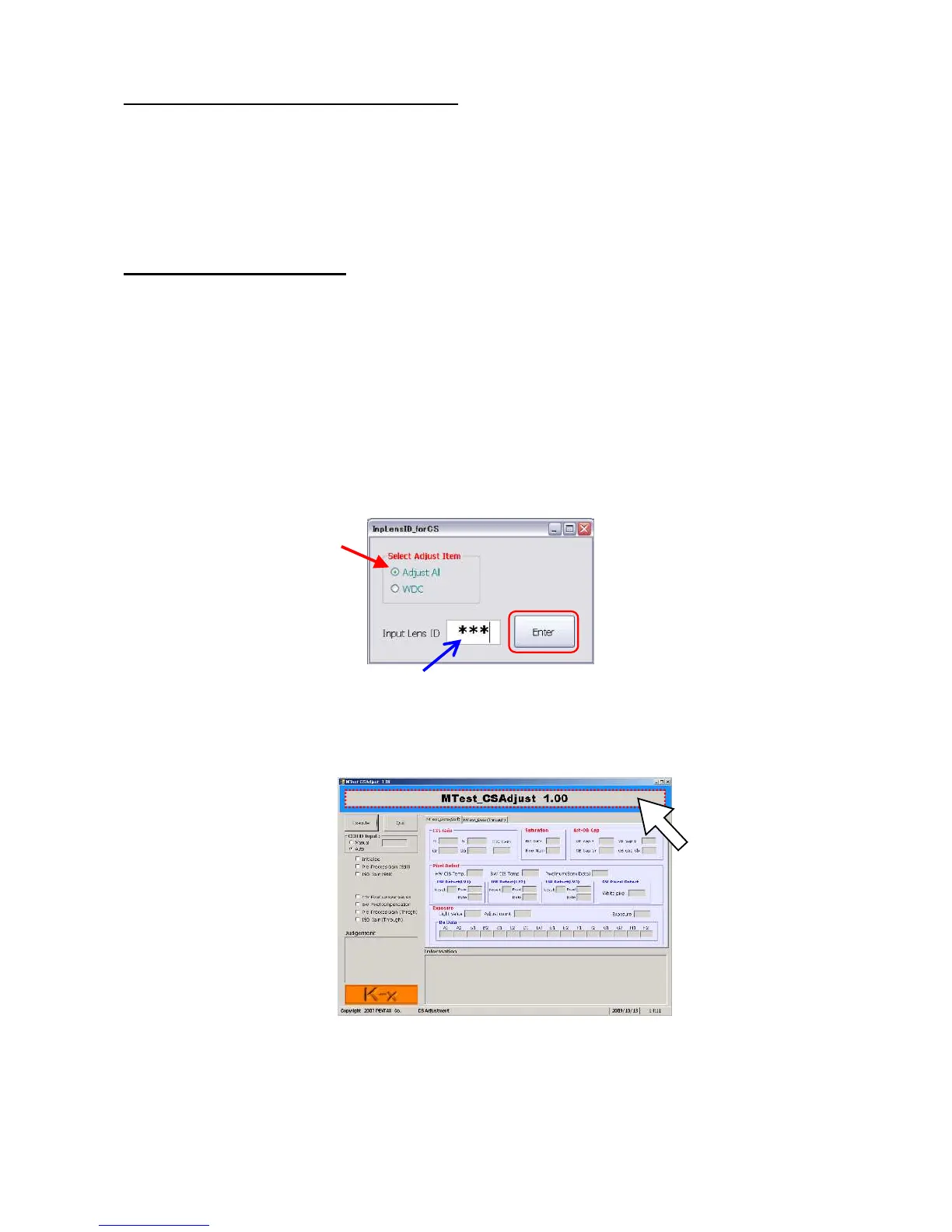
⑥On first screen, select [Adjust All] and input the lens ID number correctly then click [Enter].
⑦When below screen is displayed, click around the title in blue frame to change calibration mode.


 To Next Page