77420 - 57/107 -
3. [Adjustment] SR adjustment I (Unit adjustment)
[Caution1] Execute this adjustment when replaced T100, T640 or SR block.
[Caution2] Execute the adjustment on the stable table and do not give the vibration to the camera during the
adjustment.
[Caution3] When replacing T100 or C000, write down C000 ID number
*Some pictures and adjustment screen are using previous model but basic contents (usage / operation
message) are the same as K-r
[Required equipment] Adjusting software for 77420, SR adjustment stand, Computer (Windows Xp
(SP2),USB port as standard equipment), USB cable, AC adaptor kit
3-1. Preparation
①Set focus mode to [MF].
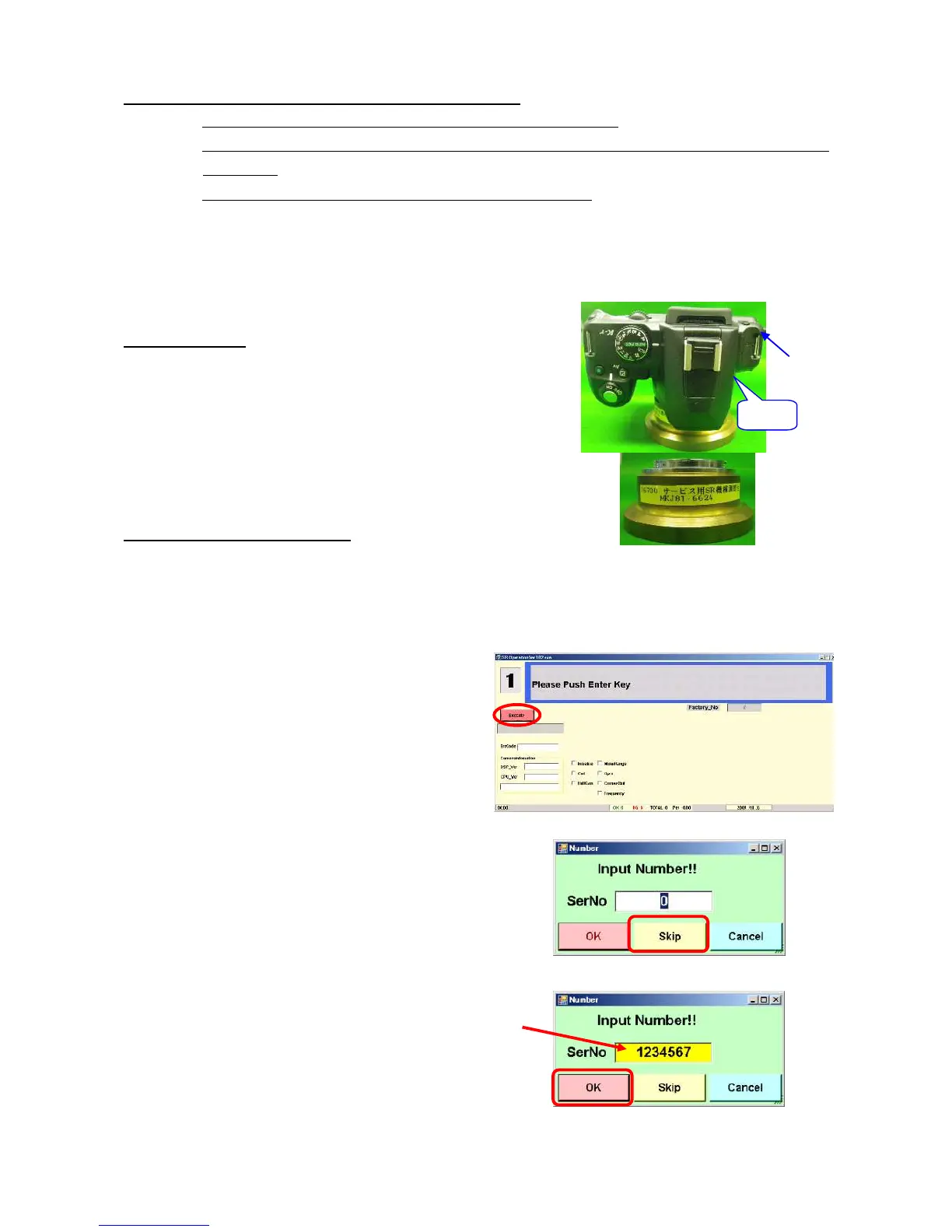
②Attach the SR adjustment stand to the camera.
③Put the camera on the stable table with lens downward.
3-2. Procedure for adjustment
①Start up the computer.
②Connect the camera to the computer via USB cable and connect the AC adapter (Power ON).
③Confirm that the camera is recognized by computer. (Hot plug icon).
④Double click [SR Operation.exe] in the [SR_Operation ver1.03] folder.
⑤Adjustment screen will be displayed.
⑥Click [Execute] button.
⑦Input screen will be displayed as shown figure right.
⑧Input number or select Skip.
[If T100 or C000 are not replaced]
Click [Skip] button.
[If T100 or C000 are replaced]
Input ID No. (7 digit)
↓
Click [OK]
*If cancel the adjustment, click [Cancel]
⑨Adjusting screen is indicated during adjustment.
(Adjusting time: Approx, 1 minute and 30seconds)
USB cable
“MF”


 To Next Page