77420 - 59/107 -
4. [Adjustment] Metering, Battery check, AGC adjustment
[Caution1] When the T100 is replaced, all adjustments are required.
[Caution2] When replace J100 or adjusted position, [BV adjustment] is required.
[Caution3] When replace M100 or adjusted M100 or mirror position, [AGC adjustment] is
required
.
[Required equipments]
□Programmed software for 77420 ---BV adjustment (K-r_BVAdjust)
□PC (Windows Xp (SP2), with USB port equipped)
□USB cable (I-USB17) □AC adaptor □DC coupler □DC cable
*For BV adjustment (Metering)
□Light source (LV6/LV8 or LV9, LV12/LV15 or LV16, Can be used shutter tester)
□D20 + F5.6 set plate or D20-01 (with lens ID number)
□Diaphragm set ring F8 (KA-0-1A)
*For battery level adjustment (Battery check level)
□DC coupler for K-r with custom (with affix insulation tape)
□DC cable □Regulated DC power
supply (8.3V/3A and above)
*AGC adjustment (M100 auto gain control)
□AF master lens for 2m □Light source (LV12)
4-1.Preparation
①Set focus mode to [MF].
②Set the Mode dial to [M].
③Connect AC adaptor and DC coupler to the camera.
④Connect USB cable to the camera then turn ON the camera.
4-2. Adjustment (BVAdjust)
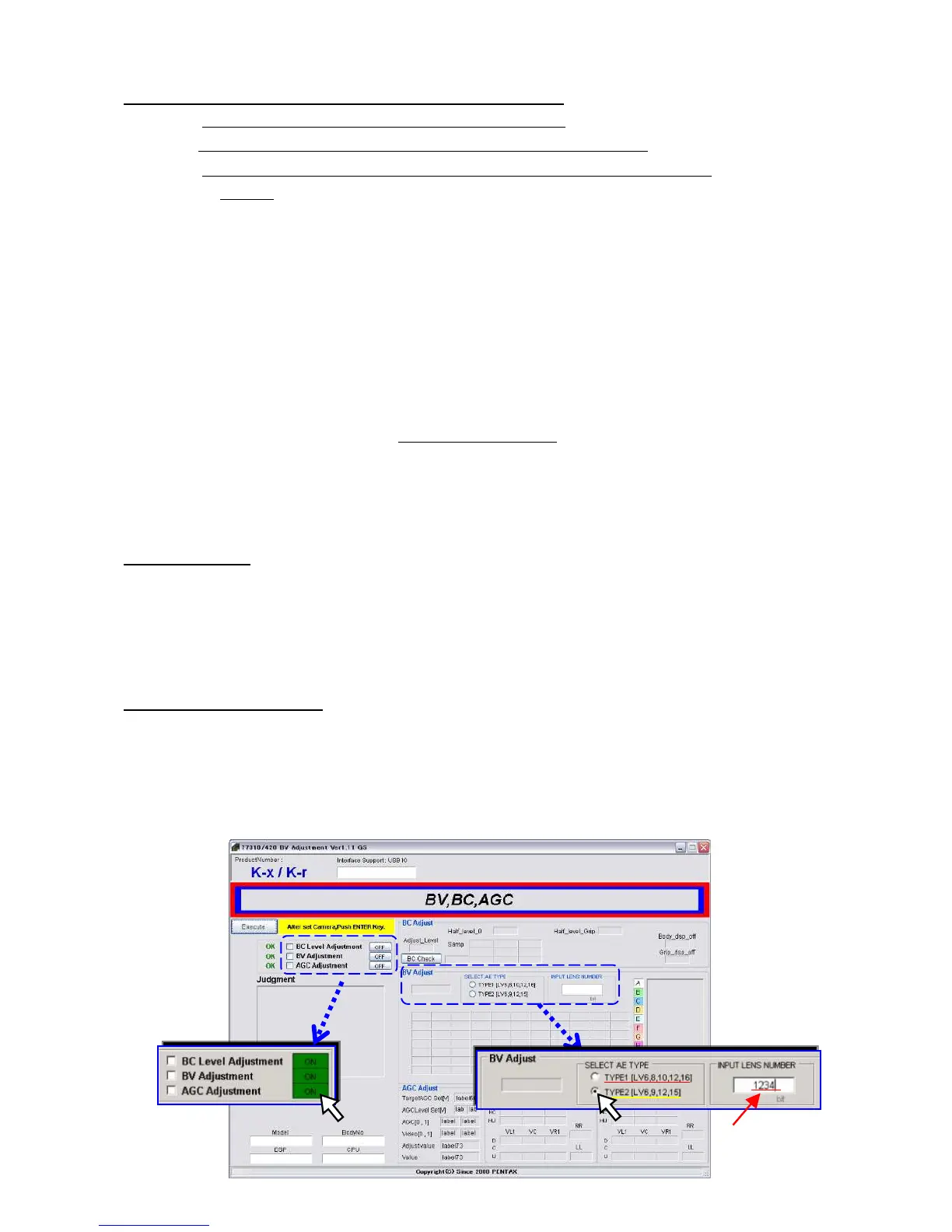
①Click [774200_BVAdjust.exe] in [77420_BVAdjust] folder to start up software.
(Adjustment screen display↓)
②Select the type of Light source for BV adjustment and input lens ID number.
If you do not execute BV adjustment, it is not necessary.
③Click [OFF] button to select adjust item --- Display will be changed to [OK] and enable to adjustment.
③


 To Next Page