77420 - 86/107 -
9-3. Reconfirm
①Execute [9-1.Confirm image].
②If adjustment is necessary, execute [9-2. Adjustment]
③Repeat ① and ② until adjustment become within tolerance.
10. [Adjustment] Writing Warranty Record
* Method for adjustment is the same as 77310(K-r), 77240 (K-7), 77010 (K20D), 77050(K200D)
and 77170(K-m/K2000).
[Caution] Execute this adjustment when replaced T100 or change the serial number.
[Required equipments] □Warranty Record software □PC □USB cable □AC adaptor kit
①Connect the camera and PC by USB cable then turn ON the power.
②Double click [Warranty_Record_SoftVer_.exe] in adjustment software folder.
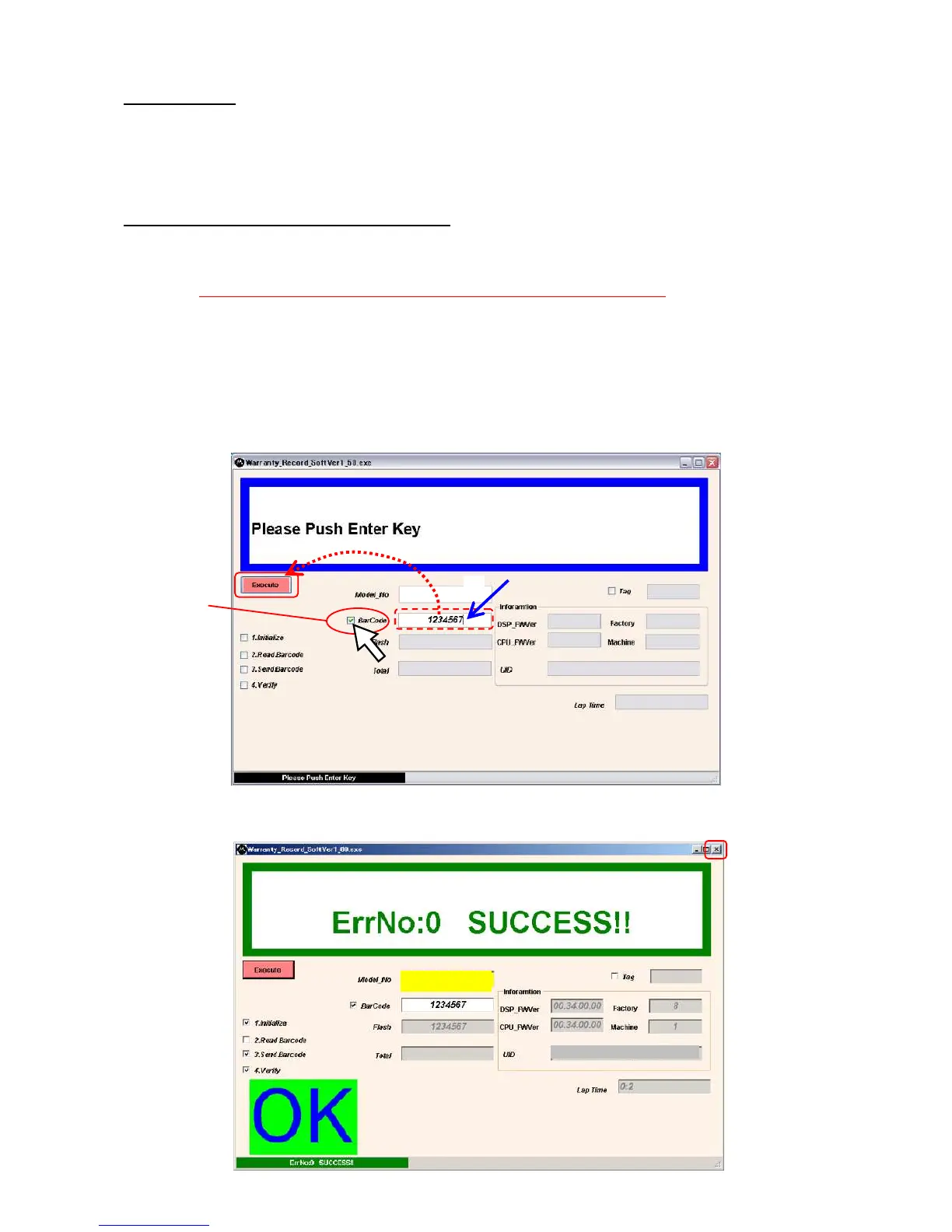
③Put check mark in [□BarCode] by mouse pointer.
④Input serial No. then push the [Execute] button.(EX:1234567)
⑤When [OK] is displayed, writing is completed. Click [X] and turn OFF the camera then disconnect the
camera.
③


 To Next Page