Section 3. JUMP MODE
USING JUMP MODE
WARNING: (Timing must be used in Jump mode and a proper two segment jump course is required
for system to work properly. Do not use PerfectPass in Jump mode without a proper course,
integrated timing and experienced operator. Because the counter cut pull and cut to the ramp are
different, you must have timing activated and running as the boat heads towards the ramp.
The Jump mode is RPM based and therefore baseline values must be established just as in Slalom
mode. Setting the jump baseline values must be done in a proper two segment jump course. Jump
Letter must be set at A for this process.
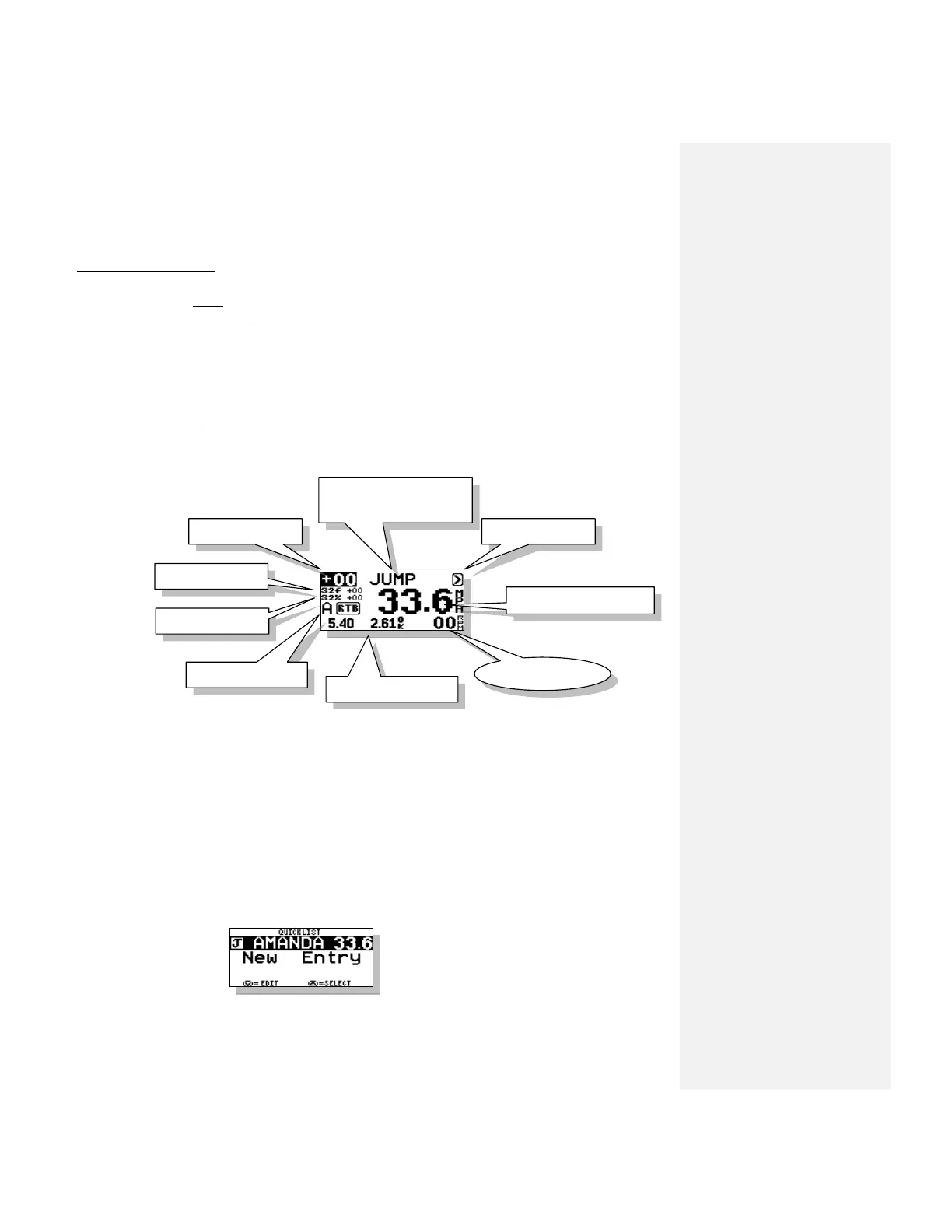
The Jump mode main screen will appear as follows:
1. RPM Adjust
RPM adjust allows the driver to increase or decrease the overall times (1
st
& 2ng segment) by
putting in a positive or negative RPM adjustment.
Example: If the times are running consistently slow on both segments, you could add a value
such as +20 rpm and the speed will be increased. You may wish to do this for a particular
jumper (a heavy puller) or for a number of jumpers if the times are drifting in a certain
direction
2. Name/Mode/Crew/New Jumper
This section of the screen displays either the Mode Name or a Skier’s Name pulled from the
Name List.
Press UP key to access the Name List:
Name List is discussed in Section 8.



 To Next Page