Maintenance
WARNING: To avoid injury from unexpected start-up or electric shock, unplug the
power cord before attempting inspection or maintenance. Do not use a damaged cut-off saw.
Brush inspection and replacement
Replace both carbon brushes when either has less than 1/4" (6.4 mm) of carbon remaining. To
inspect or replace, unplug the cut-off saw, remove the carbon brush cap on the side of the motor
housing, and pull out the brush (the cap is spring-loaded). Repeat the steps on the other side. To
reassemble, reverse the procedure.
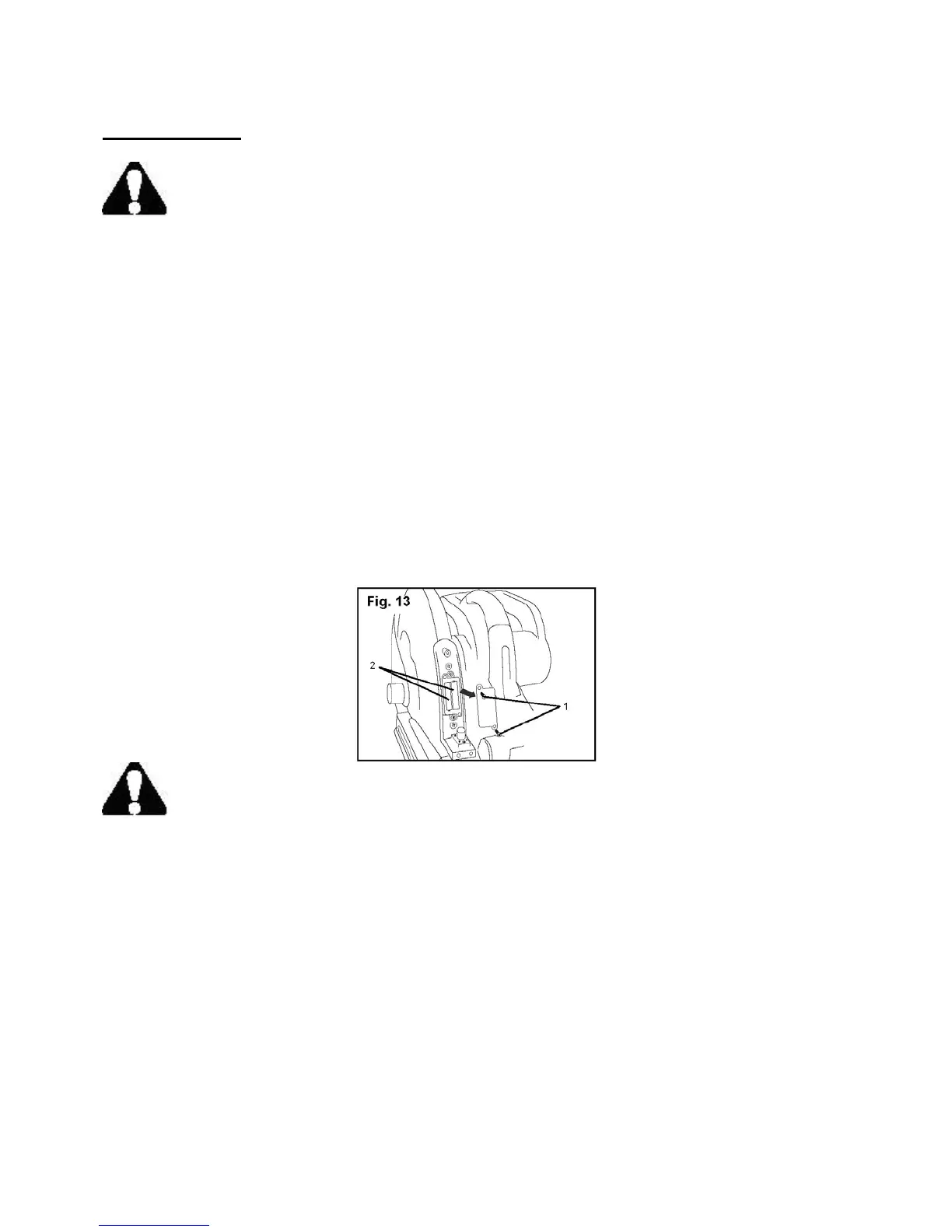
Replace the laser module batteries (Fig. 13)
1. Remove the three screws that secure the laser module cover to the housing. Remove the cover,
taking care not to damage the wires connected to the laser switch.
2. Remove the two screws (1) that secure the battery cover to the battery case. Remove the battery
cover.
3. Replace both "AAA" batteries (2).
WARNING: Never use flammable or combustible solvents around this cut-off saw.
When servicing, use only identical Performax™ replacement parts. Use of any other parts may
create a hazard or cause product failure.
Lubrication
Performax tools are properly lubricated at the factory and are ready to use. When necessary,
lubricate only those parts that pivot or move with a dry silicone spray. Lubricating motor bearings
and other internal parts should be done only by qualified service technicians.
13



 To Next Page