05
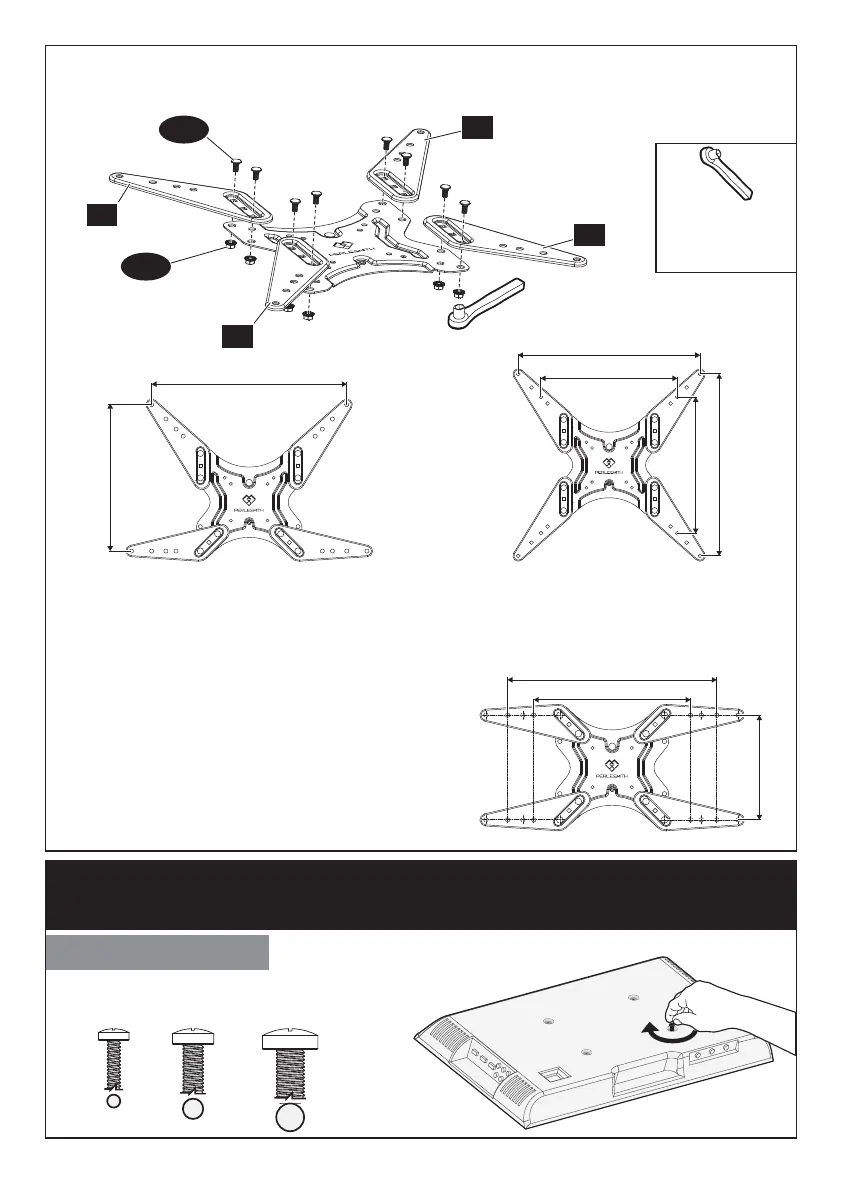
Select TV Bolts
Only one bolt size fits your TV.
Option B
Need to Attach Extender Brackets [02] and [03] to Faceplate [01A].
3/8in.(10mm)
Socket Wrench
(Not lncluded)
Step 2 Secure the Faceplate [01A] or Faceplate [01A] with
Extender Brackets [02] and [03] to TV
M4 M6 M8
H
G
02
02
03
03
400mm
300mm
200mm
300mm
300mm
400mm
400mm
300mm
400mm
For VESA hole pattern:
15.7x11.8 in. (400x300 mm)
For VESA hole pattern:
11.8x11.8 in. (300x300 mm)
15.7x15.7 in. (400x400 mm)
For VESA hole pattern:
11.8x7.9 in. (300x200 mm)
15.7x7.9 in. (400x200 mm)






 To Next Page