iMETOS Maintenance & troubleshooting 11
mode there are a lot more of data to transmit this may occur sometimes in UART Overow error, this error
is informed in the screen, but it is not a real failure of the system).
• ‘B’ – The user can send and read commands from the AP board manually, following the “AT Communication
Protocol of RF AP”.
11. STATION NOT SENDING DATA – USE TERMINAL
MODE
If station is communicating with the server but you don’t see any data in Fieldclimate, make sure logging
interval is set properly or the ash memory may be full.
11.1 How to get the data already stored in the station through TeraTerm
Sometimes it is wanted to clear the station’s memory for a fresh start of the system. When this is the case,
but it is also wanted to have all the data already stored in the station uploaded, it is possible to do it manually
with the help of TeraTerm.
To do that, please follow the steps:
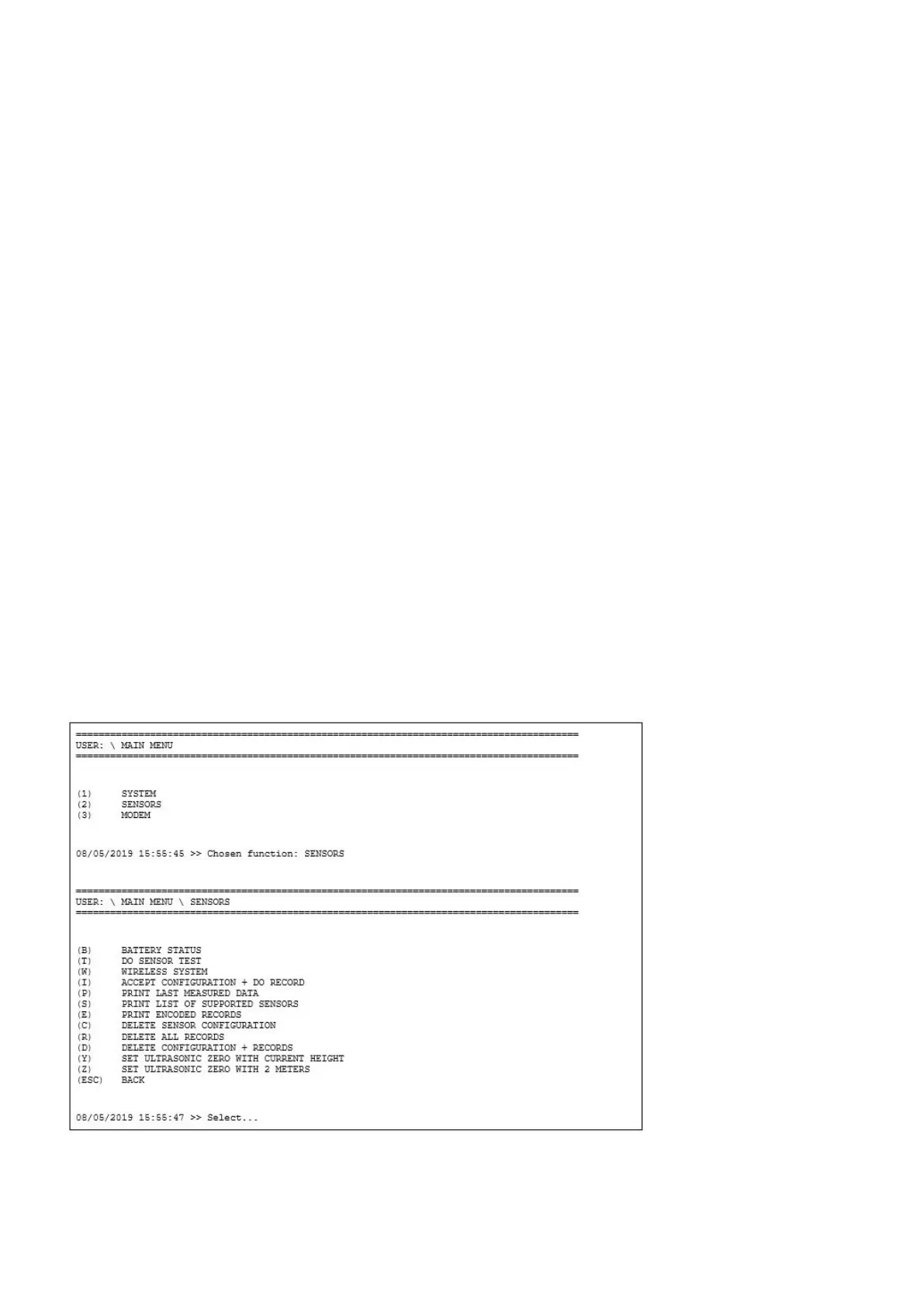
1. With the USB cable connected, jumper on J1 and the terminal application running, navigate to the menu (2)
SENSORS.
2. Now, in the SENSORS menu, select the option (E) PRINT ENCODED RECORDS.



 To Next Page