EasyManua.ls Logo

Pfaff creative 1472 - Page 43

Pfaff creative 1472
252 pages
Print Icon
To Next Page IconTo Next Page
To Previous Page IconTo Previous Page
Loading...
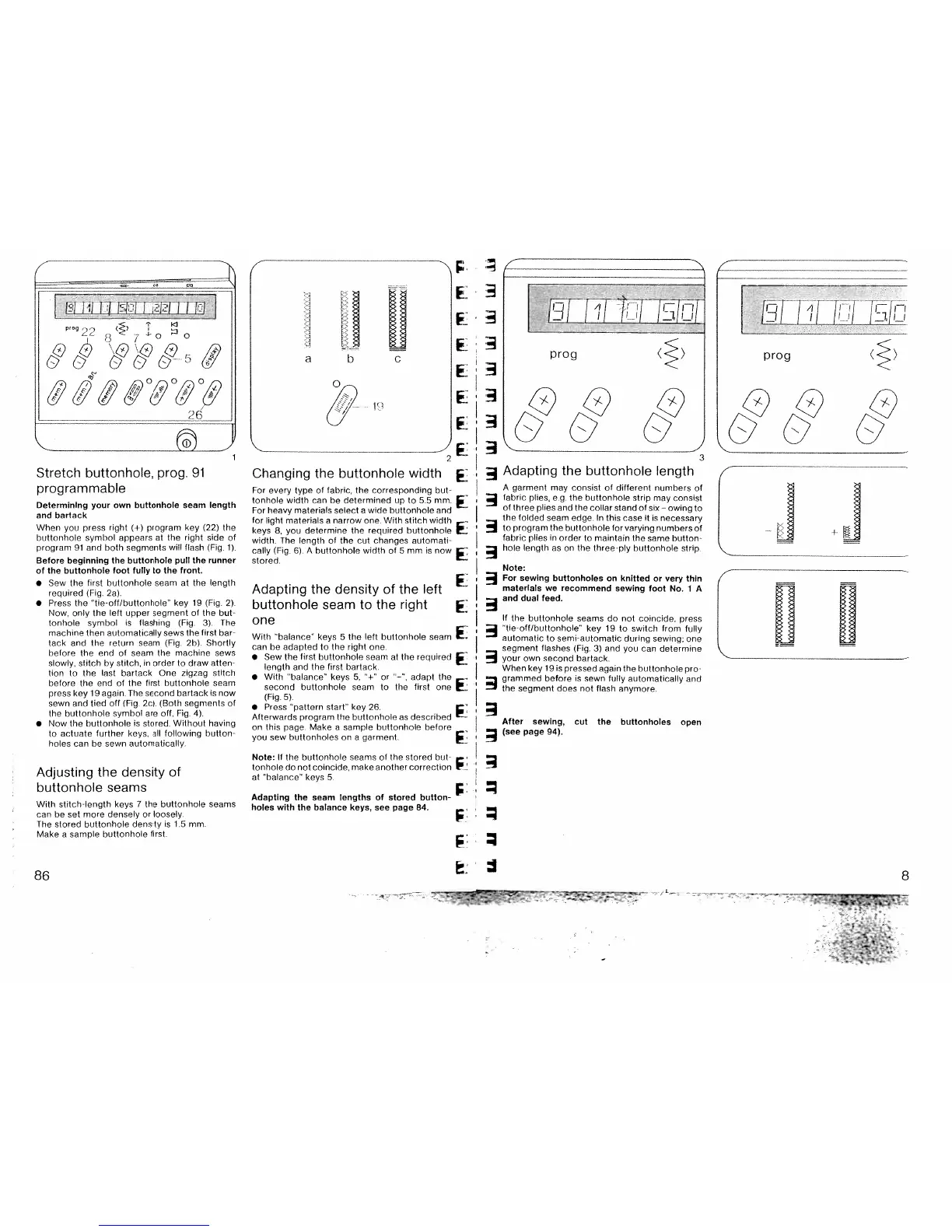
Stretch
buttonhole,
prog.
91
programmable
Determining
your
own
buttonhole
seam
length
and
bartack
When
you
press
right
(4)
program
key (22)
the
buttonhole
symbol
appears
at
the
right
side
of
program
91
and
both
segments
will
flash
(Fig
1)
Before
beginning
the
buttonhole
pull
the
runner
of
the
buttonhole
foot
fully
to
the
front.
Sew
the
first
buttonhole
seam
at
the
length
required
(Fig
2a).
Press
the
tie-off/buttonhole”
key
19
(Fig
2)
Now,
only
the
left
upper
segment
of
the
but
tonhole
symbol
is
flashing
(Fig.
3)
The
machine
then
automatically
sews
the
first
bar-
tack
and
the
return
seam
(Fig
2b).
Shortly
before the
end
of
seam
the
machine
sews
slowly,
stitch
by
stitch,
in
order
to
draw
atten
tion
to
the
last
bartack.
One
zigzag
stitch
before
the
end
of
the
first
buttonhole
seam
press
key
19
again.
The
second
barlack
is
now
sewn
and
tied
off
(Fig
2c) (Both
segments
of
the
buttonhole
symbol
are
oft,
Fig.
4).
Now
the buttonhole
is
stored.
Without
having
to
actuate
further
keys.
all
following
button
holes
can
be
sewn
automatically
Adjusting
the
density
of
buttonhole
seams
With
stitch-length
keys
7
the
buttonhole
seams
can
be
set
more
densely
or
loosely.
The
stored
buttonhole
density
is
1.5
mm.
Make
a
sample
buttonhole
first.
““F:
F:
F:
F:
Changing
the
buttonhole
width
F.
For
every
type
of
fabric,
the
corresponding
but
tonhole
width
can
be
determined
up
to
55
mm.
For
heavy
materials
select
a
wide
buttonhole
and
for
light
materials
a
narrow
one
With
stitch
width
-
keys
8,
you
determine
the
required
buttonhole
width.
The
length
of
the
cut
changes
automati
cally
(Fig.
6).
A
buttonhole
width
of
5
mm
is
now
stored.
Adapting
the
density
of
the
left
F:
buttonhole
seam
to
the
right
one
With
“balance”
keys
5
the
left
buttonhole seam
F:
can
be
adapted
to
the
right
one
Sew
the
first
buttonhole
seam
at
the
required
length
and the
first
bartack
With
“balance”
keys
5.
“-‘
or
—“,
adapt
the
second
huttonhole
seam
to
the
first
one
(Fig.
5).
Press
pattern
start”
key
26
Afterwards
program
the
buttonhole
as
described
on
this
page
Make
a
sample buttonhole
before
you
sew
buttonholes
on
a
garment.
Note:
If
the buttonhole
seams
of
the
stored
but
tonhole
do
not coincide, make
another
correction
at
‘balance”
keys
5
Adapting
the
seam
lengths
of
stored
button
holes
with
the
balance
keys,
see
page
84.
.
‘!iTJ
prog
()
x
x
..
.
3
Adapting
the buttonhole
length
Note:
For
sewing
buttonholes
on
knitted
or
very
thin
materials
we
recommend
sewing
foot
No.
1
A
and
dual
feed.
If
the
buttonhole
seams
do
not
coincide,
press
“tie-off/buttonhole”
key
19
to
switch
from
fully
automatic
to
semi-automatic
during
sewing:
one
segment
flashes
(Fig.
3)
and
you
can
determine
R
your
own
second
battack.
When
key
l9is
pressed
again
the buttonhole
pro
R
grammed
before
is
sewn
fully
automatically
and
the
segment does
not
flash
anymore
R
After
sewing,
cut
the
buttonholes
open
(see
page
94).
-
S
-b
so
4
tLTT
i1ThTT
IIL.
I
‘°
22
8
7
°
h
I
TTJ
TJ
77[E
prog
“‘&&
A
garment
may
consist
of
different
numbers
of
fabric
plies,
e
g
the
buttonhole
strip
may
consist
of
three
plies
and
the
collar
stand
of
six—owing
to
the
folded
seam
edge
In
this
case
it
is
necessary
to
program
the
buttonhole
for
varying
numbers
of
fabric plies
in
order
to
maintain
the
same
button
hole
length
as
on
the
three
ply
buttonhole
strip
L
UI’
86
8

Table of Contents

Related product manuals