INSTALLATION GUIDE
| www.phanteks.com
04
INCLUDED VERTICAL GPU MOUNT
GEN 4 RISER CABLE SOLD SEPARATELY PH-CBRS4.0_FL22
OPTIONAL UPGRADE
GEN 4 VERTICAL GPU BRACKET PH-VGPUKT4.0_03 (GEN 4.0 RISER CABLE INCLUDED)
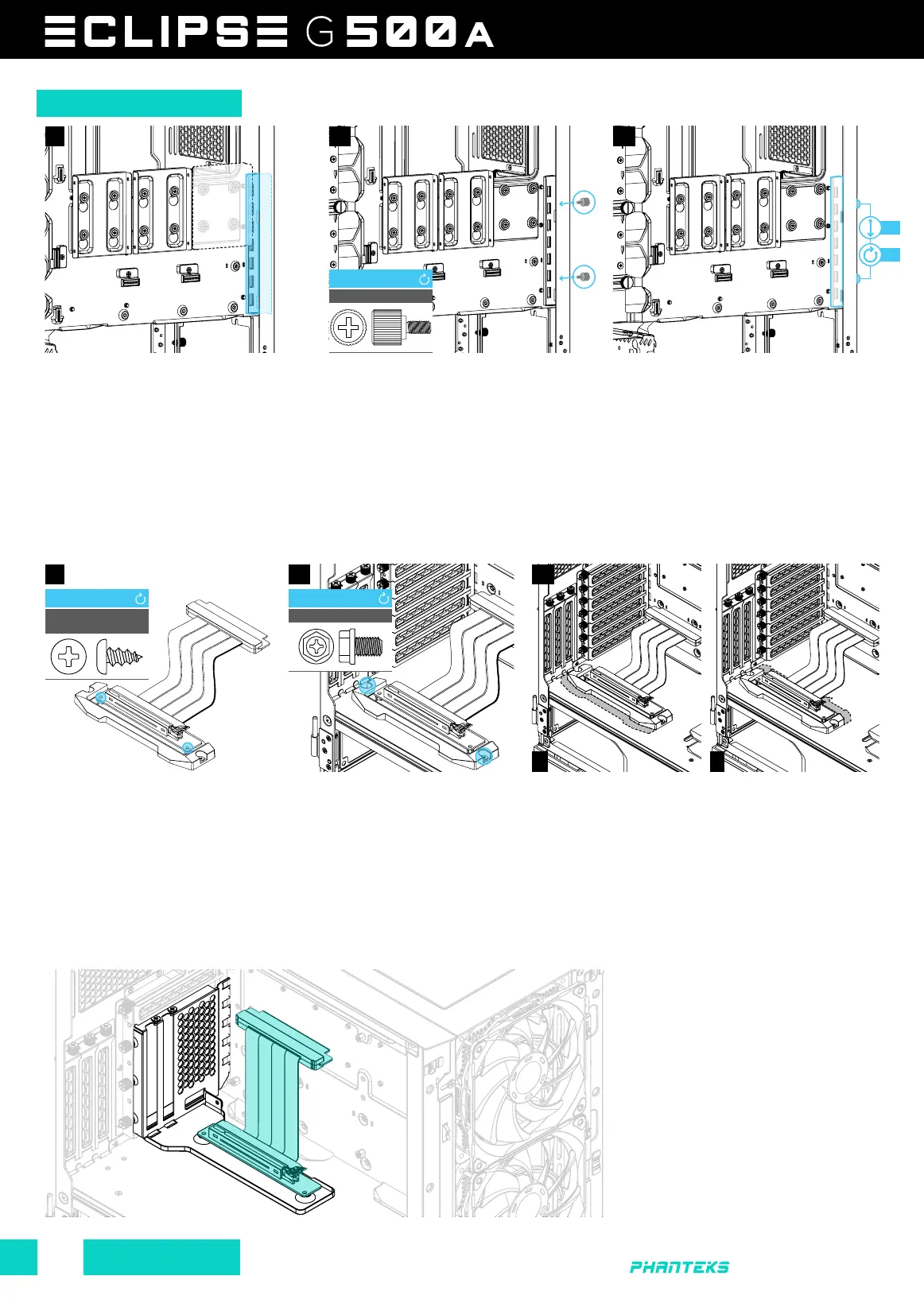
The G500A chassis supports the placement of a vertical GPU with the included vertical GPU mount. The Vertical GPU mount has two
mounting positions, A or B as seen at step 03.
As an alternative, the G500A supports the Phanteks Vertical GPU Bracket which supports up to a 4 slots GPU. Also this bracket puts
the GPU further away from the tempered glass panel for increased airflow.
OPTIONAL UPGRADE
PSU SCREW
INSTALL
2x
Insert the thumbscrews without tightening
them.
Manually press down the screws (1), then
lock the thumbscrews in position (2).
Make sure to install all GPU & PCI cards
beforehand. Place the GPU anti-sag
bracket at the back. For easy access,
remove the SSD bracket first.
THUMB SCREW
INSTALL
2x
ANTI-SAG BRACKET
01 02 03
01 02 03
A B
Connect the riser cable to the
vertical GPU mount and secure it
with 2x long riser cable screws.
Secure the Vertical GPU mount on
the chassis with 2x PSU screws.
Position A can hold 3-slot
GPU cards.
Position B can hold 2-slot
GPU cards.
RISER CABLE
SCREWS
INSTALL
3x
02
01









 To Previous Page