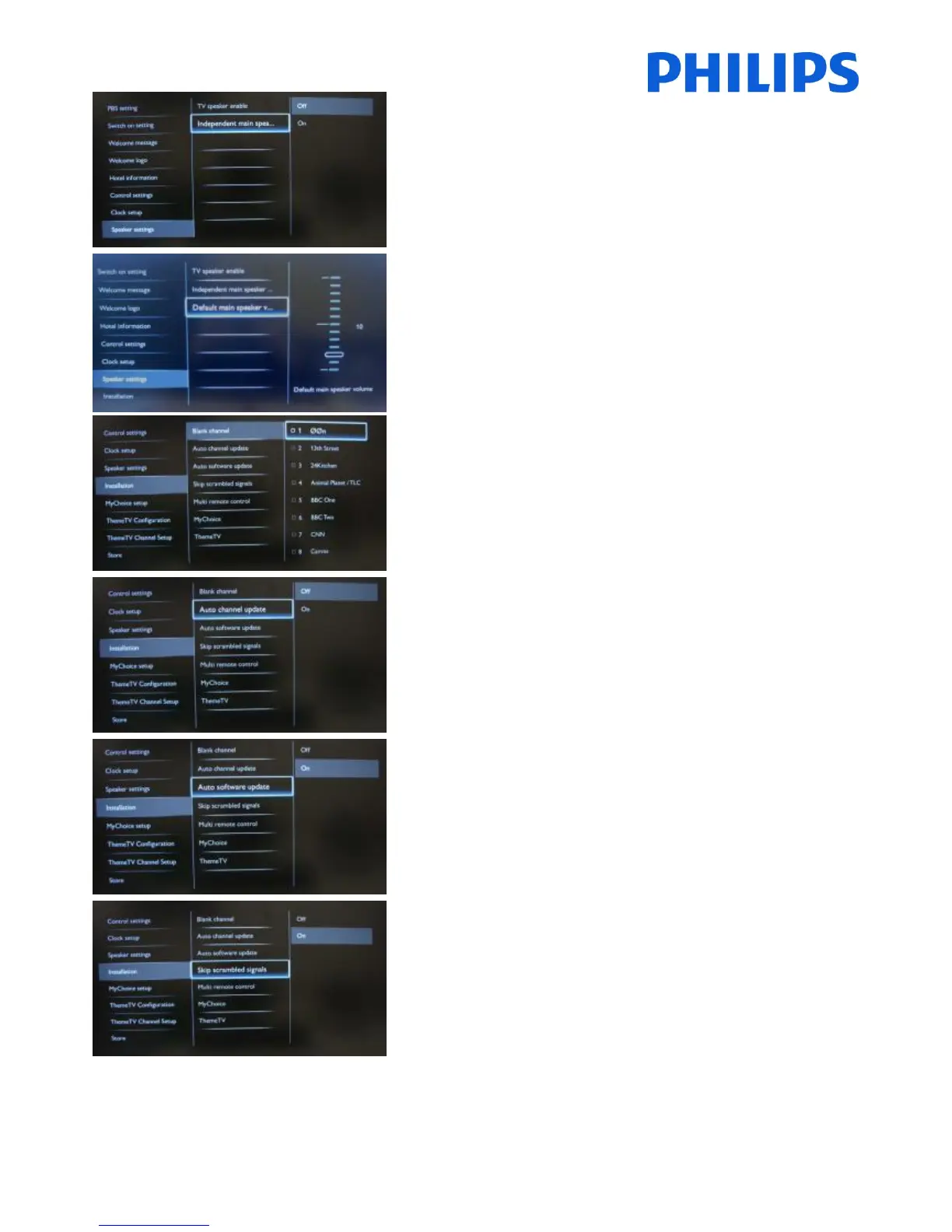
[Off]: The volume +/- on the Guest remote control will affect
both the TV Main speaker and the headphone volume.
[On]: The volume +/- on the Guest remote control will affect
both the TV Main speaker and the headphone volume.
After pressing “MUTE”, the volume +/- on the Guest remote
control will not reactivate the TV Main speaker volume, but
will only control the headphone volume.
Set the default volume level for TV Main speaker after
“Unmuting”.
This option is only visible if “Independent Main speaker
mute” is set to “On”.
The Blank channel function disables the display of video on
the TV, but does not affect the audio output.
The channels marked with X will not display video on the TV.
Select or deselect can be done by pressing “OK” button on
the remote control.
[ON]: Enables automatic channel update.
[OFF]: Disables automatic channel update.
[ON]: Enables software update
[OFF]: Disables software update
[Off]: Allows scrambled channels in the channel list.
[On]: Skips the scrambled channels in the channel list.














 To Next Page