18
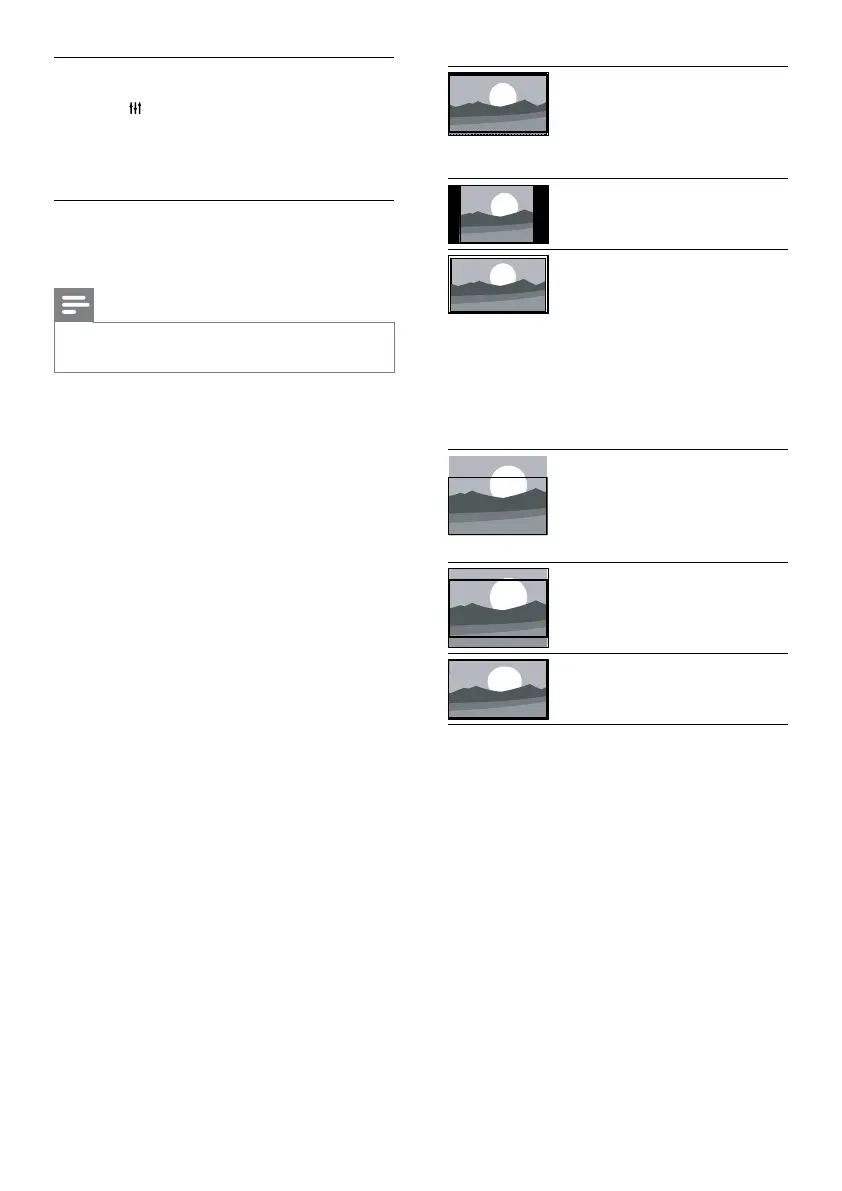
[Super zoom]: (Not
for HD and PC mode.)
Remove the black bars on
the side of 4:3 broadcasts.
There is minimal distortion.
[4:3]: Show the classic 4:3
format.
[Unscaled]:For HD and
PC mode only, and in
selected models only. Allow
maximum sharpness. Some
distortion may be present
due to the broadcaster’s
systems. Set your PC
resolution to wide screen
mode for best results.
[Subtitle zoom]: Display 4:3
pictures over the full area
of the screen with subtitles
visible. Part of the top of
the picture is clipped off.
[Movie expand 16:9]: (Not
for HD and PC mode.)
Scale 4:3 format to 16:9.
[Wide screen]: Scale 4:3
format to 16:9.
Change picture format
1 Press ADJUST.
2 Select [Picture format], then press OK.
3 Select a picture format, then press OK.
Summary of picture formats
The following picture settings can be congured.
Note
•
Depending on the format of the picture source, some
picture settings are not available.
EN




 To Next Page