PrimeSuite xxHFL4373D/10 Page 36
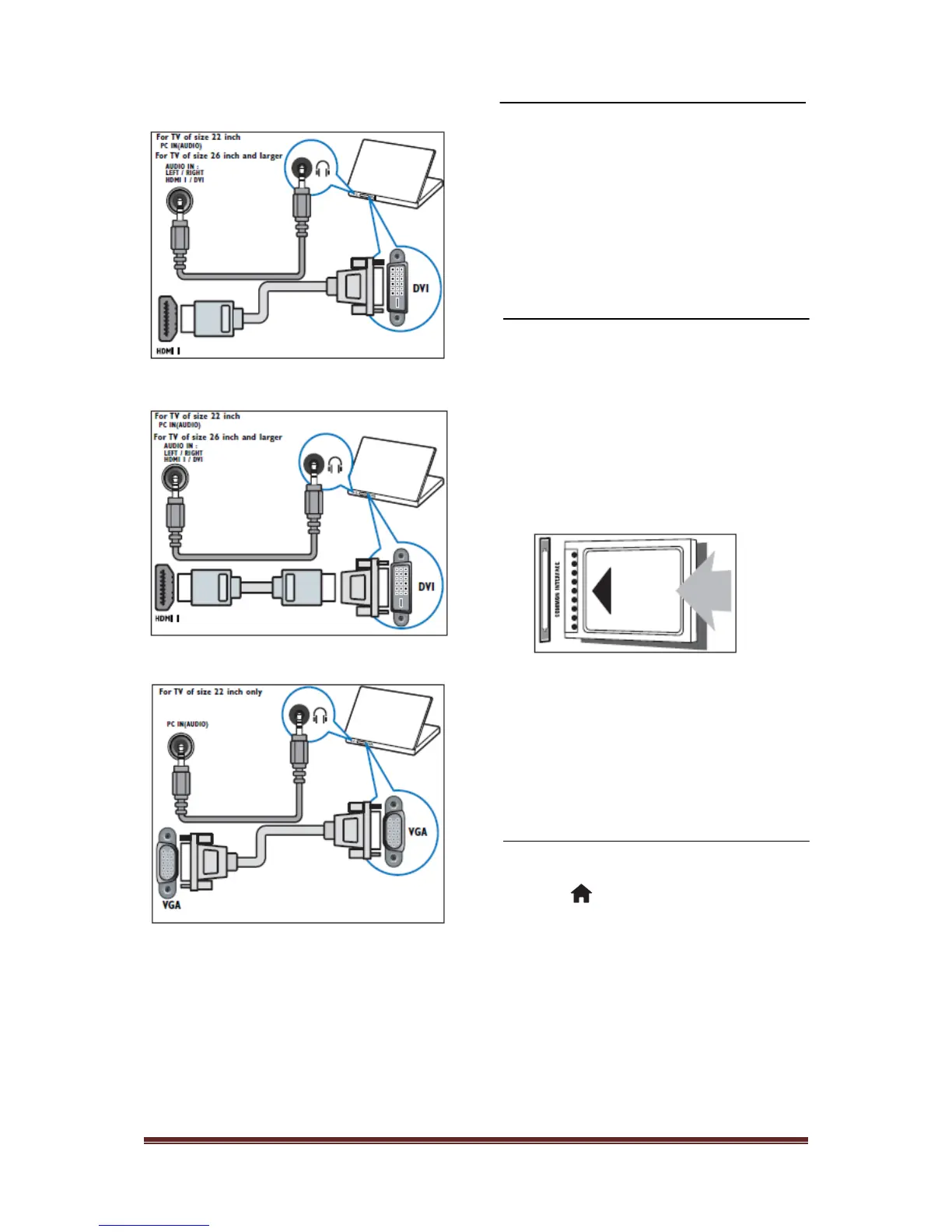
• DVI-HDMI cable
• HDMI cable and HDMI-DVI adaptor
• VGA cable
Use a Conditional Access
Module
A Conditional Access Module (CAM) is
provided by digital TV service operators to
decode digital TV channels.
••If required, refer to documentation from your
operator on how to insert a smart card into the
Conditional Access Module. Proper working can
only guaranteed by your operator.
Insert and activate a CAM
••Be sure to follow the instructions described below.
Wrong insertion of a CAM may damage both the
CAM and your TV.
1. Switch off the TV.
2. Following the directions printed on the
CAM, gently insert the CAM into the
COMMON INTERFACE at the side of
the TV.
3. Push the CAM in as far as it will go.
4. Turn on the TV and wait for the CAM to
be activated. This may take several
minutes. Do not remove the CAM from
the slot when in use — removing the
CAM will deactivate digital services
Access CAM services
1. After inserting and activating the CAM,
press
2. Press Navigation buttons to select
[Common interface].
»»Applications provided by the digital TV
service operator appear on the screen.
••This menu option is available only if the CAM is
inserted and activated correctly
.












 To Next Page