English
29
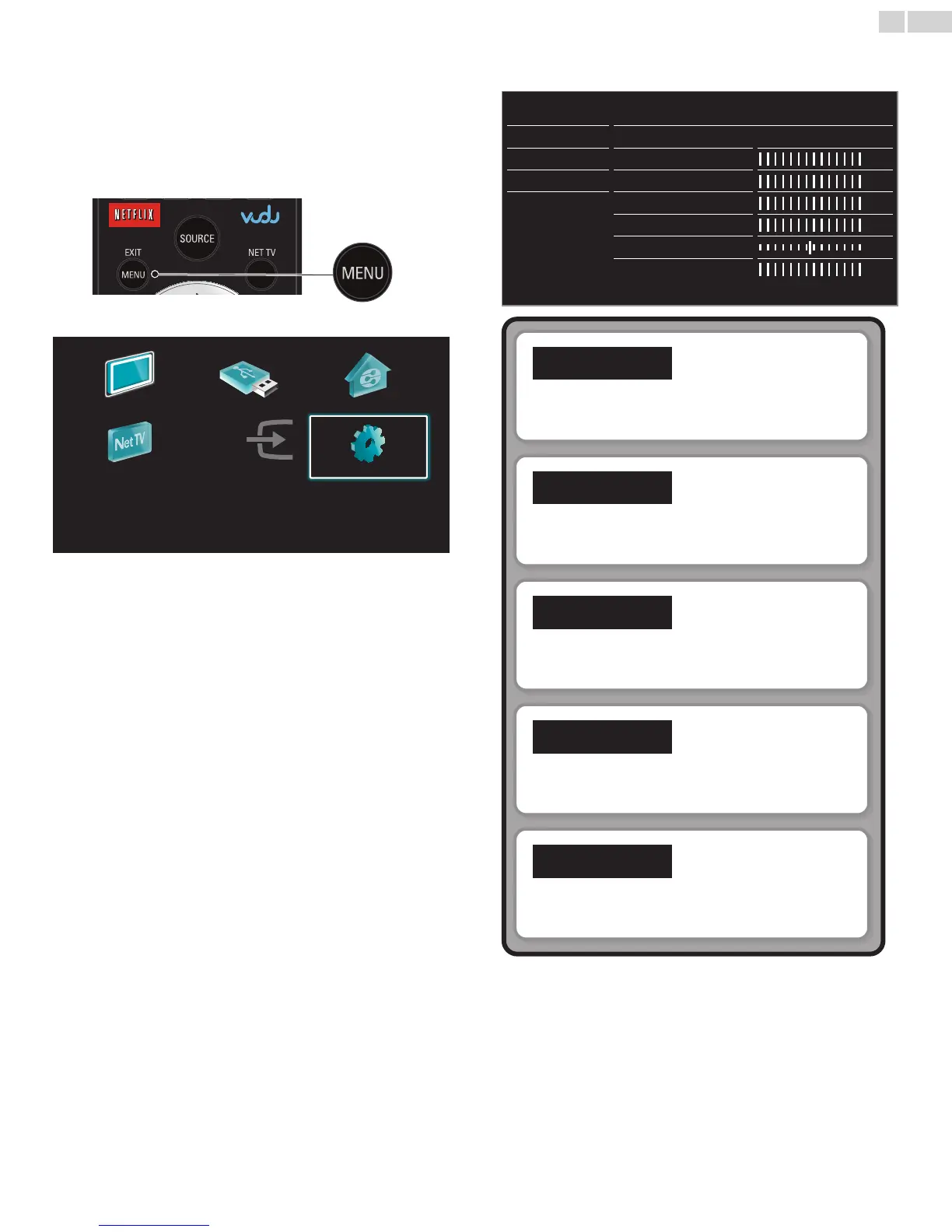
5 UsemoreofyourTV
3 Use ▲▼ to select the desired menu and an item, then press OK
or use ▲▼◄► to determine the setting.
Picture
Settings assistant
Start now
Auto picture
Personal
Backlight
Contrast
Brightness
Color
Tint
Sharpness
Sound
Features
Installation
Software
Picture
➠
p.30
Adjusting the picture mode or customize the picture
quality as your preference.
Sound
➠
p.32
Adjusting the sound mode, equalizer and some other
sound functions.
Features
➠
p.33
Adjusting the Closed Caption, parental guide and some
other useful functions.
Installation
➠
p.36
You can choose language, scan the channels available in
your area or make the Network settings.
Software
➠
p.43
You can check the current software version, update the
software or deactivate the setting for Netix and VUDU.
4 When the setting is completed, press MENU/E�IT or BACK to
exit.
This section describes the overview of the Setup menu displayed when
you press MENU/E�IT and use ▲▼◄►to selectSetup.
The Setup menu consists of the function setting items below.
1 Press MENU/E�ITto display Home menu.
2 Use ▲▼◄► to select Setup, then press OK.
WatchTV BrowseUSB BrowsePC
NetTV Addnewdevices Setup





 To Next Page