English
33
Features
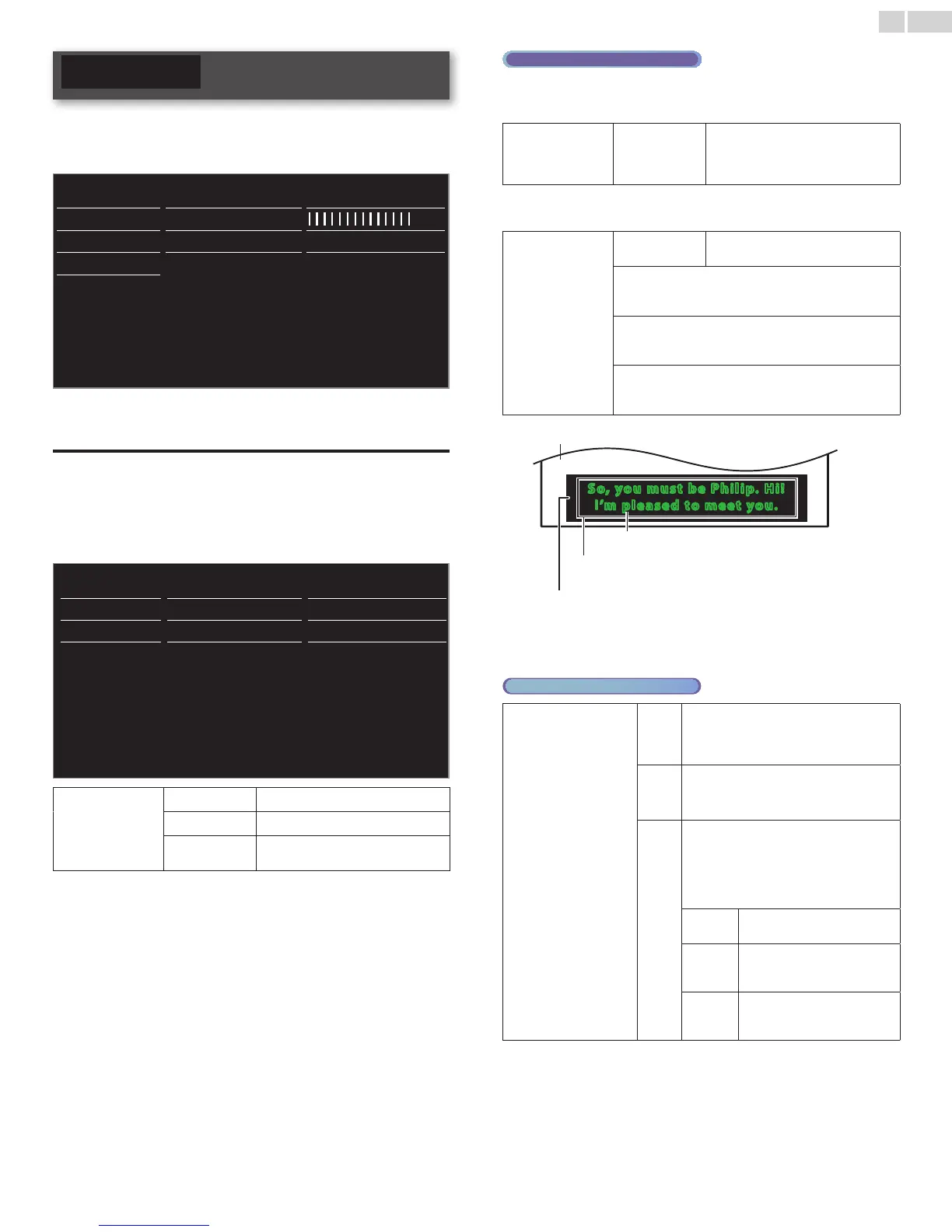
1 Press MENU/E�IT and use ▲▼◄► to select Setup, then press
OK.
2 Use ▲▼ to select Features, then press OK.
Picture Caption settings Closed captions
Sound Sleeptimer
Features Child lock Channel lock
Installation
Change PIN Start now
Software
3 Adjust the following items.
Captionsettings
Closed Captioning displays the Audio portion of programming as text
superimposed over the video.
1 Use ▲▼ to select Captionsettings, then press OK.
Caption settings Closed captions Off
Sleeptimer Caption service CC-1
Child lock Digital caption service CS-1
Change PIN Digital caption options Reset to default
Closedcaptions
Off
not to display the Closed Caption
On
to display the Closed Caption
Onduringmute
to display the Closed Caption when
you set to mute
DigitalTVoperation
In addition to the basic Closed Caption, DTV has its own Closed
Caption called Digital caption service. Use this menu to change the
settings for Digital caption service.
Digitalcaption
service
CS-1
to
CS-6
Selects one of these before changing
any other item in Captionsettings
menu. Choose CS-1 under normal
circumstances.
You can choose the size, font, color, background and other
characteristics of the caption text.
Digitalcaption
options
Resettodefault
You can reset the status of Digital
caption options.
You can change Closed Captioning font size, style, color
and transparency.
(Size, Style, TextColor and Textopacity)
You can change background color and transparency of
the displayed caption.
(Backgroundcolor and Backgroundopacity)
You can change edge color and type of the displayed
caption.
(Edgetype and Edgecolor)
So, you m ust be P hili p. H i !
I’m ple ased to m eet you.
So, you m ust be P hili p. H i !
I’m ple ased to m eet you.
Background
(BackgroundcolorandBackgroundopacity)
Picturedisplay
Font
(Style,Size,TextColorandTextopacity)
Edge
(EdgecolorandEdgetype)
• Review your setting choice made below by looking in the upper
left corner of the displayed setting box (not all selections show
the differences selected).
Analog/CableTVoperation
Captionservice
CC-1
and
T-1
The primary caption and text services. The
captioning or text is displayed in the same
language as the program’s dialog (up to 4
lines of script on the TV screen).
CC-3
and
T-3
Serve as the preferred data channels. The
captioning or text is often a secondary
language.
CC-2,
CC-4,
T-2
and
T-4
Rarely available and broadcasters use them
only in special conditions, such as when
CC-1 and CC-3 or T-1 and T-3 are not
available.
• There are 3 display modes according to
programs:
Paint-on
Displays input characters on
the TV screen immediately.
Pop-on
Once characters are stored in
memory, they are displayed all
at once.
Roll-up
Displays the characters
continuously by scrolling (max.
4 lines).
Continued on next page.






 To Next Page