English
45
6 Connectingdevices
No supplied cables are used with these connections:
• Please purchase the necessary cables at your local store.
Before you connect AC power cord:
Be sure other devices are connected properly before plugging in the AC
power cord.
Selectingyourconnectionquality
HDMI-Highestquality
Supports high-denition Digital signals and gives highest picture and
sound quality. Video and Audio signals are combined in one cable. You
must use HDMI for full high-denition video and to enable Philips
EasyLink.
Note
• Philips HDMI supports HDCP (High-bandwidth Digital Contents Protection). HDCP
is a form of Digital Rights Management that protects high denition content in Blu-ray
discs or DVDs.
• The HDMI-ARC connector on the TV features HDMI-ARC functionality. This allows
output of TV Audio to an HDMI-ARC-compliant device.
Component(YPbPr)-Highquality
Supports high-denition Analog signals but gives lower picture quality than
HDMI. Component (Y/Pb/Pr) Video cables combine Red / Green / Blue
video cables with Red / White Audio (L/R) cables. Match the cable
colors when you connect to the TV.
Composite-Basicquality
For Analog connections. Composite Video / Audio Analog cable usually
combine a Yellow video cable with Red / White Audio (L/R) cables.
With this unit, Yellow cable must be connected to Y (Green) of
Component Video Input jacks.
Connectingyourdevices
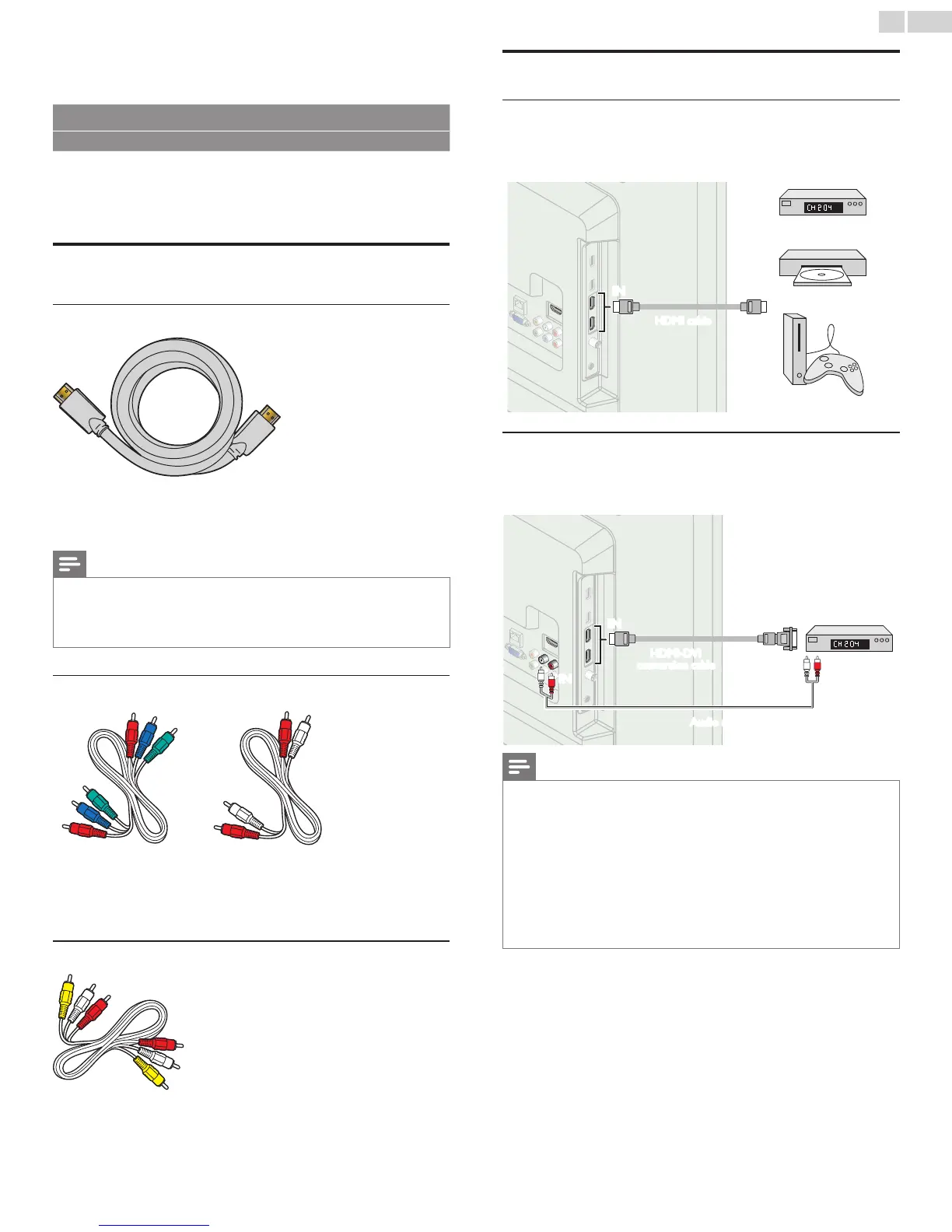
HDMIDigitalconnection
HDMI connection offers the highest picture quality. connection offers the highest picture quality.
HDMI (High-Denition Multimedia Interface) transports high denition
Digital video and multi-channel Digital Audio through a single cable.
ININ OUT
set-topbox
or
Blu-raydiscplayer
or
HDgameconsole
HDMIcable
HDMI-DVIconnection
This unit can be connected to your device that has a DVI terminal.
Use an HDMI-DVI conversion cable for this connection and it requires
Audio cable for Analog Audio signal as well.
ININ OUT
IN
IN
OUT
HDMI-DVI
conversioncable
Audio(L/R)cables
cablereceiveror
satelliteboxwiththe
DVIOutputjack
Note
• Use an HDMI cable with the HDMI logo (a certied HDMI cable). High Speed HDMI
cable is recommended for the better compatibility.
ForHDMIconnection
• The unit accepts 480i / 480p / 720p / 1080i, 1080p 24/30/60Hz of video signals, 32kHz
/ 44.1kHz and 48kHz of Audio signals.
• This unit accepts 2 channel Audio signal (LPCM) only.
• This unit accepts only signals in compliance with EIA861.
ForHDMI-DVIconnection
• The unit accepts 480i, 480p, 720p, 1080i and 1080p video signals.
• HDMI-DVI connection requires separate Audio connections as well and the Audio
signals are output as Analog (L/R) Audio.
• DVI does not display 480i image which is not in compliance with EIA/CEA-861/861B.





 To Next Page