English
47
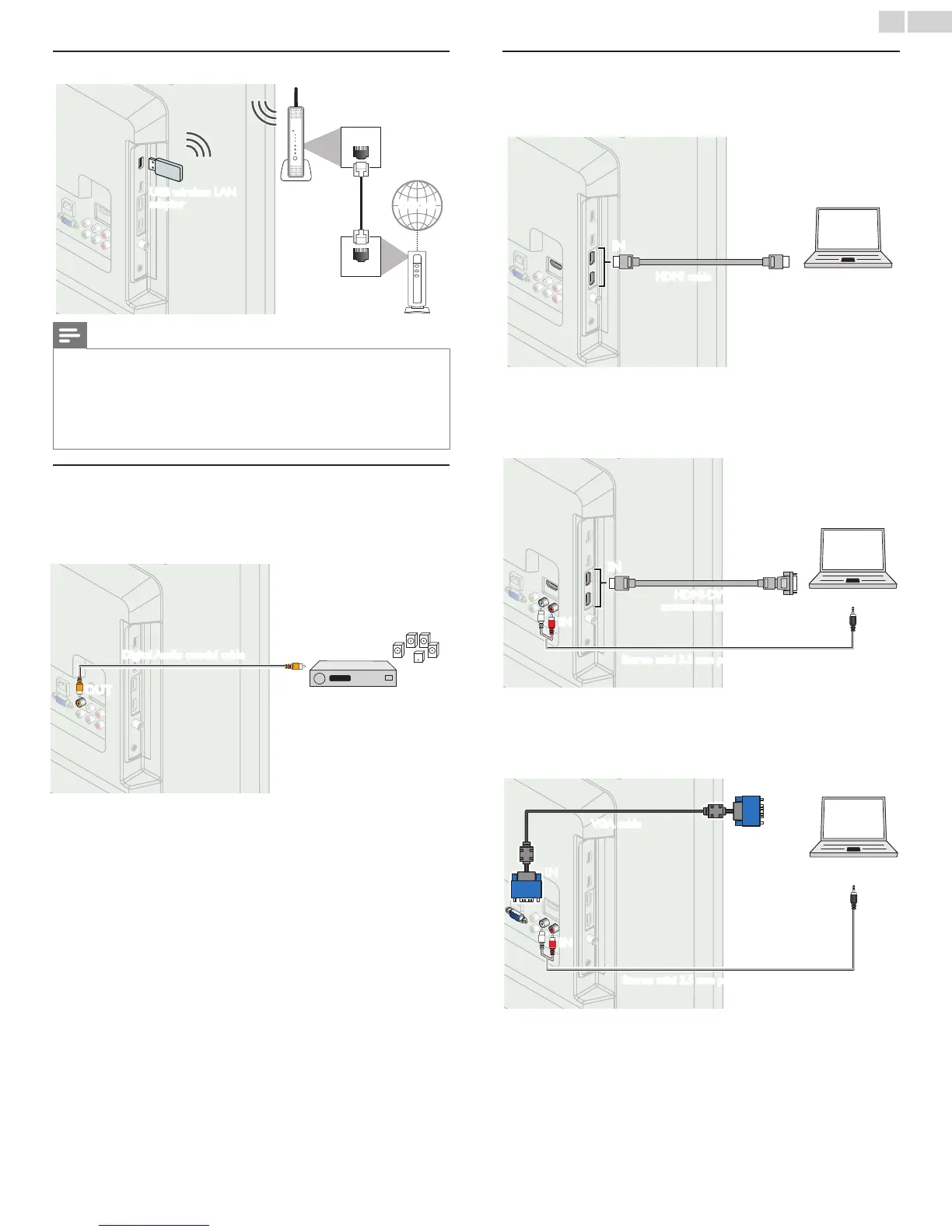
ConnectingtheTVtotheInternetusingawirelessLAN
WLAN
LAN
Broadbandrouter
USBwirelessLAN
adapter
Networkprovisioning
equipment
Ethernetcable
Internet
Note
• After you made the wireless connection, set up necessary network settings.
Network
➠
p.40
• Use a Wireless LAN Access Point (AP) (e.g. wireless router) which supports IEEE
802.11 b/g/n. (n is recommended for stable operation of the wireless network.)
• This unit does not support Ad-hoc mode.
• Other radio devices or obstacles may cause interference to the wireless network
connection.
DigitalAudioOutputConnection
If you connect this unit to an external Digital Audio device, you can
enjoy multi-channel Audio like 5.1ch Digital broadcasting sound.
Use a Digital Audio coaxial cable to connect the unit to external Digital
Audio devices.
ININ
OUT
OUT
Digitalhometheater
amplier
DigitalAudiocoaxialcable
PCconnection
HDMI connection
This unit can be connected to your PC that has a HDMI terminal. Use
an HDMI cable for this Digital connection.
ININ OUT
PC
HDMIcable
HDMI-DVI connection
This unit can be connected to your PC that has a DVI terminal. Use
an HDMI-DVI conversion cable for this Video Digital connection and it
requires Stereo mini 3.5mm plug Audio cable for Analog Audio signal as
well.
OUT
IN
IN
OUT
ININ
PC
Stereomini3.5mmplugAudiocable
HDMI-DVI
conversioncable
VGA connection
This unit is equipped with a PC Input jack. If you connect this unit to
your PC, you can use this unit as a PC monitor.
Use a VGA cable for this Video connection and it requires a Stereo mini
3.5mm plug Audio cable for Analog Audio signal as well.
OUT
IN
IN
IN
IN
OUT
PC
VGAcable
Stereomini3.5mmplugAudiocable





 To Next Page