9
Note
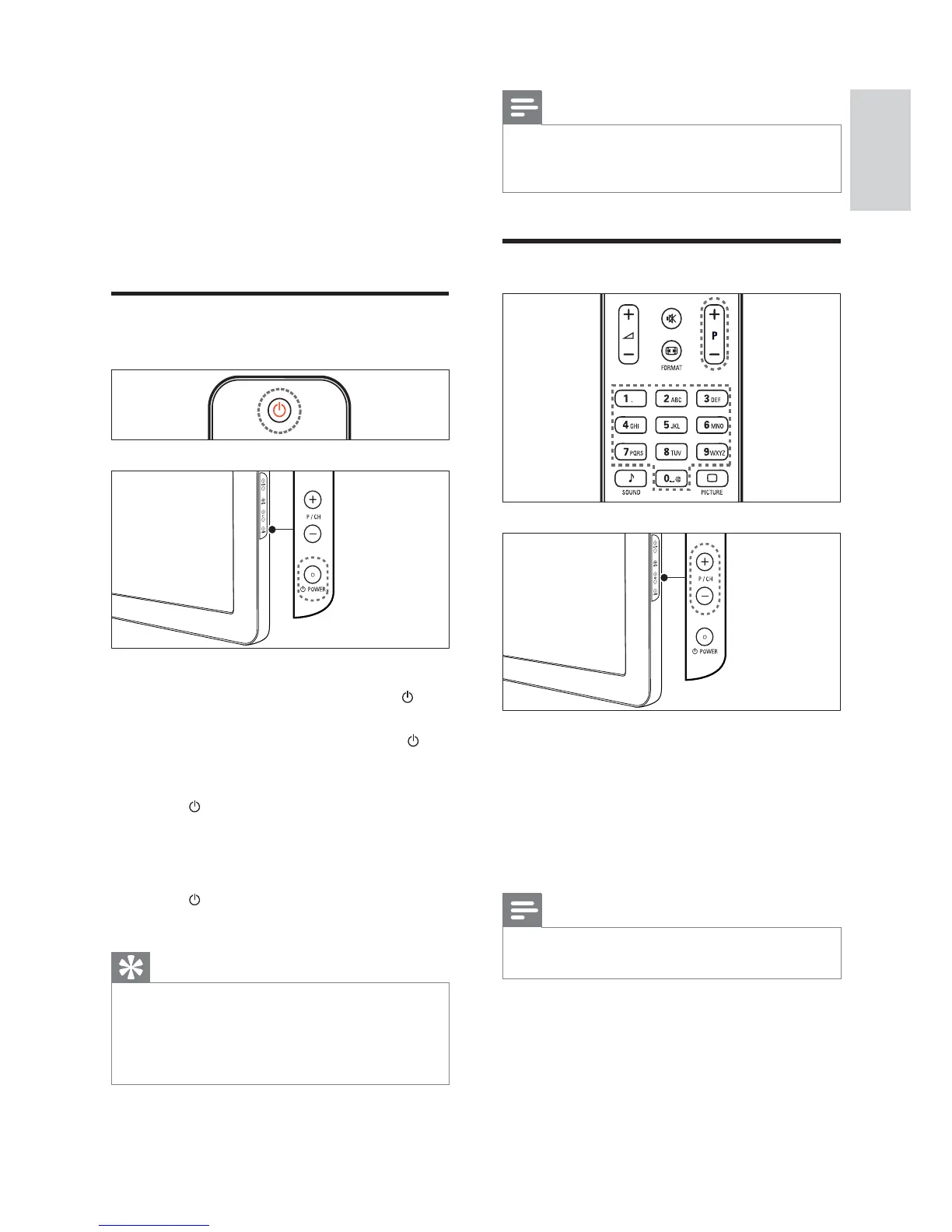
If you cannot locate your remote control and •
want to switch on the TV from standby, press
P/CH +/- or SOURCE at the side of the TV.
Switch channels
Press • P +/- on the remote control or
P/CH +/- on the side of the TV.
Enter a channel number using the •
Numeric buttons.
Use the channel • grid (see ‘Switch
channels with the channel grid’ on page
10 ).
Note
When you use a favourite list, you can only •
select those channels in the list.
4 Use your
product
This section helps you perform basic operations
(see ‘Use more of your product’ on page 11).
Switch your TV on/off or to
standby
To switch on
If the standby indicator is off, press •
POWER at the side of the TV.
If the standby indicator is red, press •
(Standby-On) on the remote control.
To switch to standby
Press •
( Standby-On) on the remote
control.
The standby indicator switches to red.»
To switch off
Press •
POWER at the side of the TV.
The standby indicator switches off.»
Tip
Though your TV consumes very little power •
when in standby, energy continues to be
consumed. When not in use for an extended
period of time, disconnect the TV power cable
from the power outlet.
English
EN







 To Next Page