10
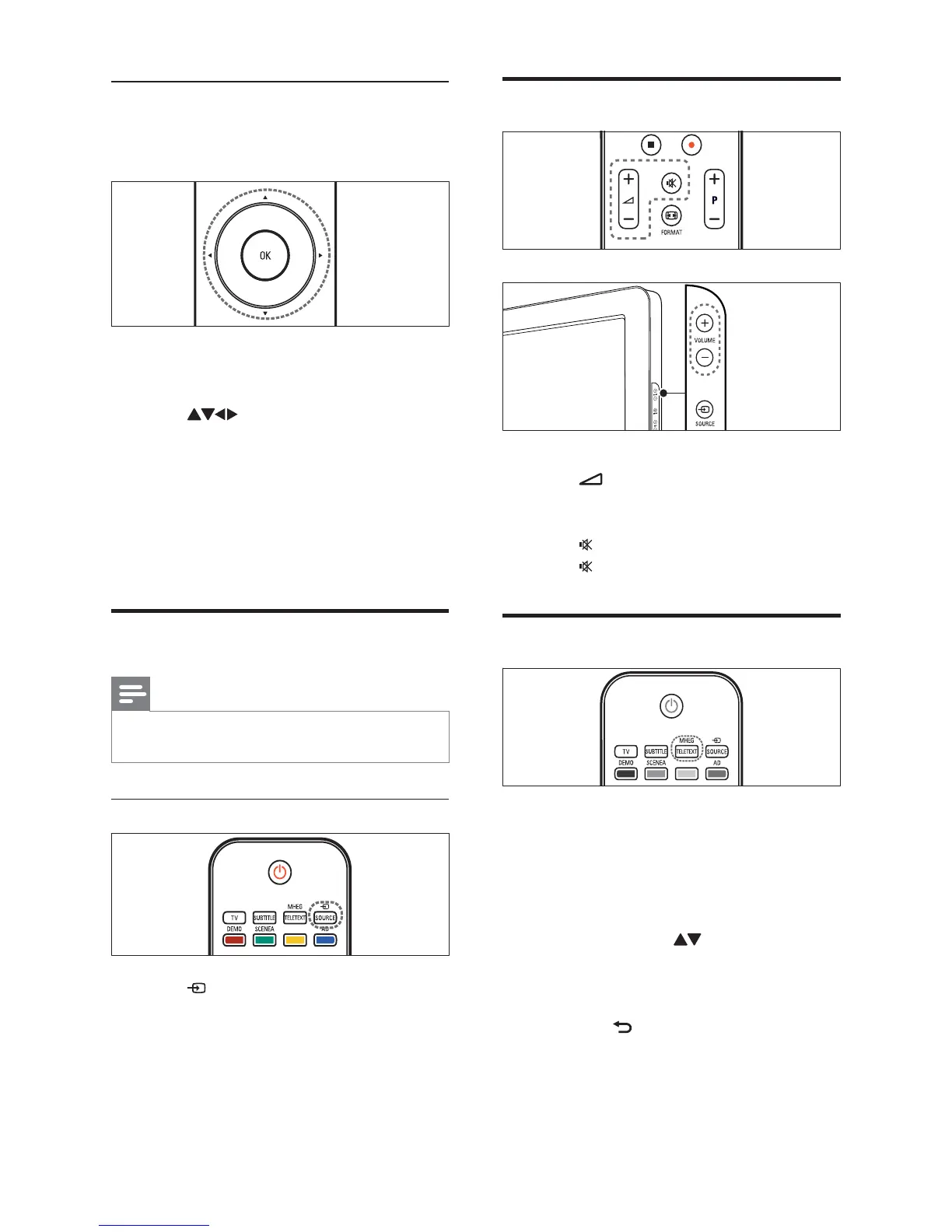
Adjust TV volume
To increase or decrease volume
Press •
+/-.
Press • VOLUME +/- on the side of the TV.
To mute or unmute sound
Press •
to mute the sound.
Press •
again to restore the sound.
Use teletext
1 Press MHEG/TELETEXT.
The main index page appears.»
2 Select a page as follows:
Press the • Numeric buttons to enter
a page number
Press • P +/- or
to view the next
or previous page
Press the • Colour buttons to select a
colour coded item
Press •
BACK to return to a
previously viewed page
3 Press MHEG/TELETEXT to exit teletext.
Switch channels with the channel grid
The channel grid allows you to view all
available channels in a grid format.
1 Press OK.
The channel grid appears.»
2 Press to browse the channel grid
and preview a channel.
The channel content is displayed after »
a lapse of approximately two seconds.
3 When you fi nd a channel of your choice,
press OK to watch.
The selected channel appears.»
Watch connected devices
Note
Switch on the device before selecting it as a •
source on the TV.
Use the source button
1 Press SOURCE.
The source list appears.»
2 Press the Navigation buttons to select a
device.
3 Press OK to confi rm your choice.
The TV switches to the selected device.»
EN








 To Next Page