22
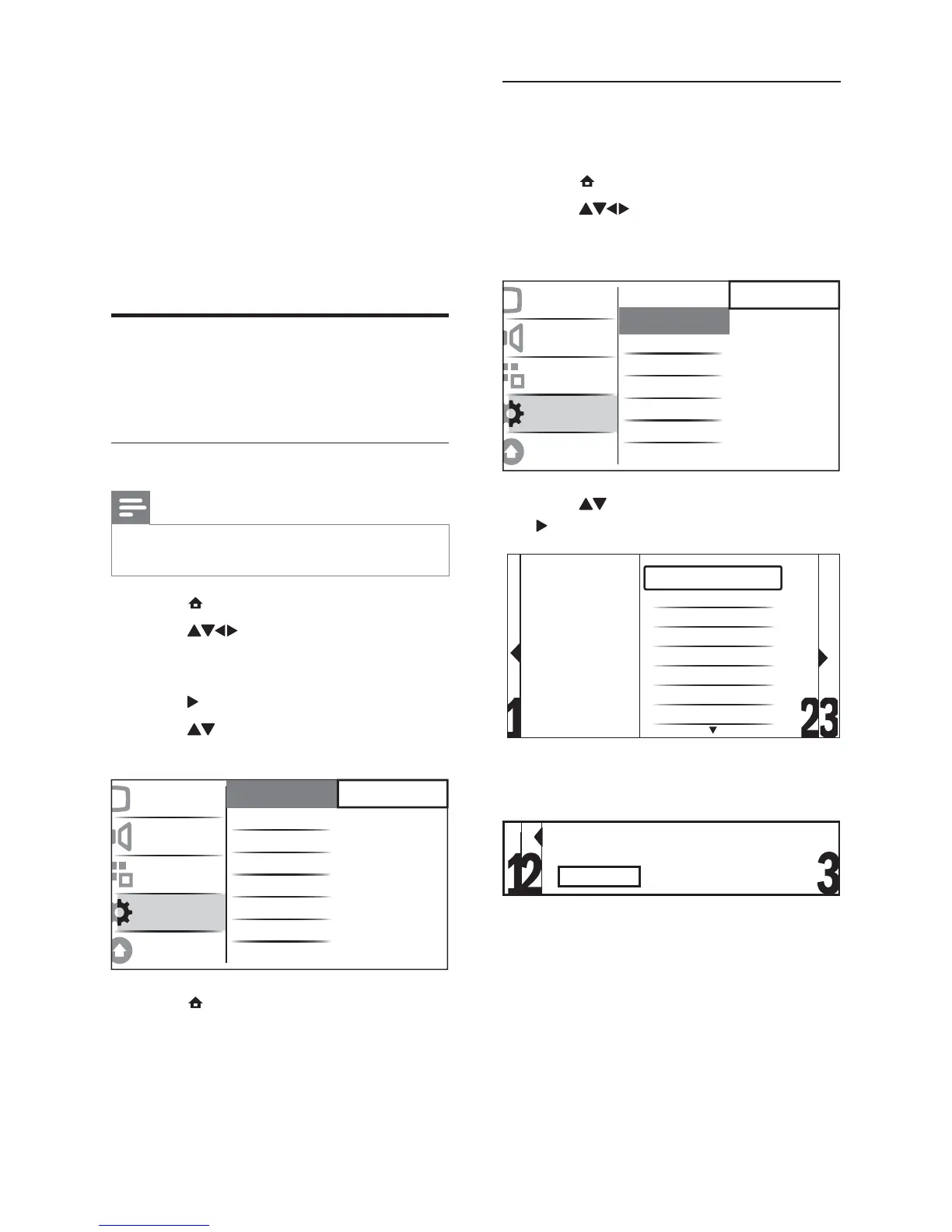
Step 2 Install Channels
Select your country for proper channel
installation.
1 Press ( Home).
2 Press to select [Setup] >
[Installation] > [Channel install.] >
[Channel assistant].
3 Press to select your country and then
to go to the next step.
4 Select [Start] and press OK to re-install
channels.
As the system searches for channels, »
you have the option to [Stop] the
process.
5 To stop searching, select [Stop] and press
OK.
A dialogue box appears asking »
you if you really want to [Stop] or
[Continue] with the process.
Picture
Sound
Features
Installation
Software update
Menu language
Channel install.
Preferences
Decoder
Factory setting
Current software
Channel assistant
Analogue: Manual
Select your country
Austria
Belgium
Croatia
Czech Republic
Denmark
Finland
France
Germany
Start automatic installation. This takes a few minutes.
Start?
6 Install channels
The fi rst time you set up your TV, you are
prompted to select a menu language and to
install TV and digital radio channels (if available).
This chapter provides instructions on how to
re-install and fi ne tune channels.
Automatically install channels
This section describes how to search and store
channels automatically.
Step 1 Select your menu language
Note
Skip this step if your language settings are •
correct.
1 Press ( Home).
2 Press to select [Setup] >
[Installation] > [Language] > [Menu
language].
3 Press to enter [Menu language].
4 Press to select a language setting and
then OK to confi rm.
5 Press ( Home) to exit.
Picture
Sound
Features
Installation
Software update
Menu language
Channel install.
Preferences
Decoder
Factory setting
Current software
English
Česky
Български
Dansk
Deutsch
Ελληνικά
Español
Français
EN








 To Next Page