23
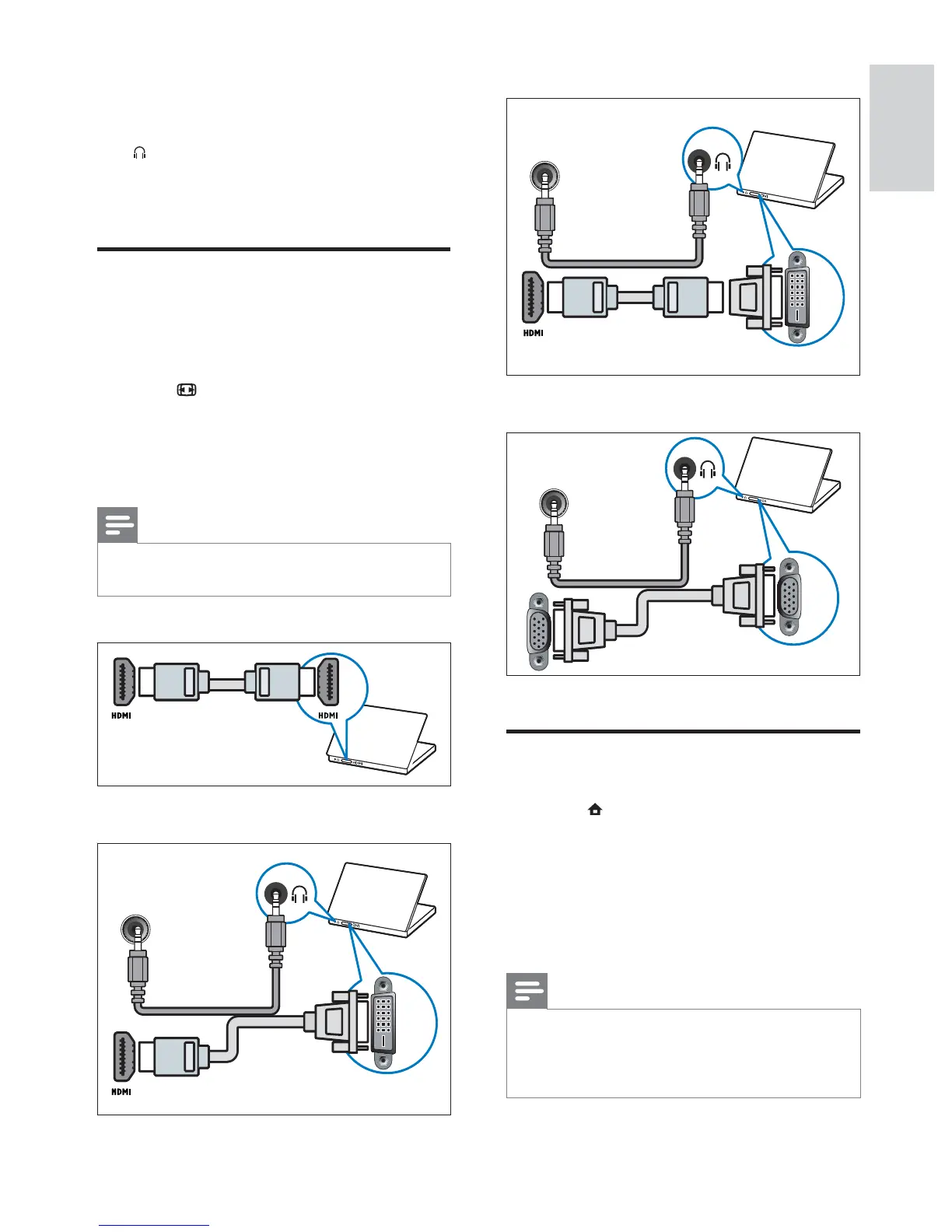
HDMI cable and HDMI-DVI adaptor
VGA cable
Use dual view
1
Press ( Home ).
2 Select [Setup] > [Features] > [Dual
View] .
3 Select [On] .
4 Press OK .
5 Press OK to exit.
Note
When the dual view mode is turned on, a
small window for TV input appears on the
upper right-hand corner of the TV screen. The
audio output is still from the VGA input.
•
•
•
DVI
PC AUDIO IN/ PC IN(AUDIO)
DVI
PC AUDIO IN/ PC IN(AUDIO)
VGA
PC AUDIO IN/ PC IN(AUDIO)
VGA
PC AUDIO IN/ PC IN(AUDIO)
e AUDIO L/R
Audio input from analog devices
connected to VIDEO or S-VIDEO .
f
Stereo audio output to headphones or
earphones.
Connect a computer
Before connecting a computer to the TV
Set the monitor refresh rate on your
computer to 60Hz.
Press
FORMAT and change the TV
picture format to [Unscaled] .
Connect a computer with one of the
following connectors:
Note
Connections via DVI or VGA require an
additional audio cable.
•
HDMI cable
DVI-HDMI cable
•
•
•
•
DVI
PC AUDIO IN/ PC IN(AUDIO)
DVI
PC AUDIO IN/ PC IN(AUDIO)
English
EN







 To Next Page