- 13 -
Brightness
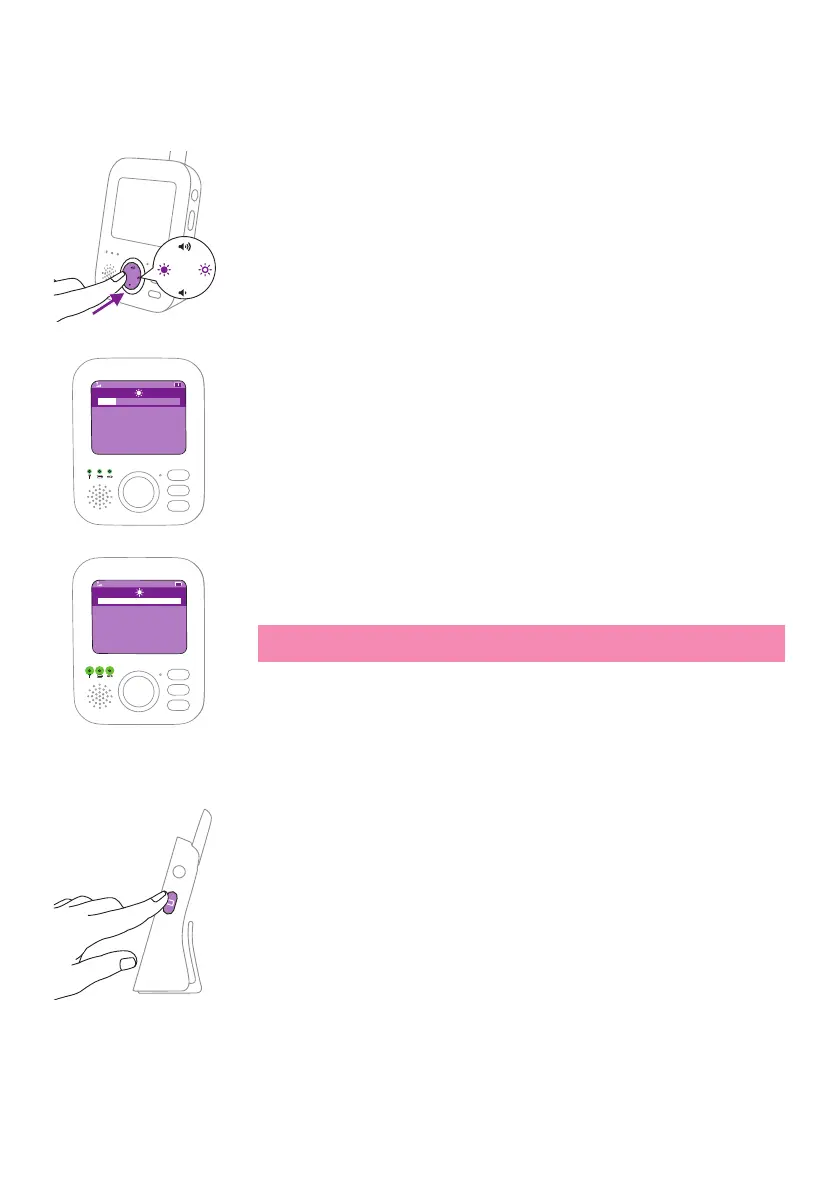
You can adjust the brightness of the display and lights on the parent unit
to the level you prefer�
1 Press the left or right part of the control button to adjust the
brightness� This will adjust both the brightness of the display and lights
of the parent unit at the same time�
The brightness bar appears on display to show the selected brightness�
There are ve brightness levels in the brightness bar.
The display has ve levels of brightness. The lights of the parent unit
have two levels of brightness� If the brightness bar is at the minimum
and second level, the brightness of the lights is dimmer. If the
brightness bar is at the third level to maximum, the brightness of the
lights is brighter�
17:00
Note: If the brightness is set to a high level, the parent unit consumes
more power�
Modes
This baby monitor has four dierent modes that allows you to choose
how you want to look after your baby: Video, Audio, Vox and Eco.
With the baby monitor on, you can switch between these 4 dierent
modes by pressing the mode button on the side of the parent unit�
The display shows the selected mode� The selected mode is also indicated
in the status bar. When turning on the device, the mode that was last
used will be active�
17:00










 To Next Page