8
English
It is recommended to use 12-14 grams of beans for a single cup, and 18-20 grams for double cups. You
may use an electronic scale for precise control of the coffee amount. You can use the "Max" indication on
the filter basket as a rough measure.
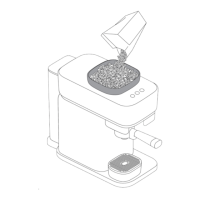
Make sure the bean hopper is properly installed and locked before adding coffee beans and using the
machine.
Only roasted coffee beans are allowed in the bean hopper. Do not put raw coffee beans, coffee powder,
instant coffee or other materials in the bean hopper, as it may damage the coffee machine.
Pay attention to the maximum level of ground coffee during grinding and avoid clogging the ground
coffee outlet (Fig. 19).
Different beans may yield slightly different amounts of ground coffee in automatic grinding. You may
need to adjust the grinding settings based on the actual brewing pressure for each type of bean (see
'Optimized brew').
When splattering of ground coffee visibly worsens, clean the grinding chute (see 'Cleaning the grinder
and ground coffee outlet').
Tamping
1 Remove the portafilter from the grinder bracket.
2 Remove the powder ring from the portafilter (Fig. 20).
3 Position the portafilter on a countertop with its padded bottom to facilitate effortless tamping (Fig. 21).
4 Gently tap the portafilter several times to make the ground coffee distribute evenly in the filter basket
(Fig. 22).
5 Use the calibrated tamper to tamp the ground coffee.
Brewing Espresso
1 Insert the portafilter into the brewing head.
-
Align the portafilter with the "triangle" mark on the brewing head and place it upward inside the
brewing head (Fig. 23). Then, rotate the portafilter counterclockwise to the center to lock it (Fig. 24).
2 Press the Espresso or Double Espresso button to start brewing (Fig. 25). To stop dispensing before the
machine is finished, press the button again.
When the On/Off button indicator flashes, the machine is in the preheating mode and brewing cannot
be started. When all button indicators are solid on, brewing can be started.
After brewing is completed, there may be steam and pump noise above the drip tray. This is normal and
indicates that the machine is depressurizing.
When the brewing pressure is too high, the machine will stop dispensing coffee to maintain the desired
coffee taste. At this time, the indicator keeps flashing. In such cases, brew coffee again.
The Espresso volume is about 40 ml and Double Espresso volume about 80 ml by default.








 To Next Page