BDL5590VL
26
• Thetimeforthedisplaytoturnonandturnoff.
• Thedaysinaweekforthedisplaytoactivate.
Notes:
• Werecommendyoutosetupcurrentdateandtimeinthe{Clock}
menubeforeusingthisfunction.
• Afterchangingthe{Clock}optioninthe{General settings}menu,
youneedtosetthis{Scheduling}again.
Picture
Sound
Tiling
Network
Storage
General settings
Adv.
Menu language
Monitor Group
Monitor ID
Eco mode
Auto search
Clock
Scheduling
Sleep timer
OneWire
Local KB lock
RC lock
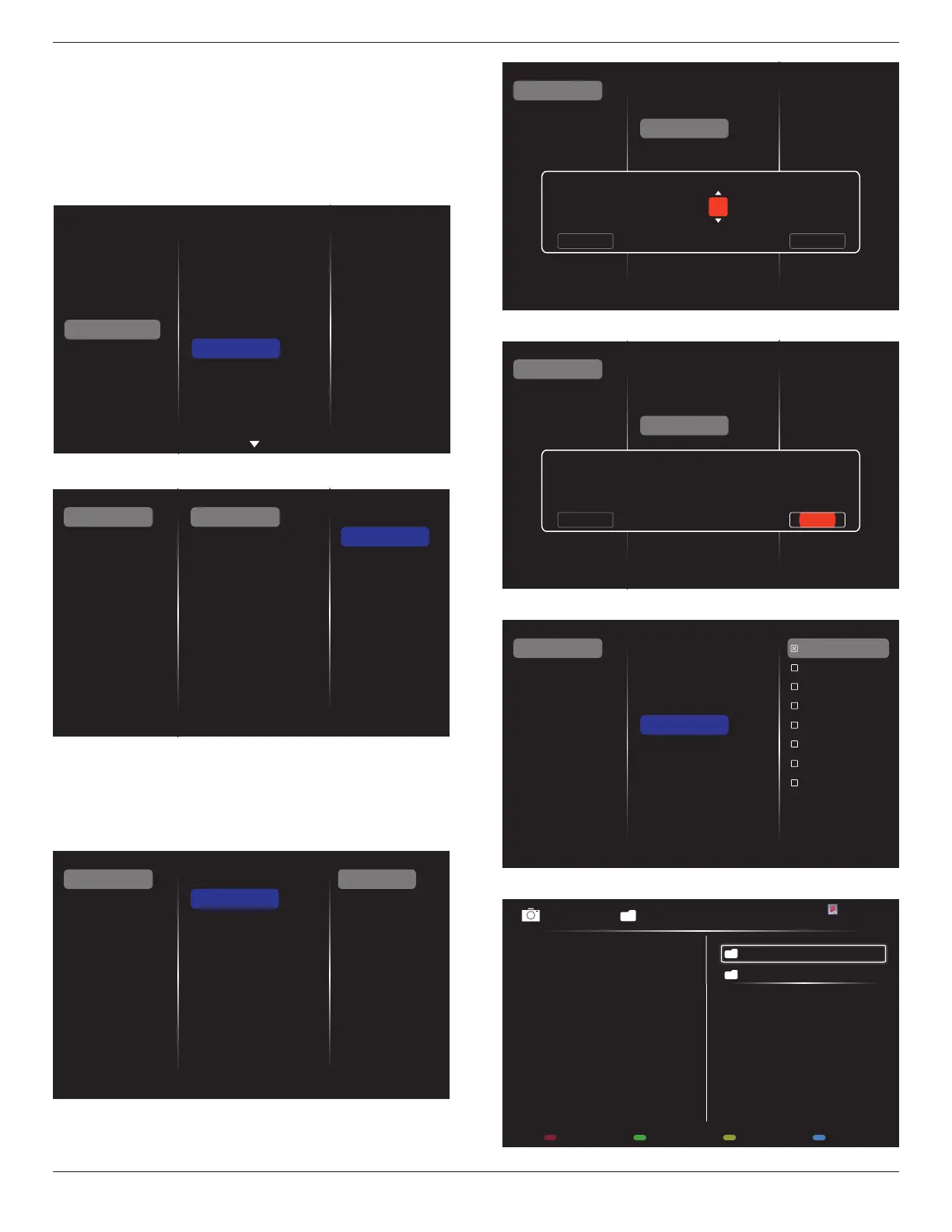
1. Thereare7schedulecanbeset.Goto
Status
andchoose
On
.
Status
Source
On time
Off time
Repeat modes
Playlist setting
Off
On
Schedule 1
Schedule 2
Schedule 3
Schedule 4
Schedule 5
Schedule 6
Schedule 7
Slideshow durations
2. Goto
Source
andchooseinputsource.
If{Source}
{USB playlist}ischosen.Youneedtosetplayliist.
If{Source}
{Internet}ischosen.YouneedtosetURLaddress.
If{Source}
{USB AutoPlay}ischosen.Youneedtocreateafolder
named“philips”intheUSBandputallmedialesintothespecic
folderforautoplay.
Status
Source
On time
Off time
Repeat modes
Playlist setting
Schedule 1
Schedule 2
Schedule 3
Schedule 4
Schedule 5
Schedule 6
Schedule 7
Slideshow durations
USB playlist
CVBS
YPbPr
VGA
HDMI 1
HDMI 2
DVI-D
DisplayPort
Card OPS
Internet
SmartCMS
3. Set
On time
.
Status
Source
On time
Off time
Repeat modes
Playlist setting
Schedule 1
Schedule 2
Schedule 3
Schedule 4
Schedule 5
Schedule 6
Schedule 7
On time
Cancel Done
00 : 00
4. Set
Off time
.
Status
Source
On time
Off time
Repeat modes
Playlist setting
Schedule 1
Schedule 2
Schedule 3
Schedule 4
Schedule 5
Schedule 6
Schedule 7
Off time
Cancel
14 : 00
Done
5. Goto
Repeat modes
andchoose.
Status
Source
On time
Off time
Repeat modes
Playlist setting
Schedule 1
Schedule 2
Schedule 3
Schedule 4
Schedule 5
Schedule 6
Schedule 7
No repeat
Every Sunday
Every Monday
Every Tuesday
Every Wednesday
Every Thursday
Every Friday
Every Saturday
Slideshow durations
6. If{Source}
{USB playlist}ischosen.Goto
Playlist setting
.
0001/0002
Options Exit
Photo
Photo
Video










 To Next Page