BDL8470QT
24
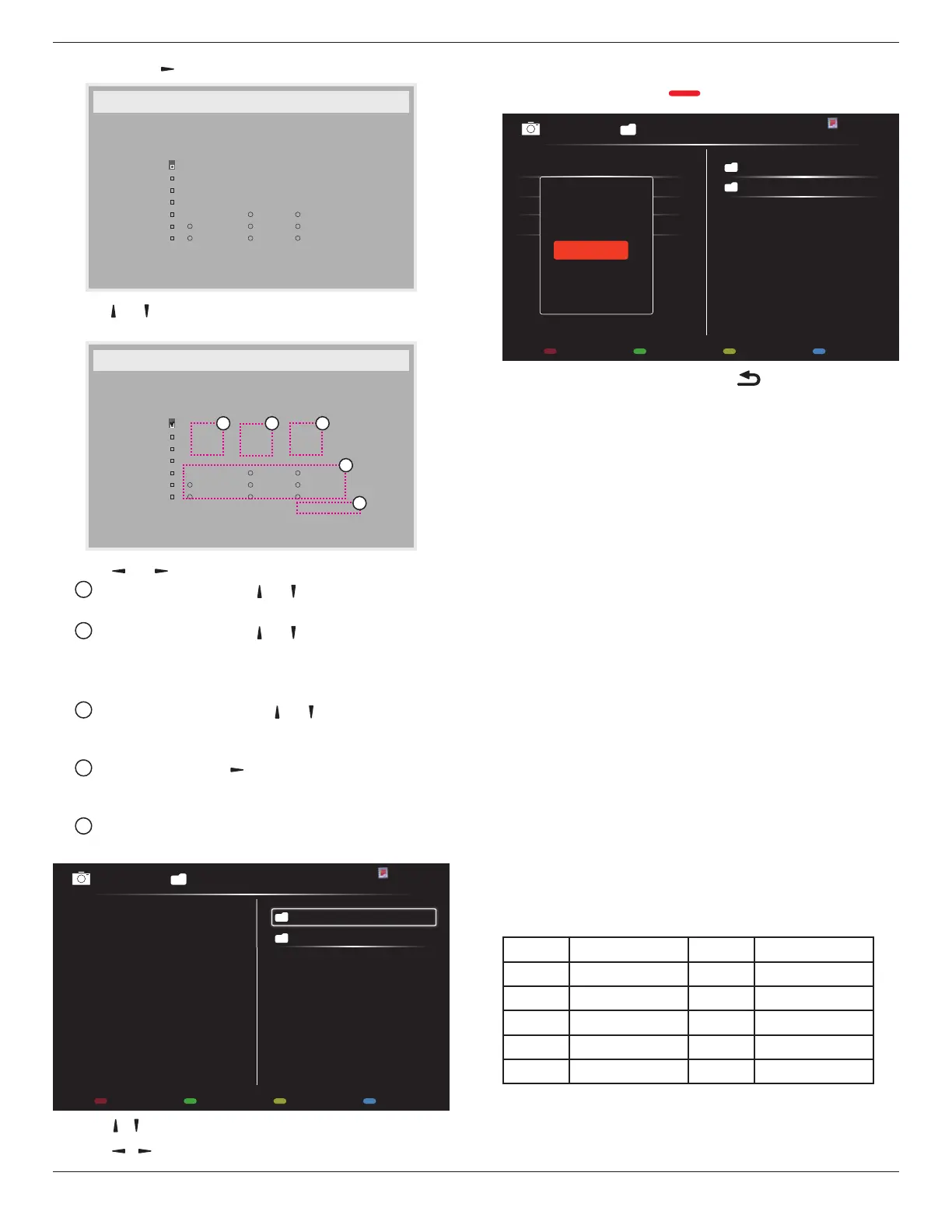
1. Press[OK]or[ ]buttontoenterthesubmenu.
Schedule
Today
1
2
3
4
5
7
6
2014 . 11 . 04 TUE 20 : 19 : 55
On
:
_
:
_ _ _ _
Off
Input
WED
SAT
MON
THU
SUN
TUE
FRI
Every week
USB play list
2. Press[ ] or[ ] buttontoselectascheduleitem(itemnumber1~7),
andthenpress[OK]buttontomarkittheitemnumber.
Schedule
Today
1
2
3
4
5
7
6
2014 . 11 . 04 TUE 20 : 19 : 55
On
:
_
:
_ _ _ _
Off
Input
WED
SAT
MON
THU
SUN
TUE
FRI
Every week
USB play list
4
1 32
5
3. Press[ ]
or[ ]buttontoselecttheschedule:
1
Power-onschedule:Press[ ] or[ ]buttontosetthehour
andminuteforthedisplaytoturnon.
2
Power-offschedule:Press[ ] or[ ] buttontosetthehour
andminuteforthedisplaytoturnoff.
Selectorleaveanempty“__”forboththehourandminuteslotif
youdonotwanttousethispower-onorpower-offschedule.
3
Input-sourceselection:Press[ ] or[ ] buttontoselectan
inputsource.Ifnoinputsourceisselected,theinputsource
willremainthesameaslastselected.
4
Dateschedule:Press[ ]buttontoselectwhichdayina
weekthisscheduleitemwillbetakeeffect,andthenpressthe
[OK]button.
5
WhenInput-sourceselecttoUSB,enabletoaccessUSB play
listsetting:
0001/0002
Options Exit
Photo
Photo
Video
- Press[ ] [ ] buttonstochooseles.
- Press[ ] [ ]buttonstoswitchPlaylistandFileManager.
- Press[OK]buttontosetorcleartheplaylist.
- Tosavetheplaylist,press[ ] andchooseSave list.
0004/0004
Options Exit
Photo
Photo
[..]
Movie.avi
\media\photo
Photo1.jpg
Photo2.jpg
Photo3.jpg
Sort
Recursive Parser
Media Type
Save list
4.
Foradditionalschedulesettings,press[ ],thenrepeatthesteps
above.Acheckmarkintheboxnexttothenumberoftheschedule
itemindicatesthattheselectedscheduleisineffect.
NOTES:
• Iftheschedulesoverlap,thescheduledpower-ontimetakespriority
overscheduledpower-offtime.
• Iftherearetwoscheduleitemsprogrammedforthesametime,the
highestnumberedscheduletakespriority.Forexample,ifschedule
items#1and#2bothsetthedisplaytopoweronat7:00AMand
offat5:00PM,thenonlyscheduleitem#1willtakeeffect.
• EachPlaylistsupportsupto30les.
• Playlistwillnotbeclearedafter{Factory reset}.Youhaveto
manuallyremovethelesordeleteusb_schedulinglist.txtinthe
USB.
DDC/CI
ChoosetoturnonorofftheDDC/CIcommunicationfunction.Select
{On}fornormaluse.
DDC/CI(CommandInterface)speciesameansforacomputerto
sendcommandstothemonitor,aswellasreceivesensordatafromthe
monitor,overthebidirectionallinksuchasDDC2Ab/Bi/B+.
Speciccommandstocontrolmonitorsaredenedinaseparate
MonitorControlCommandSet(MCCS)standard.
DDC/CImonitorsaresometimessuppliedwithanexternalcolor
sensortoallowautomaticcalibrationofthemonitor’scolorbalance.
SometiltingDDC/CImonitorssupportanautopivotfunction,where
arotationsensorinthemonitorenablestheoperatingsystemtokeep
thedisplayuprightasthemonitorismovedbetweenitsportraitand
landscapepositions.
ThefollowingDDC/CIcommandsshouldbesupportedviacommand
line:
No. Commands No. Commands
1 SetBrightness 6 GetBrightness
2 SetContrast 7 GetContrast
3 SetRedGain 8 GetRedGain
4 SetGreenGain 9 GetGreenGain
5 SetBlueGain 10 GetBlueGain
HDMI with One Wire
CECcontrol.
• {Off} -DisableCEC.(Default)
• {On}-EnableCEC.





 To Next Page