Service Modes, Error Codes, and Fault Finding
EN 24 BP2.2U, BP2.3U5.
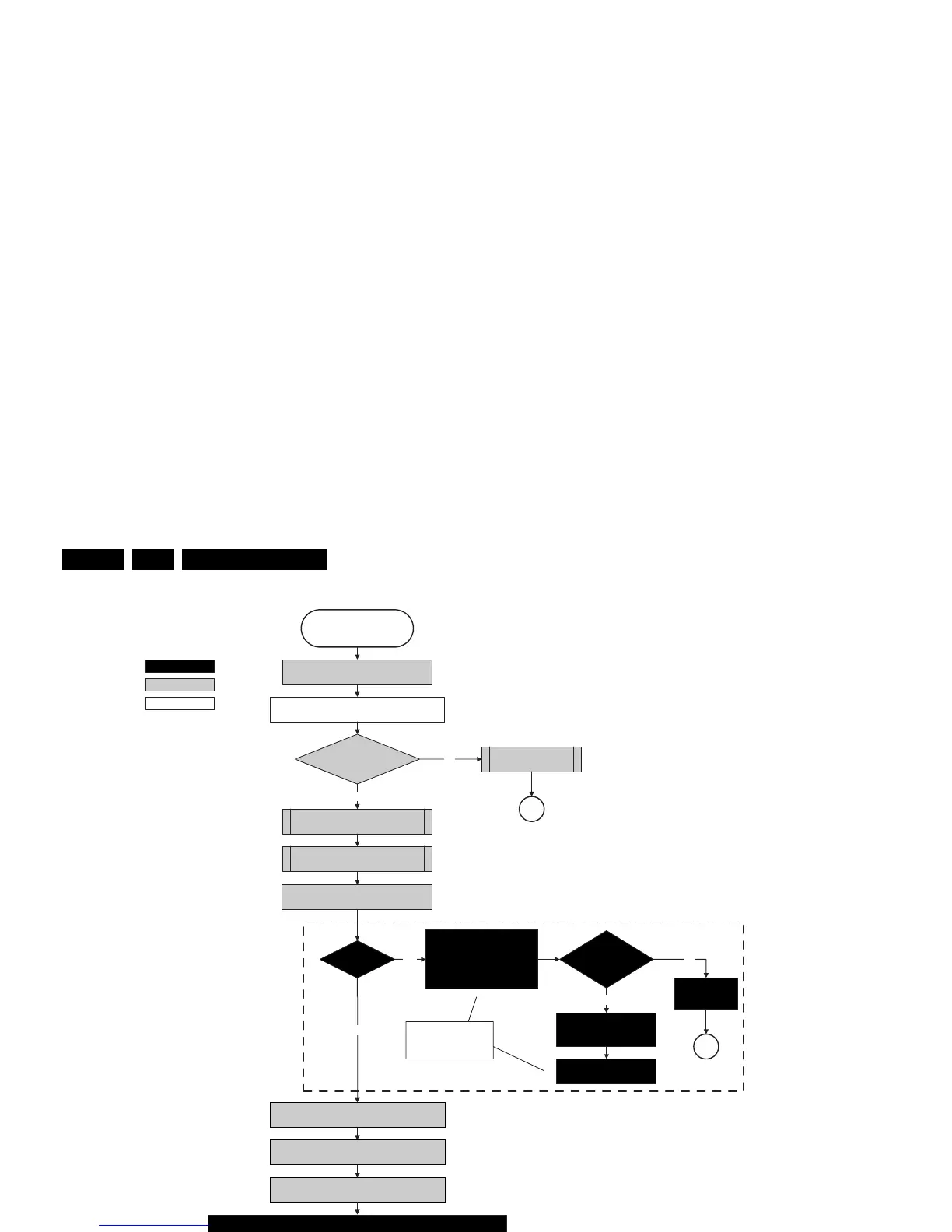
Figure 5-10 “POD Stand-by” to “Semi Stand-by” flowchart
action holder: MIPS
autonomous action
action holder: St-by
Semi-Stand-by
Initialize MPIFs
MPIF should deliver 4 observers:
POR= 0; normal operation
MSUP = 1: Main supply is present
ASUP = 1; audio supply is present
ROK = 1; reference frequency is present (coming from AVIP)
(AVIPs must be started before the MPIFs in order to have a good clock distribution).
AVIP default power-up mode is Stand-by. The Viper instructs AVIP via I2C to enable all the
PLLs and clocks and hence enter to Full Power mode.
Initialize tuners and Hirate
All observers present with correct state?
appropriate Observer error
No
Yes
Initialize video processing ICs
- Spider (if available)
Initialize source selection
Initialize Columbus
Initialize 3D Combfilter
Initialize AutoTV
MP
POD stand by
initialize PNX2015 HD subsystem
Full SSB power and the display related supplies
become available
Switch “on” all supplies by switching “low”
the ON-MODE I/O line.
+8V6 error
+8V6
detected within
200 ms after ON-MODE
toggle?
No
Yes
SP
activate +8V6 supply
detection algorithm
Yes
Init SDI PDP
Yes
No
SP
Switch LVDS back “off” if end
state is not the active state.
These LVDS items are
SDI V3 display only !!
Wait 2000ms to allow main supply to
deliver full power.
F_15400_101.eps
120505
SDI PDP
Set?
Log display error
and enter
protection mode
Switch “on” the LVDS output
the PNX2015 with a correct
clock frequency within 4s after
switching the POD and ON-
mode to prevent PDP display
supply protection.
PWR-OK-PDP
received within 5s after
POD and ONmode
toggle ?
No
Power-up HDMI and 1394 hardware by putting
POWERDOWN-1394 GPIO 0 line “low”.
Enable Viper HW blocks (TM1, TM2, MBS, VMSP1 and
VMSP2) which were in powerdown mode.
Release PNX2015 reset
Enable audio protection algorithm









 To Next Page