21
English
EN
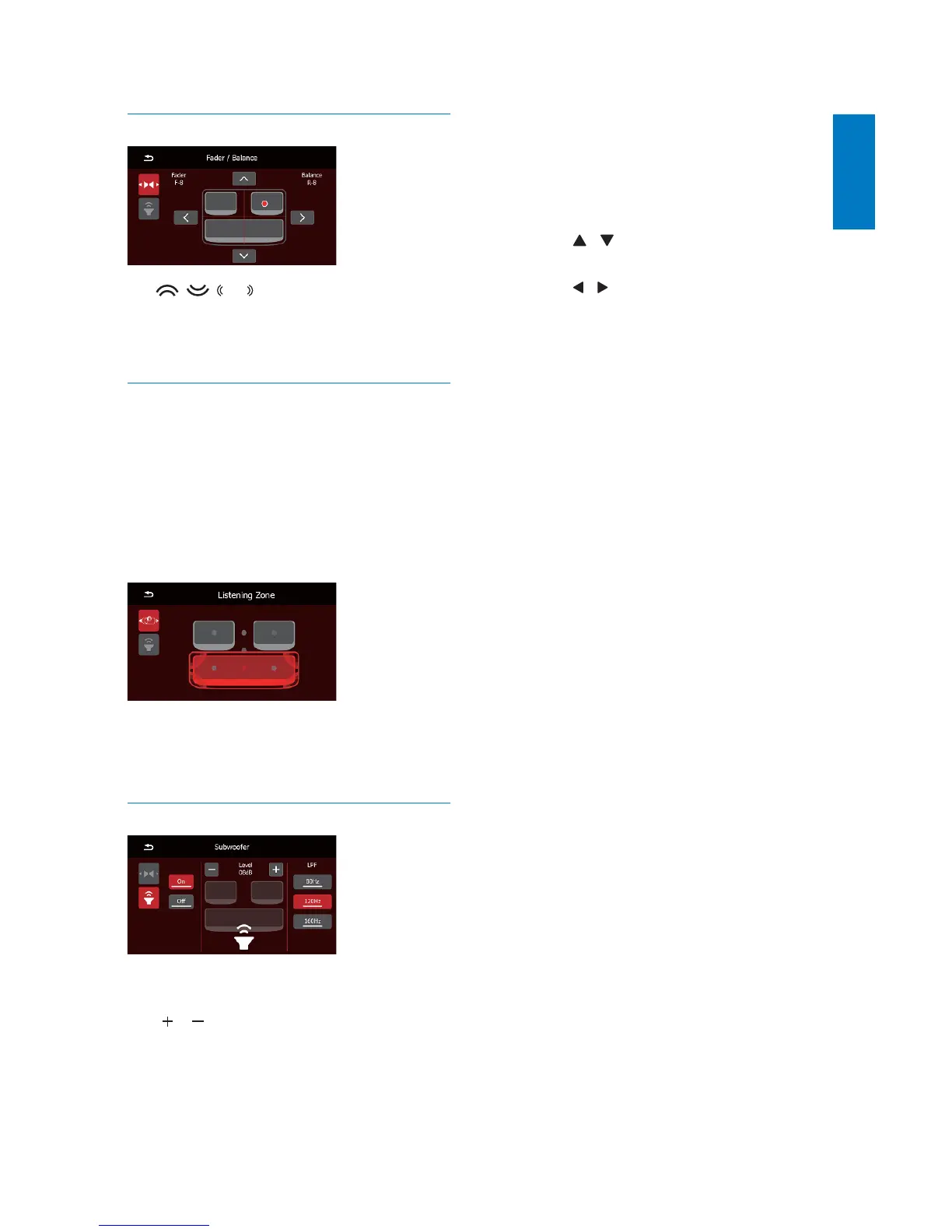
Adjust the fader and balance
Tap , , or to adjust fader or balance
value.
[Fader]: fader range (+16 to -16).
[Balance]: balance range (-16 to +16).
Select a listening zone
Philips’ innovative Zone technology enables the
driver or passengers to enjoy music with the
best speakers balance and experience more
vivid spacial effect as the artist is intended to
create. You can switch the music listening zone
from the driver to passengers for the best
speaker sound settings in car.
Tap a gray area to switch the listening zone.
» The selected area is highlighted with
red dot.
Set the sub-woofer
[On]/[Off]: Tap to turn on or off the sub-
woofer.
/ : Tap to set the volume of sub-
woofer (0 dB to 12 dB).
[80 Hz]/[120 Hz]/[160 Hz]: Tap to select a
ORZSDVVÀOWHUUDQJHIRUWKHVXEZRRIHU
You can also change the settings by the remote
control.
1 Press SUBW to access the menu.
2 Press OK to enable or disable the
subwoofer.
3 Press / WRVHOHFWDORZSDVVÀOWHU
range.
4 Press / to set the volume.
To exit the menu, press SUBW again.



 To Next Page