30 EN
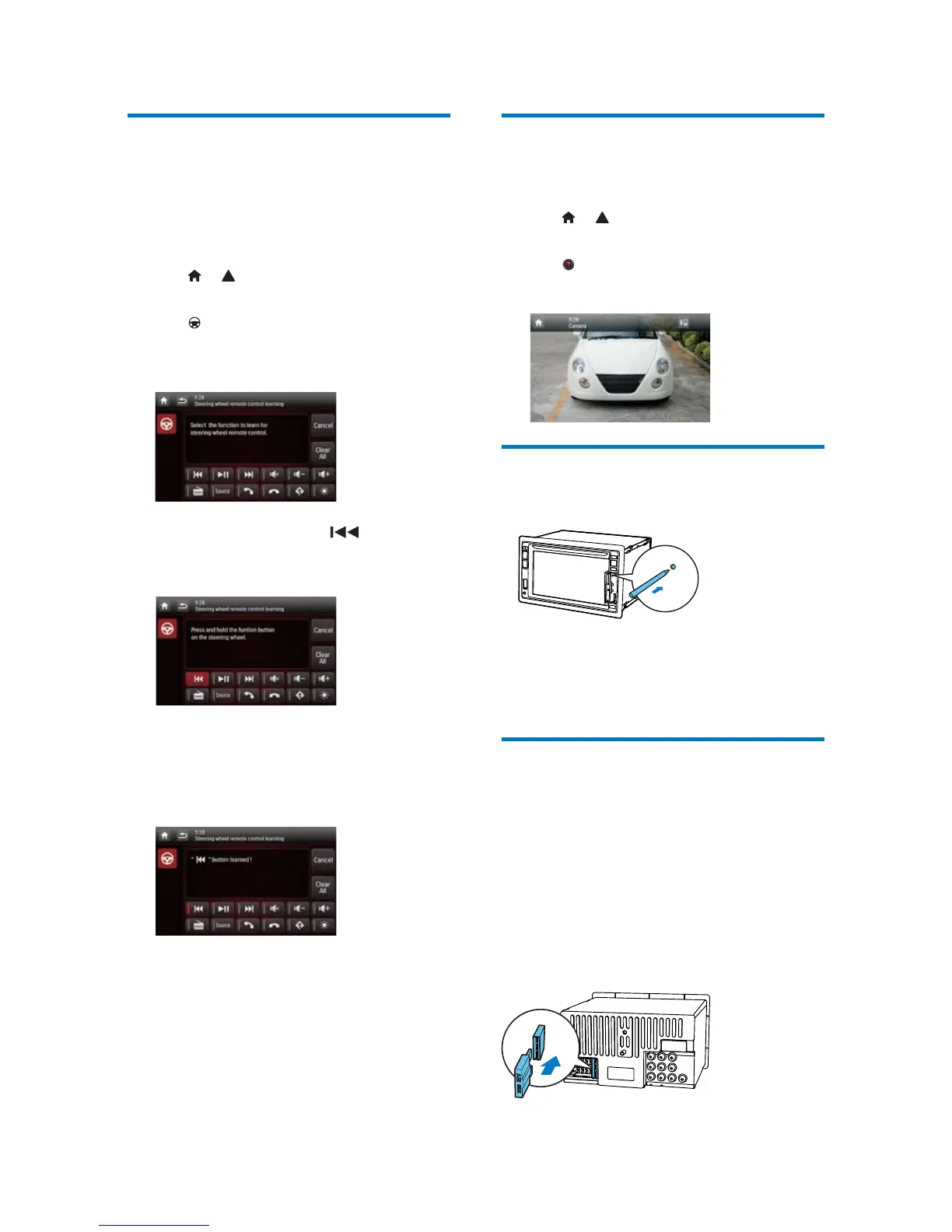
Use buttons on the steering
wheel
You can assign a function to a button on the
steering wheel, and then control the system
with that button.
1 Tap > to access the full menu with all
feature icons displayed.
2 Tap .
» The
[Steering Wheel Remote Control
Learning]
interface is displayed.
3 Tap an icon, for example, , of which
you want to assign the function to a button
on the steering wheel.
To cancel the assignment, tap [Cancel].
4 Press and hold the button on the steering
wheel for one second.
» The following interface is displayed.
5 Repeat steps 3 and 4 to assign more
functions to buttons on the steering wheel.
To clear the assignment, tap [Clear All].
Set the rear view camera
If a rear view camera is connected, you can
view on the screen what the camera takes.
1 Tap > to access the full menu with all
feature icons displayed.
2 Tap .
» Picture from rear camera is displayed.
Reset the system
If the system hangs up, reset it.
1 Flip up the protective cover.
2 Press RESET with the tip of a ball-point
pen or toothpick.
Replace the fuse
If there is no power, check the fuse and replace
it if it is damaged.
1 Detach the main unit from dashboard.
2 Check the electric connection.
3 Remove the damaged fuse from the rear
panel.
4 Insert a new fuse with the same
VSHFLÀFDWLRQV$



 To Next Page