8 EN
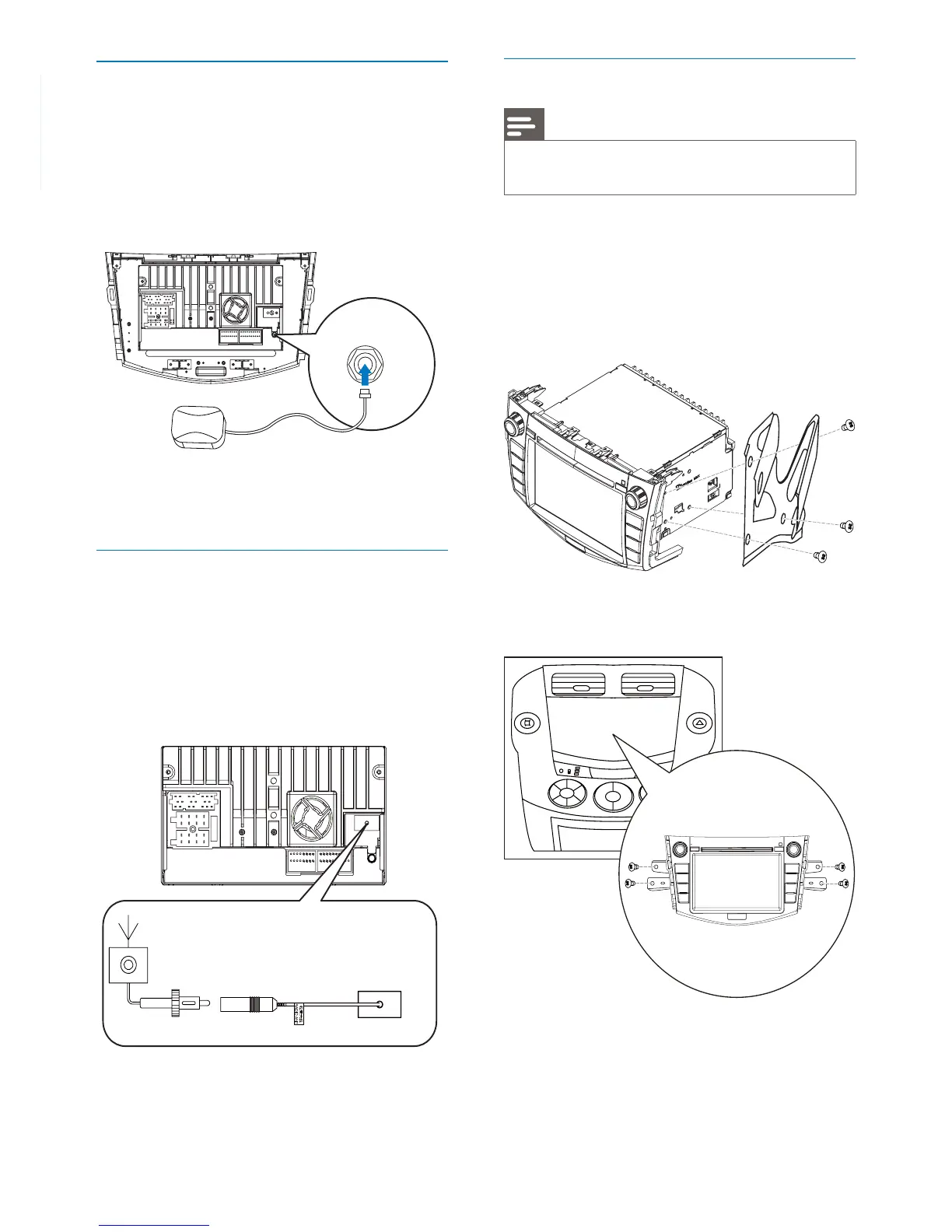
Connect GPS antenna
To receive signal from satellites, connect the
supplied GPS antenna to your car and the
system.
1 Connect the supplied GPS antenna to the
system fi rst.
2 Stick the other end of the GPS antenna to
a surface for signal reception.
Connect Radio antenna
If your car has built-in radio antenna, connect it
to the radio antenna of the system for better
radio signal.
1 Connect the radio antenna to the car
antenna.
Mount into the dashboard
Note
Check wire connection before you mount the unit into •
a car.
1 Take off the trim plate of the car.
2 Screw off the host car audio.
3 Fix the mounting brackets to CID3685
with screws (supplied by the car
manufacturer).
4 Fix the unit to the dashboard with screws
(supplied by the car manufacturer).
5 Attach the trim plate.
6 Reconnect the negative terminal of the car
battery.



 To Next Page