23
3 Tap on the option to display/select an
option.
General
settings
Options Description
[Radio
region]
[USA], [S.
Amer-1],
[Arabia],
[China],[S.
Amer-2],
[Europe],
[Korea],
[OIRT]
Select one that
matches your
location.
[Radio
range]
[Local] Only stations with
strong signals can
be broadcast.
[Distance] Stations with
strong and weak
signals can be
broadcast.
[Blackout] [off] Never turn on the
screen saver.
[10s] Turn on the screen
saver automatically
10 seconds after
last operation.
[20s] Turn on the screen
saver automatically
20 seconds after
last operation.
[Key color] [Red] Button backlight
turns red.
[Blue] Button backlight
turns blue.
[Beep] [On] Turn on the
beep sound. Each
time you press a
button, the unit
beeps.
[Off] Turn off the beep
sound.
[WallPaper] [Blue] Turn background
color to blue.
[Black] Turn background
color to black.
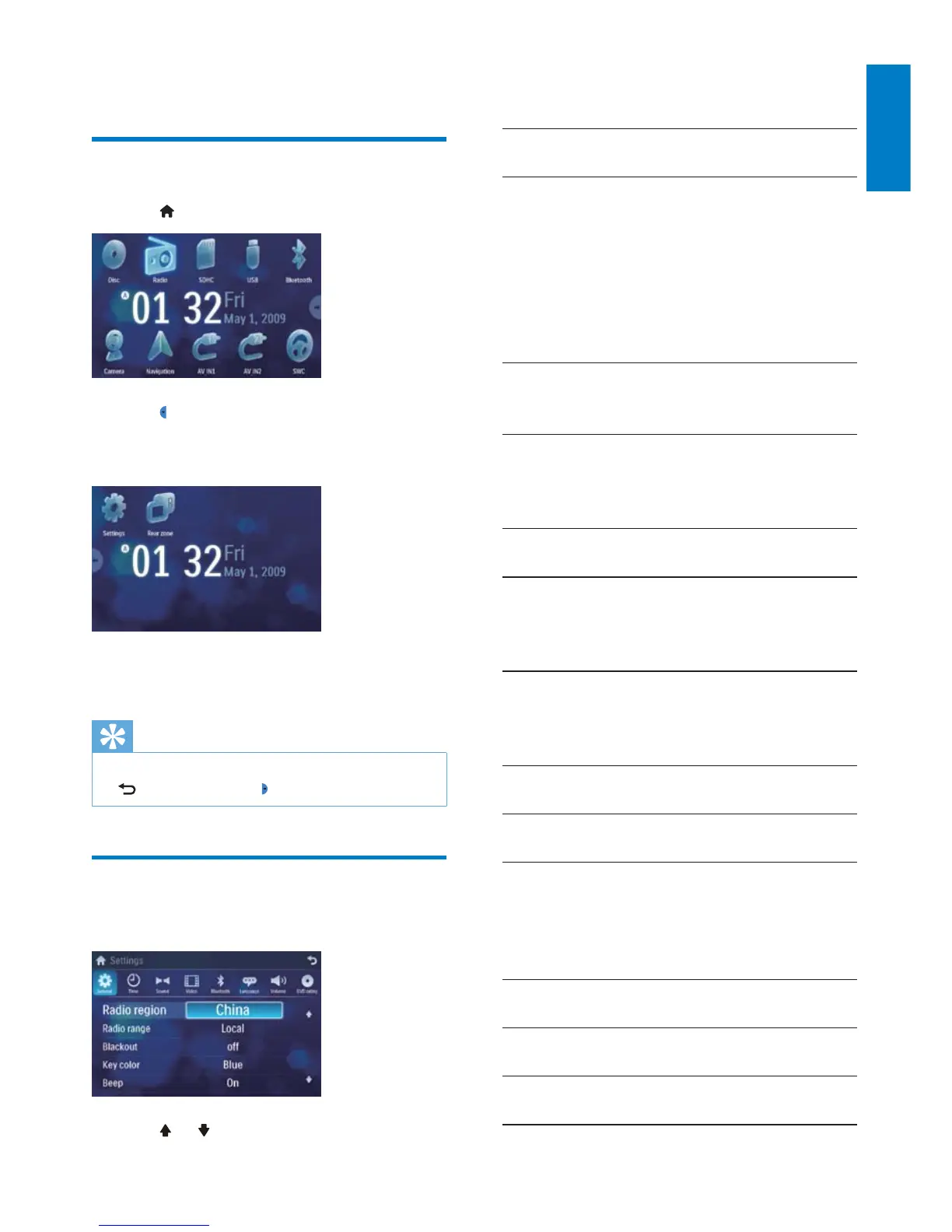
9 Adjust settings
Display system setup menu
1 Tap to display main menu.
2 Tap in the middle right side of the
screen.
The second main menu is displayed. »
3 Tap [Settings].
The settings menu is displayed. »
Tip
When the setup adjustment is completed, tap •
first and then tap to return to main menu.
Adjust general settings
1
Tap [General], if necessary.
2 Tap or to highlight a setting.
English
EN



 To Next Page