This set complies with the radio interference requirements of the European Union.
PHILIPS reserves the right to make design and specification changes for product
improvement without prior notice.
6
English
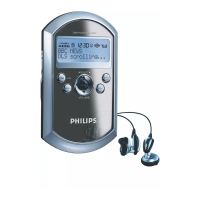
Controls (see Figure 1)
1
p
– 3.5mm headphone socket.
2
Display
– shows menu, options, tack information
and station information.
3 REC/SCAN
– searches and stores DAB stations (Local
Scan/Full Scan/Manu Tune).
– press and hold to record voices in record-
ing mode.
4 1/2/3/4
– navigation controls (left, right, up, down)
for scrolling through the option lists.
1/2
– scrolls radio stations.
3/4
– increases / decreases the volume.
2;
/B
– confirms selection.
– starts playback.
– press and hold to switch on/off the set.
5 INFO (for DAB only)
– displays station information in seven types.
6 HOLD
– adjusts slider to select lock function on/off.
7 MENU
– enters the main menu or returns to
previous menu.
– enables access to advanced setup
options.
8 PRESET
– saves 20 stations for quick access.
9 MIC
– Microphone.
0
– USB jack.
Supplied accessories
1 x USB cable
2 x AAA batteries
1 x headphones


 To Next Page