English
14
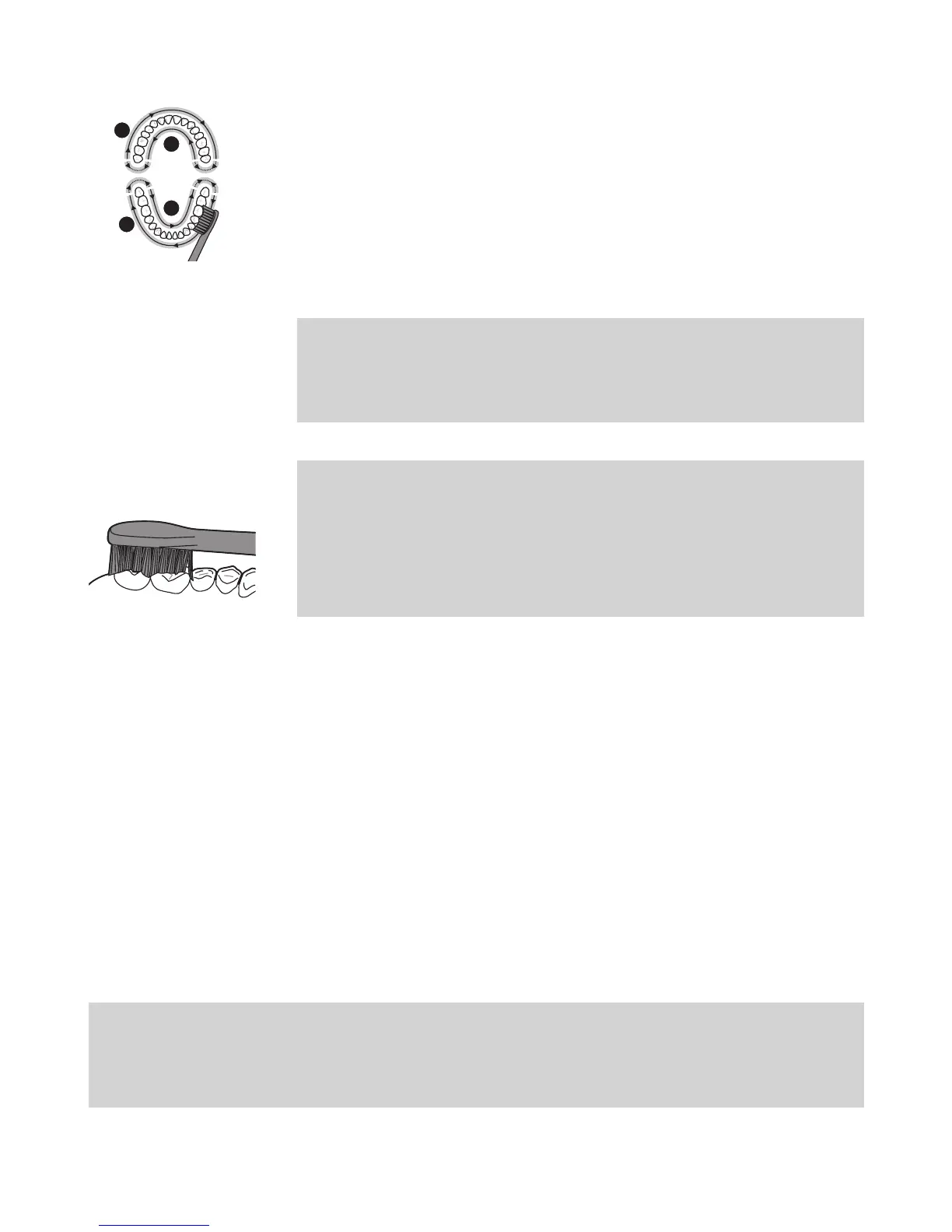
7 Begin brushing in section 1 (outside top teeth)
and brush for 30 seconds (45 seconds in Deep
Clean mode) before moving to section 2 (inside
top teeth). Continue brushing in section
3
(outside bottom teeth) and brush for 30 seconds
(45 seconds in Deep Clean mode) before
moving to section 4 (inside bottom teeth).
Note: To make sure you brush evenly
throughout the mouth, divide your mouth
into 4 sections using the Quadpacer feature
(see chapter ‘Features’).
Note: After you have completed the brushing
cycle, you can spend additional time brushing
the chewing surfaces of your teeth and areas
where staining occurs. You can also brush your
tongue, with the toothbrush turned on or o,
as you prefer.
Your Philips Sonicare is safe to use on:
- Braces (brush heads wear out sooner when
used on braces).
- Dental restorations (llings, crowns, veneers).
Brushing modes
1 To toggle through modes press the on/o
button twice in less than 5 seconds.
2 To turn o your Philips Sonicare press the
on/o button again after 5 seconds.
Your Philips Sonicare comes with the Clean mode
activated.
Note: When the Philips Sonicare is used in clinical
studies, it must be used in the default 2-minute
Clean mode or in the Deep Clean mode with Easy
Start turned o.
1
2
4
3





 To Next Page