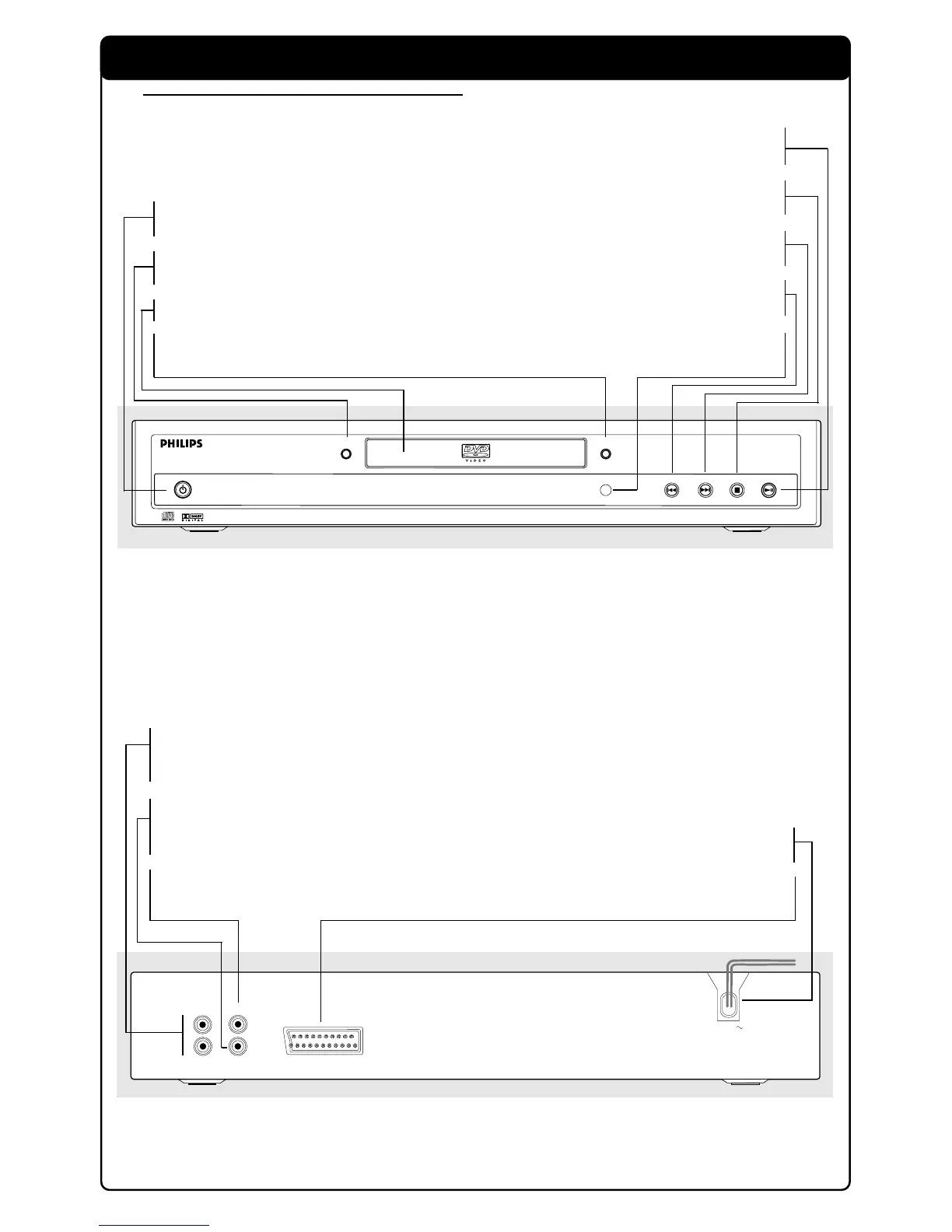
POWER ON/OFF
– switches the player to ON or OFF
SMART PICTURE
– to change colour settings
Disc Tray
/ OPEN/CLOSE
– to open/close the disc tray
2; PLAY/PAUSE
– to start or interrupt playback
9 STOP
– to stop playback
T NEXT
– goes to next chapter or track
S PREV
– goes to previous chapter or track
IR Sensor
– receive signals from remote control
COAXIAL
CVBS
AUDIO
OUT
L
R
TV OUT
MAINS
AUDIO OUT (Left/Right)
– connect to AUDIO inputs of an
amplifier, receiver or stereo system
COAXIAL (Digital audio out)
– connect to AUDIO inputs of a digital
(coaxial) audio equipment
CVBS (VIDEO OUT)
– connect to CVBS Video inputs of a TV
MAINS (AC Power Cord)
– connect to a standard AC outlet
TV OUT (VIDEO OUT)
– connect to a TV with SCART
Caution: Do not touch the inner pins of the jacks on the rear panel. Electrostatic
discharge may cause permanent damage to the unit.



 To Next Page