20 21
Auto-sensing & Wake-up
Function:
After enabling this function, the system will
automatically wake up when the infrared sensor
detects human body.
How to use:
1. Function Enabled: After the keypad wakes up,
enter 401, then press [#] to conrm.
2. Function Disabled: After the keypad wakes up,
enter 402, then press [#] to conrm.
This function is enabled by default. When the
function is enabled, the power consumption of the
lock will increase.
One-button mute function
Outside forced lock function
Function:
Use only one button to mute the lock by turning
o the voice guide.Applicable to the scenes
where you don’t want to disturb your family.
How to use:
1. Mute: When the system is awake, long press
the [Mute] button for 2 seconds to enter one-
time mute mode. The button will glow green.
2. Unmute: When the system is awake, long
press the [Mute] button for 2 seconds to restore
the voice guide. The button will glow white.
Function:
Unlocking from inside will trigger an alarm.
How to use:
After the door is successfully locked, long press
the functional button for 2 seconds to enter the
outside forced lock mode.
Enabling the outside forced lock function will
not aect unlocking from outside.
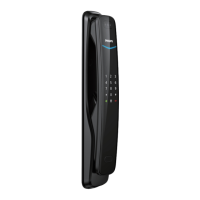
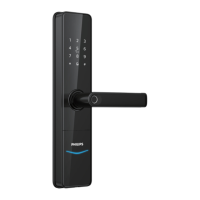
Lock status indicator
Low battery indicator
Outside forced lock indicator
Colors of the light and the corresponding
meanings:
Blue: After the system wakes up, the light will
glow blue, indicating that you can operate the
lock.
Green: After the door is unlocked, the light will
glow green, indicating that the door has been
opened.
Red: After the door is locked, the light will glow
red, indicating that the door has been closed.
Colors of the light and the corresponding
meanings:
Red: After waking up, the system will run an
automatic examination on the battery voltage.
If the voltage is too low, the light will ash in
red and there will be a voice prompt of “Low
battery. Please replace all batteries”.
Colors of the light and the corresponding
meanings:
White:
1. When the door is locked, the light will light up
alone, indicating that you can enable the outside
forced lock function.
2. If you have enabled the outside forced lock
function, the light will light up after the system
wakes up, indicating this function is in use.
7 Meanings & Use of the indicators
Outside forced lock button
Attention
Attention
Lock
status
indicator
Outside forced
Low battery
indicator
lock indicator







 To Next Page