EasyManua.ls Logo

Philips FA 950 - Introduction; Installation Guide

Philips FA 950
14 pages
Print Icon
To Next Page IconTo Next Page
To Previous Page IconTo Previous Page
Loading...
INTRODUCTION
INSTALLATION
_ysy6uq
i
iF
Thank
you
for
selecting
the
Philips
FA950
Integrated
Stereo
Control
Amplifier.
An
amplitier
of
the
state-of-the-art
Philips
900
series,
the
FA950
is
engineered
to
fulfil
the
task
of
generating
powerful
*
sound
with
the
highest
achievable
definition
and
minimum
noise
and
distortion,
supported
by
features
such
as:
~The
Digital
Selector
Circuit,
the
direct
digital
input
and
output
for
signals
from
digital
sources
like
a
CD
player,
Digital
Compact
Cassette
recorder,
or
Digital
Broadcast
Satellite
unconditionally
maintains
the
purity
of
the
digital
signals.
~
A
full-function
remote
control
can
handle
your
entire
PHILIPS
900
series
HiFi
system
as
well
as
a
TV
set,
a
video
recorder
and
an
Laser
Disc
player.
Extended
Dynamics
Circuitry,
a
special
circuit
in
the
power
stages
offering
the
ability
to
process
peaks
in
the
output
signal
(high
dynamic
headroom)
and
creating
a
clean
undistorted
sound.
-
Enhanced
System
Intelligence,
offering
increased
ease
of
operation
by
extensive
communication
between
the
various
components
of
your
system.
Please
read
this
manual
carefully
before
you
attempt
to
|
connect
or
operate
the
amplifier.
This
manual
is
divided
into
six
sections:
-
Installation:
explains
how
to
set
up
your
system.
Operation:
explains
how
to
use
the
major
controls.
-
Advanced
Options:
gives
more
detailed
information
on
operation,
including
special
features.
System
Aspects:
explains
the
Enhanced
System
Intelligence
feature
and
its
benefits.
-
Remote
Control:
gives
detailed
information
on the
operating
functions
of
the
system
remote-control
handset.
General
Information:
includes
maintenance
information
and
technical
data.
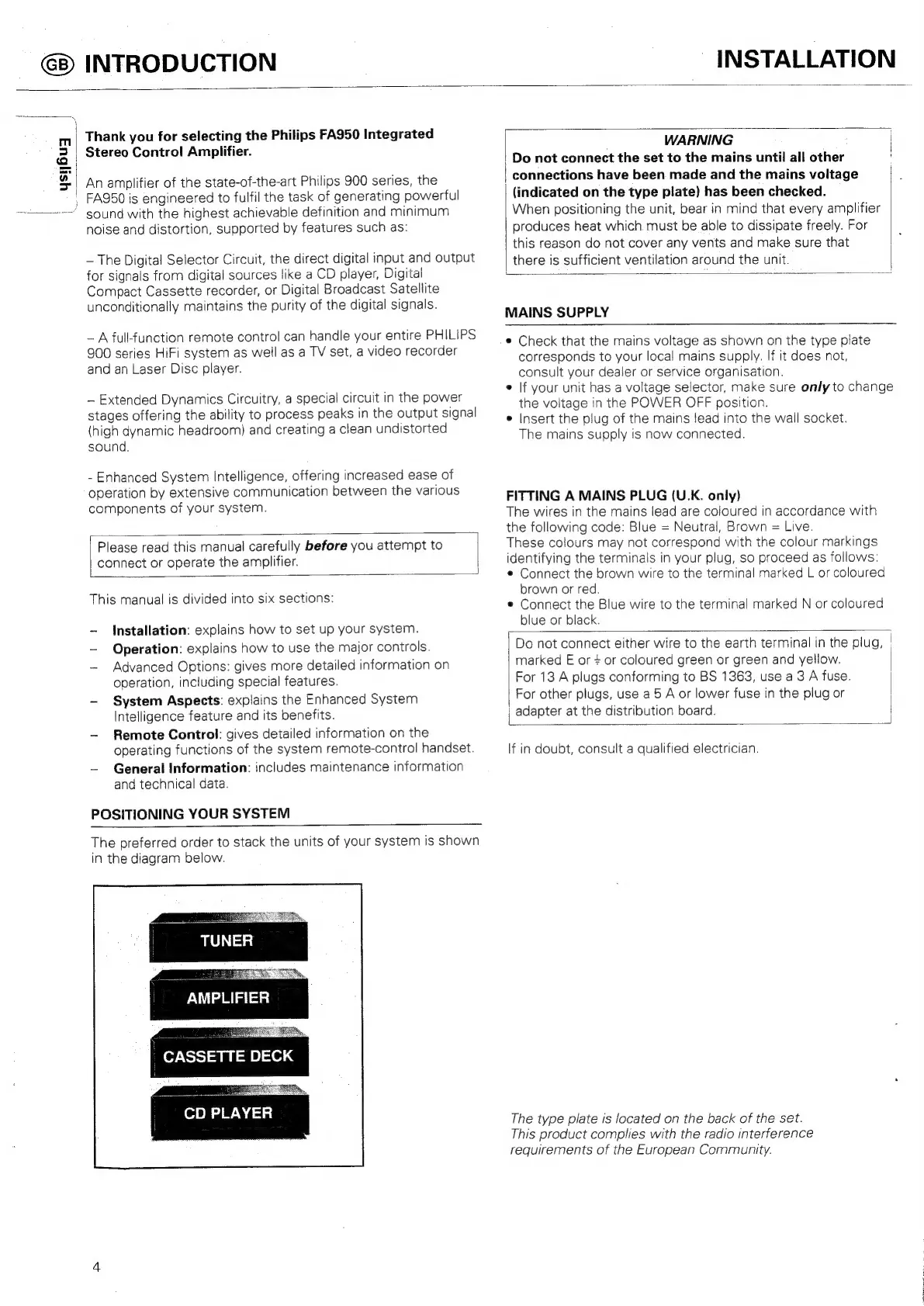
POSITIONING
YOUR
SYSTEM
The
preferred
order
to
stack
the
units
of
your
system
is
shown
in
the
diagram
below.
AMPLIFIER
"CASSETTE
DECK
CD
PLAYER
WARNING
|
Do
not
connect
the
set
to
the
mains
until
all
other
connections
have
been
made
and
the
mains
voltage
(indicated
on
the
type
plate)
has
been
checked.
When
positioning
the
unit,
bear
in
mind
that
every
amplifier
produces
heat
which.
must
be
able
to
dissipate
freely.
For
this
reason
do
not
cover
any
vents
and
make
sure
that
there
is
sufficient
ventilation
around
the
unit.
MAINS
SUPPLY
¢
Check
that
the
mains
voltage
as
shown
on
the
type
plate
corresponds
to
your
local
mains
supply.
If
it
does
not,
consult
your
dealer
or
service
organisation.
e
|f
your
unit
has
a
voltage
selector,
make
sure
only
to
change
the
voitage
in
the
POWER
OFF
position.
°
Insert
the
plug
of
the
mains
lead
into
the
wall
socket.
The
mains
supply
is
now
connected.
FITTING
A
MAINS
PLUG
(U.K.
only)
The
wires
in
the
mains
lead
are
coloured
in
accordance
with
the
following
code:
Blue
=
Neutral,
Brown
=
Live.
These
colours
may
not
correspond
with
the
colour
markings
identifying
the
terminals
in
your
plug,
so
proceed
as
follows:
¢
Connect
the
brown
wire
to
the
terminal
marked
L
or
coloured
brown
or
red.
e
Connect
the
Blue wire
to
the
terminal
marked
N
or
coloured
blue
or
black.
Do
not
connect
either
wire
to
the
earth
terminal
in
the
plug,
|
marked
E
or
+
or
coloured
green
or
green
and
yellow.
For
13
A
plugs
conforming
to
BS
1363,
use
a3
A
fuse.
|
|
For
other
plugs,
use
a
5
A
or
lower
fuse
in
the
plug
or
adapter
at
the
distribution
board.
If
in
doubt,
consult
a
qualified
electrician.
The
type
plate
is
located
on
the
back
of
the
set.
This
product
complies
with
the
radio
interference
requirements
of
the
European
Community.

Related product manuals