EasyManua.ls Logo

Philips FA 950 - Advanced Features and Options

Philips FA 950
14 pages
Print Icon
To Next Page IconTo Next Page
To Previous Page IconTo Previous Page
Loading...
OPERATION
ADVANCED
OPTIONS
ysy6uq
if
i
SOUND
CONTROL
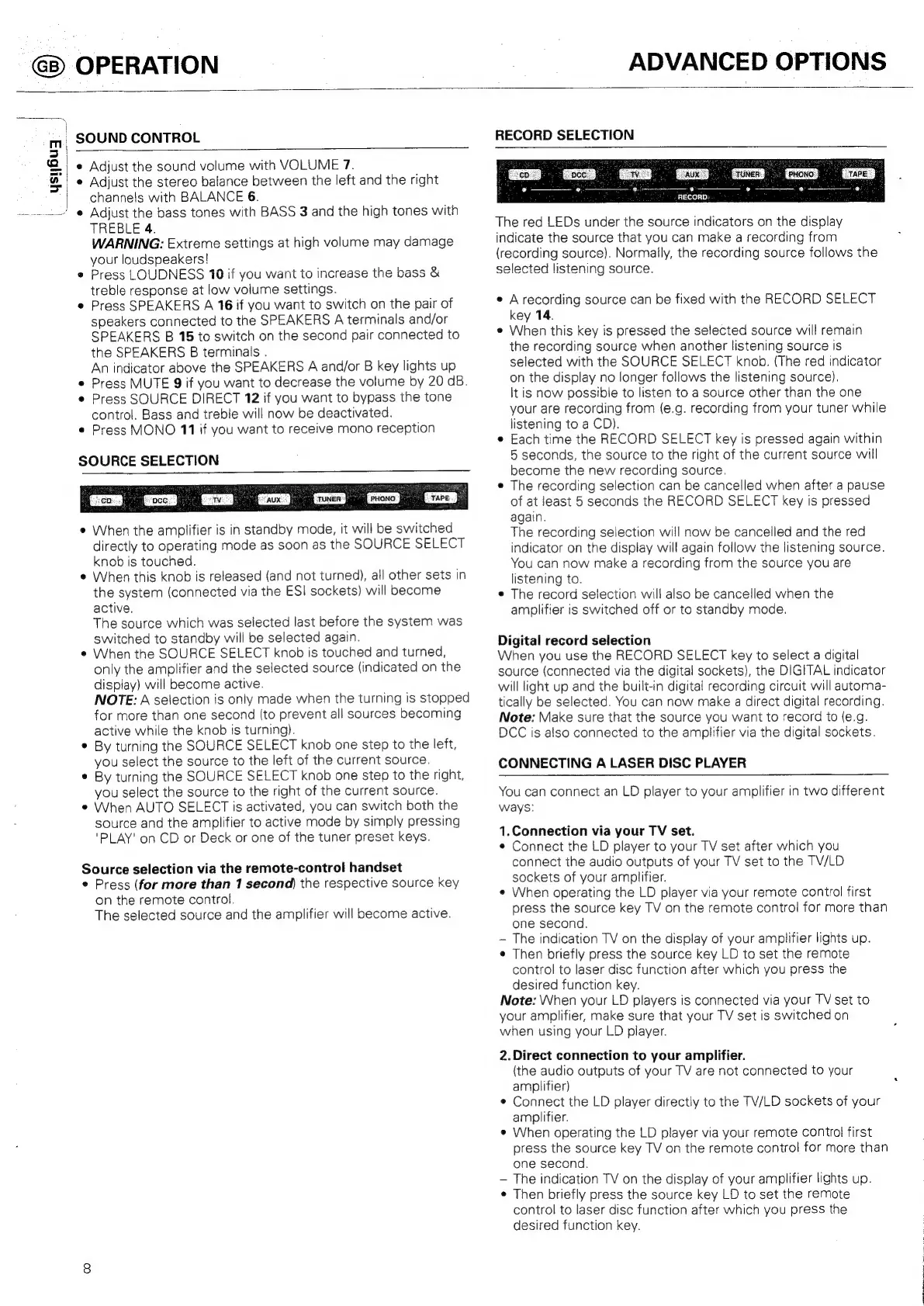
RECORD
SELECTION
¢
Adjust
the
sound
volume
with
VOLUME
7.
*
Adjust
the
stereo
balance
between
the
left
and
the
right
channels
with
BALANCE
6.
e
Adjust
the
bass
tones
with
BASS
3
and
the
high
tones
with
TREBLE
4.
WARNING:
Extreme
settings
at
high
volume
may
damage
your
loudspeakers!
*
Press
LOUDNESS
10
if
you
want
to
increase
the
bass
&
treble
response
at
low
volume
settings.
*
Press
SPEAKERS
A
16
if
you
want
to
switch
on
the
pair
of
speakers
connected
to
the
SPEAKERS
A
terminals
and/or
SPEAKERS
B
15
to
switch
on
the
second
pair
connected
to
the
SPEAKERS
B
terminals
.
An
indicator
above
the
SPEAKERS
A
and/or
B
key
lights
up
e
Press
MUTE
9
if
you
want
to
decrease
the
volume
by
20
dB.
¢
Press
SOURCE
DIRECT
12
if
you
want
to
bypass
the
tone
control.
Bass
and
treble
will
now
be
deactivated.
¢
Press
MONO
11
if
you
want
to
receive
mono
reception
SOURCE
SELECTION
e
When
the
amplifier
is
in
standby
mode,
it
will
be
switched
directly
to
operating
mode
as
soon
as
the
SOURCE
SELECT
knob
is
touched.
¢
When
this
knob
is
released
(and
not
turned),
all
other
sets
in
the
system
(connected
via
the
ESI
sockets)
will
become
active.
The
source
which
was
selected
last
before
the
system
was
switched
to
standby
will
be
selected
again.
¢
When
the
SOURCE
SELECT
knob
is
touched
and
turned,
only
the
amplifier
and
the
selected
source
(indicated
on
the
display)
will
become
active.
NOTE:
A
selection
is
only
made
when
the
turning
is
stopped
for
more
than
one
second
(to
prevent
all
sources
becoming
active
while
the
knob
is
turning).
¢
By
turning
the
SOURCE
SELECT
knob
one
step
to
the
left,
you
select
the
source
to
the
left
of
the
current
source.
¢
By
turning
the
SOURCE
SELECT
knob
one
step
to
the
right,
you
select
the
source
to
the
right
of
the
current
source.
e
When
AUTO
SELECT
is
activated,
you
can
switch
both
the
source
and
the
amplifier
to
active
mode
by
simply
pressing
'PLAY'
on
CD
or
Deck
or
one
of
the
tuner
preset
keys.
Source
selection
via
the
remote-control
handset
e
Press
(for
more
than
1
second)
the
respective
source
key
on
the
remote
control.
The
selected
source
and
the
amplifier
will
become
active.
*
proc
IRem
TAFE
9
6
RECORD:
The
red
LEDs
under
the
source
indicators
on
the
display
indicate
the
source
that
you
can
make
a
recording
from
(recording
source).
Normally,
the
recording
source
follows
the
selected
listening
source.
e
A
recording
source
can
be
fixed
with
the
RECORD
SELECT
key
14.
e
When
this
key
is
pressed
the
selected
source
will
remain
the
recording
source
when
another
listening
source
is
selected
with
the
SOURCE
SELECT
knob.
(The
red
indicator
on
the
display
no
longer
follows
the
listening
source).
It
is
now
possibie
to
listen
to
a
source
other
than
the
one
your
are
recording
from
(e.g.
recording
from
your
tuner
while
listening
to
a
CD).
e
Each
time
the
RECORD
SELECT
key
is
pressed
again
within
5
seconds,
the
source
to
the
right
of
the
current
source
will
become
the
new
recording
source.
e
The
recording
selection
can
be
cancelled
when
after
a
pause
of
at
least
5
seconds
the
RECORD
SELECT
key
is
pressed
again.
The
recording
selection
will
now
be
cancelled
and
the
red
indicator
on
the
display
will
again
follow
the
listening
source.
You
can
now
make
a
recording
from
the
source
you
are
listening
to.
©
The
record
selection
will
also
be
cancelled
when
the
amplifier
is
switched
off
or
to
standby
mode.
Digital
record
selection
When
you
use
the
RECORD
SELECT
key
to
select
a
digital
source
(connected
via
the
digital
sockets),
the
DIGITAL
indicator
will
light
up
and
the
built-in
digital
recording
circuit
will
autorna-
tically
be
selected.
You
can
now
make
a
direct
digital
recording.
Note:
Make
sure
that
the
source
you
want
to
record
to
(e.g.
DCC
is
also
connected
to
the
amplifier
via
the
digital
sockets.
CONNECTING
A
LASER
DISC
PLAYER
You
can
connect
an
LD
player
to
your
amplifier
in
two
different
ways:
1.Connection
via
your
TV
set.
¢
Connect
the
LD
player
to
your
TV
set
after
which
you
connect
the
audio
outputs
of
your
TV
set
to
the
TV/LD
sockets
of
your
amplifier.
e
When
operating
the
LD
player
via
your
remote
control
first
press
the
source
key
TV
on
the
remote
control
for
more
than
one
second.
~
The
indication
TV
on
the
display
of
your
amplifier
lights
up.
e
Then
briefly
press
the
source
key
LD
to
set
the
remote
control
to
laser
disc
function
after
which
you
press
the
desired
function
key.
Note:
When
your
LD
players
is
connected
via
your
TV
set
to
your
amplifier,
make
sure
that
your
TV
set
is
switched
on
when
using
your
LD
player.
2.
Direct
connection
to
your
amplifier.
(the
audio
outputs
of
your
TV
are
not
connected
to
your
amplifier)
¢
Connect
the
LD
player
directly
to
the
TV/LD
sockets
of
your
amplifier.
e
When
operating
the
LD
player
via
your
remote
control
first
press
the
source
key
TV
on
the
remote
control
for
more than
one
second.
The
indication
TV
on
the
display
of
your
amplifier
lights
up.
e
Then
briefly
press
the
source
key
LD
to
set
the
reMote
control
to
laser
disc
function
after
which
you
press
the
desired
function
key.

Related product manuals