21Connect Peripheral equipment
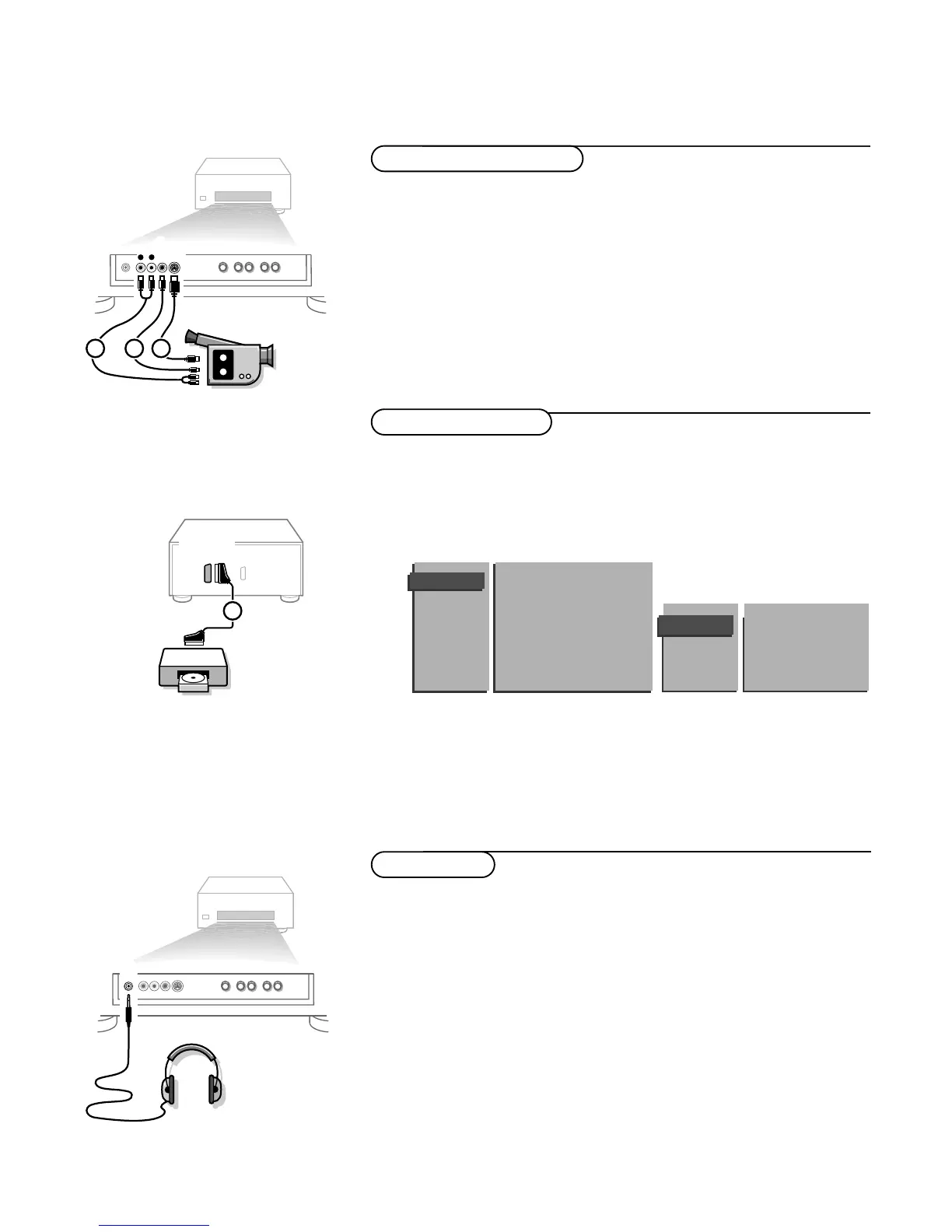
& Connect your camera or camcorder at the front side of your receiver.
é Connect the equipment to VIDEO 2 and AUDIO L 1 for mono
equipment.
“ For stereo equipment also connect AUDIO R 1.
S-VHS quality with an S-VHS camcorder is obtained by connecting the S-VHS
cables with the S-VHS input 3 and AUDIO inputs 1.
Camera & camcorder
Connect the eurocable 1 to EXTERNAL 1 as shown opposite.
Only for Photo CD
& Press S and s at the same time.
é Select Photo CD in the Setup menu.
“ Select Photo CD Present.
This offers you optimum picture quality for still pictures.
‘ Press one of the colour menu keys repeatedly to switch off all menus.
Other equipment
& Insert the plug into the headphone socket L at the front side of the
receiver.
é Press ¬ to switch off the internal loudspeakers of the TV.
The headphone impedance must be between 8 and 2000 Ohm.
The headphone socket has a 3.5 mm jack.
In the
SOUND menu select Headphone to adjust the headphone volume and
balance and to select the audio source for your headphone sound. See p. 14.
If you want to connect more equipment to your receiver, consult your dealer.
Headphone











 To Next Page