EasyManua.ls Logo

Philips FTR9952/12 - TV Channel Installation; Menu Navigation and Language Setup

Philips FTR9952/12
32 pages
Print Icon
To Next Page IconTo Next Page
To Previous Page IconTo Previous Page
Loading...
5Installation
Store TV channels
First, select your language and country.
& Select Menu Language in the INSTALLATION menu and press the OK key.
é Select your language and press the OK key.
Select Country and press the OK key.
Select the country where you are now located and press the OK key.
Select
Other when none of the countries applies.
You can now search for and store the TV channels in two different ways:
using automatic installation or manual installation (tuning-in channel by
channel).
Select your choice and press the OK key.
Select the menu language and country
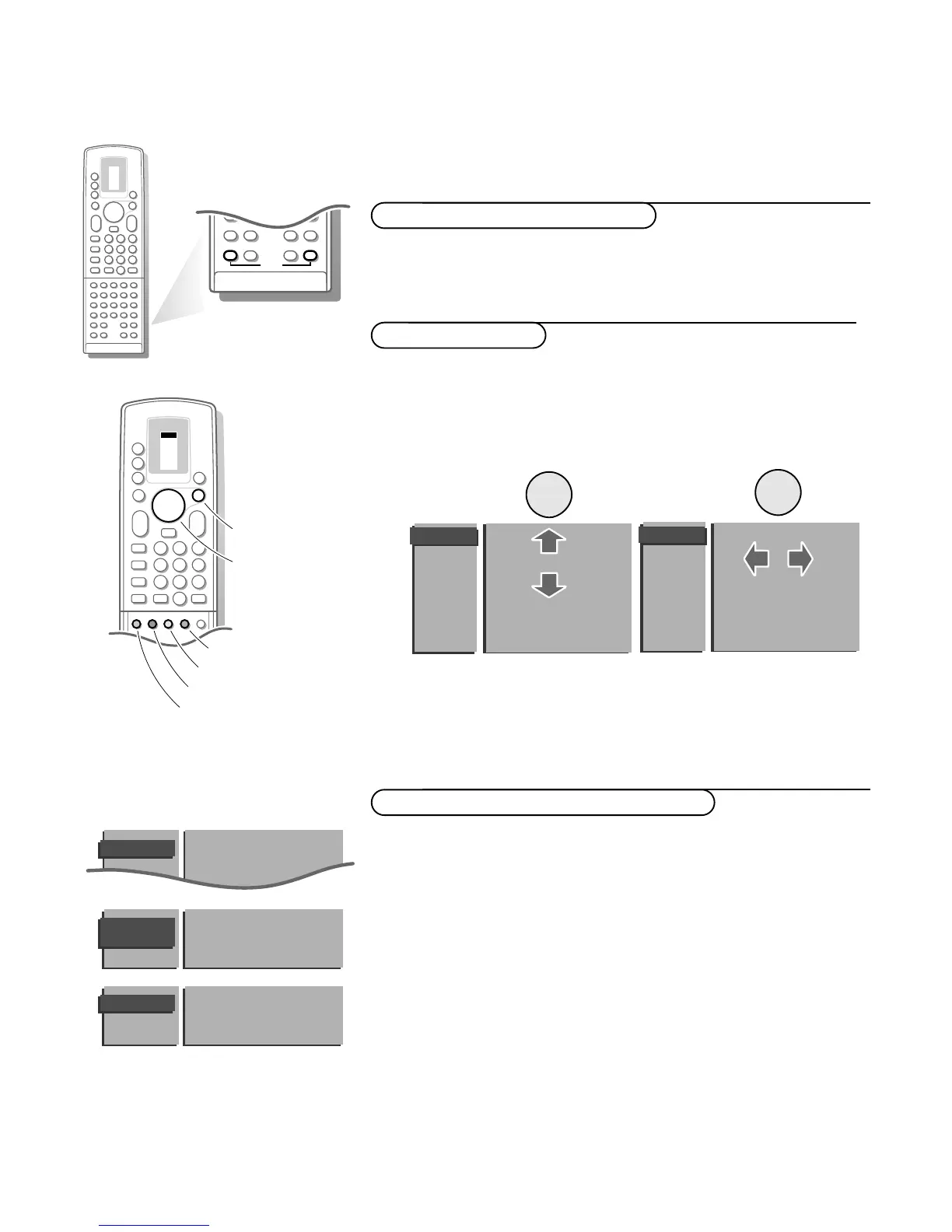
& Open the door of the remote control.
é Press S and s at the same time.
Installation
Select the
INSTALLATION
menu
& Use the cursor in the up/down, left/right directions to select a menu item.
é Press the OK key to activate.
Press one of the colour menu keys on the door of the remote control to
return or to switch menu off.
To use the menus

q
456
789
PICTURE
SOUND
SMART
0
i
0
π
Ò
C
P
S
s
dc
TXT
d
fh
U
+
-
PP
b
Menu Language
Country
Automatic Installation
Manual Installation
Give Name
Reshuffle
Favourite Programmes
Decoder/Descrambler
Setup
INSTALLATION
B
B
B
B
Menu Language
Country
Automatic Installation
Manual Installation
Give Name
Reshuffle
Favourite Programmes
Decoder/Descrambler
Setup
INSTALLATION
B
B
B
B
Menu Language
Country
Automatic Installation
Manual Installation
INSTALLATION
MENU
LANGUAGE
English
... ...
••• ••• •••
••• ••• •••
COUNTRY
UK
•••
••• •••
•••
Other
VCR 1
VCR 2
DVD
AMP
TUNER
TAPE
SAT
CD
TV
b
π
π
π
π
OK
M
w
TV
q
æ
X
b
B
1
23
456
789
+
-
V
P
+
-
¬
0
ib
j
0
activate
picture menu
sound menu
features menu
programme list
select
adjustments

Related product manuals