Multi-cooking
Saucè/Sear, Slow cook low, Slow cook
high, Pot roast, Bake, Yoghurt and
Reheat are multi- cooking functions.
1
Follow the steps in “Preparations
before cooking”.
2
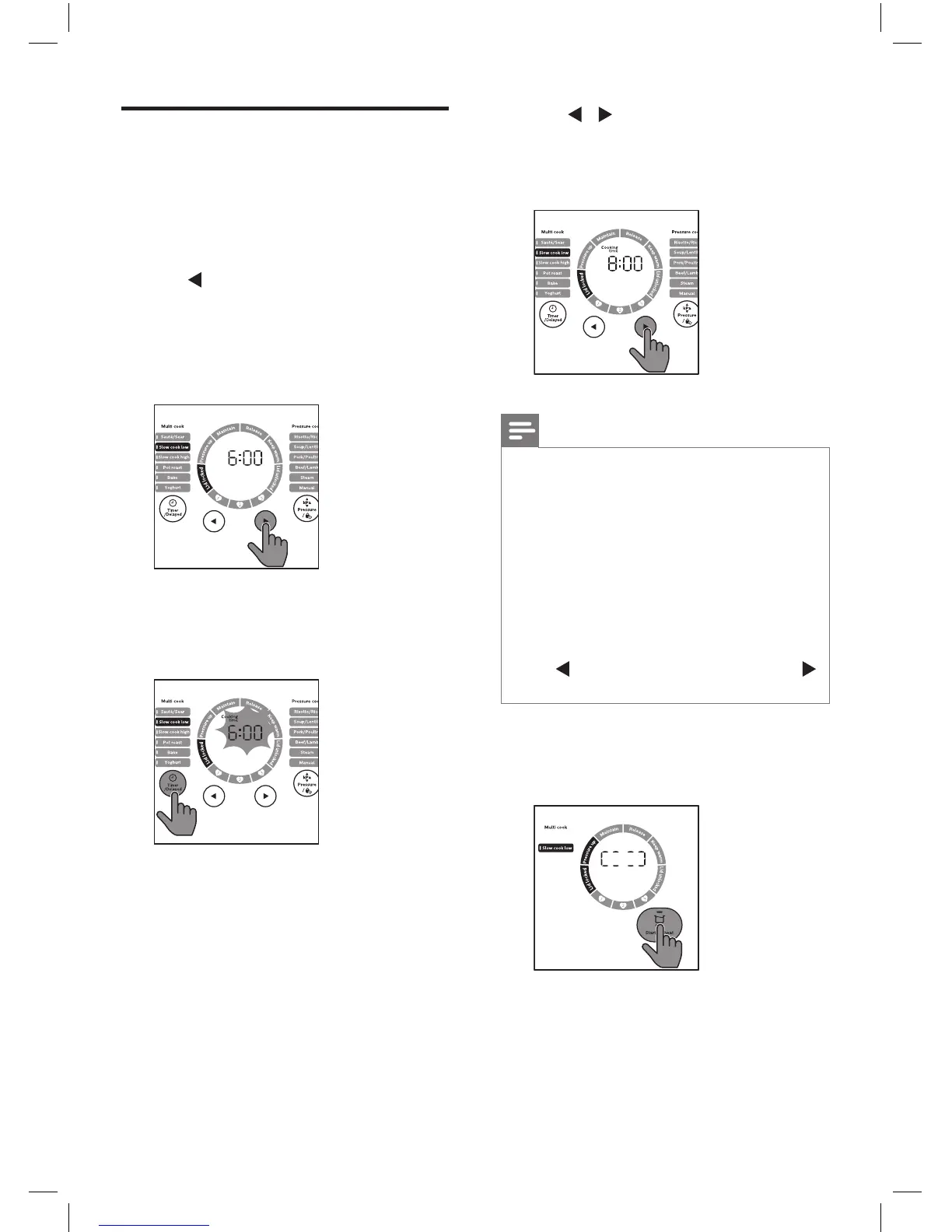
Tap to choose the function you
need.
»
The chosen cooking function
lights up, the default cooking
time is displayed on the screen.
3
To set a dierent cooking time, tap
Timer/Delay, Cooking time lights up.
»
The cooking time blinks.
4
Tap / to set the cooking time.
For the cooking time regulating
range, refer to Chapter ‘Cooking
time regulating range‘.
Note
•
Cooking time will start to count down
once internal temperature reaches
cooking temperature as outlined in
‘Cooking time regulating range’.
•
There is preheat time for Sauté/Sear
mode (up to 5 minutes). Insert your food
once the “Maintain” status is reached
on the working status ring and the timer
starts to count down. Inserting food
before the correct status is reached will
slow down the process.
•
Tap to adjust the time by hours, tap
to adjust the time by minutes.
5
Tap and hold Start/Reheat for
3 seconds, the All-in-One cooker
starts working in the selected mode.
6
When the All-in One cooker reaches
the cooking temperature, the
cooking time starts countdown.



 To Next Page