Setting up My Favourite
menu
You can set any three menus as “My
Favourite”. Before you make any
changes to the setting, the default
menus are “
-
Risotto/Rice”, “
-
Soup/
Lentils” and “
-
Steam”.
If you need to change the menu in
“My Favourite”, for instance to change
“Soup/Lentils” to “Beef/Lamb”, follow
the steps below.
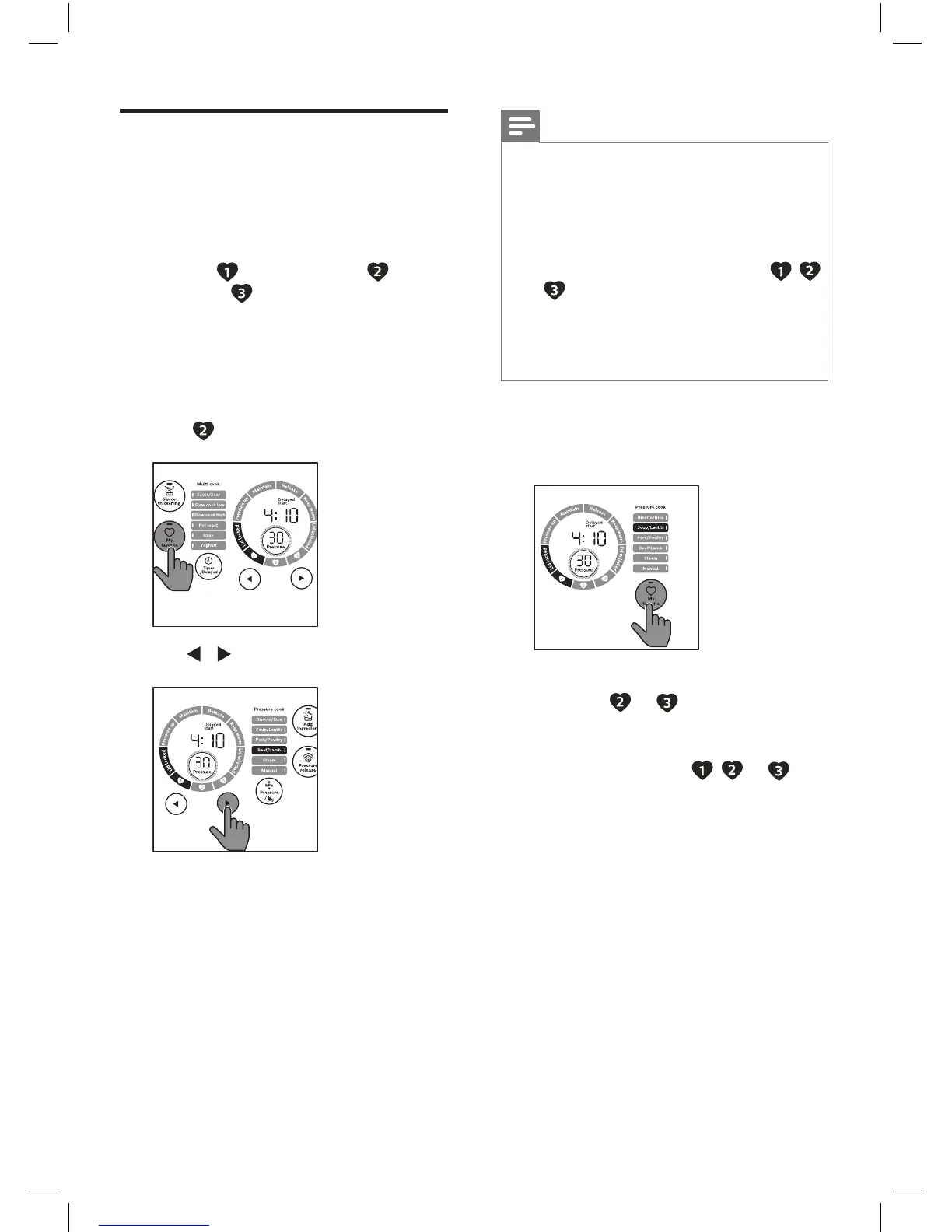
1
Tap My Favourite repeatedly
until
is selected.
3S
2
Tap / to select Beef/Lamb.
Note
•
Refer to “Set the cooking time” and
“Set the cooking pressure” if you
need to customize the program. The
new program will be saved in the “My
Favourite” menu.
•
If you want to save your own favourite
menus, 1) rst, press any No. from ,
or . 2) second, select the menu you
preferred from the menu list.
3) third, adjust your preferred cooking
time and pressure. 4) then press and
hold “My Favourite” button to save it.
3
Touch and hold My Favourite for 3
seconds, the Soup/Lentils will be
replaced by Beef/Lamb.
3S
4
Follow steps 1-3 to change My
favourite
or .
5
After changing the menu, tap My
Favourite once or more times to
select my favourite , or
and then tap and hold Start/
Reheat button to quickly access my
favourite menu.


 To Next Page