»
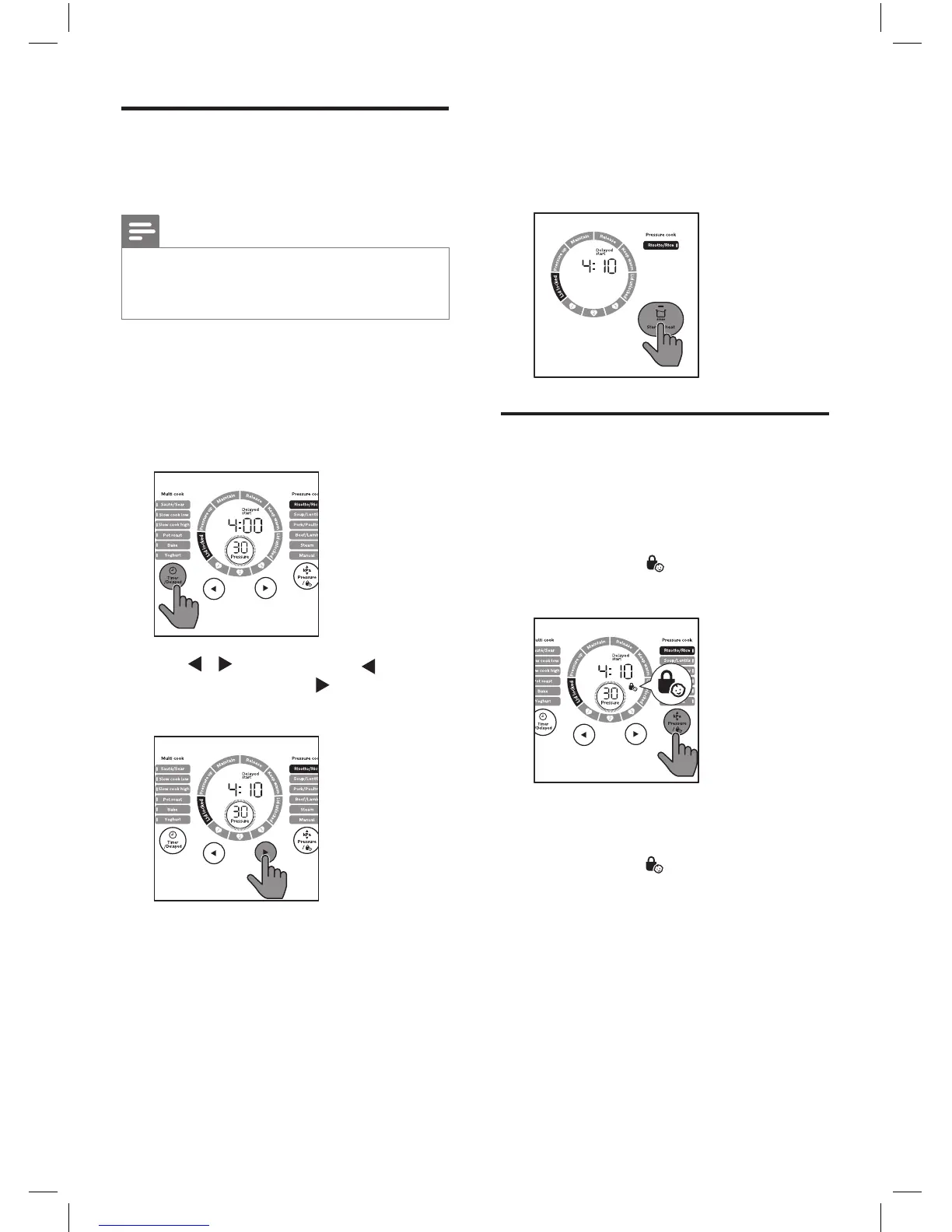
When preset time is elapsed, the
All-in-One cooker starts working
in the selected cooking mode
automatically.
Setting up child lock
To protect your child from using the
appliance, or to avoid unexpected
operations during cooking, you can set
up the child lock function.
1
Tap and hold
for 3 seconds
activate child lock.
3S
»
The other buttons are not
responsive.
2
Tap and hold for 3 seconds
again to deactivate child lock.
Preset time for delayed
cooking
Note
•
The preset timer is not available only
in Sautè/Sear, Source thickening and
Reheat.
1
Follow the steps of pressure
cooking or multi-cooking, choose
the cooking function you need.
2
Tap Timer/Delayed twice, the Delay
start indicator lights up.
3
Tap / to set time. Tap to adjust
the time by hours, tap to adjust the
time by minutes.
4
Tap Start/Reheat for 3 seconds to
conrm the preset time.



 To Next Page