HP L1502
15
Go to cover page
Mechanical Instructions
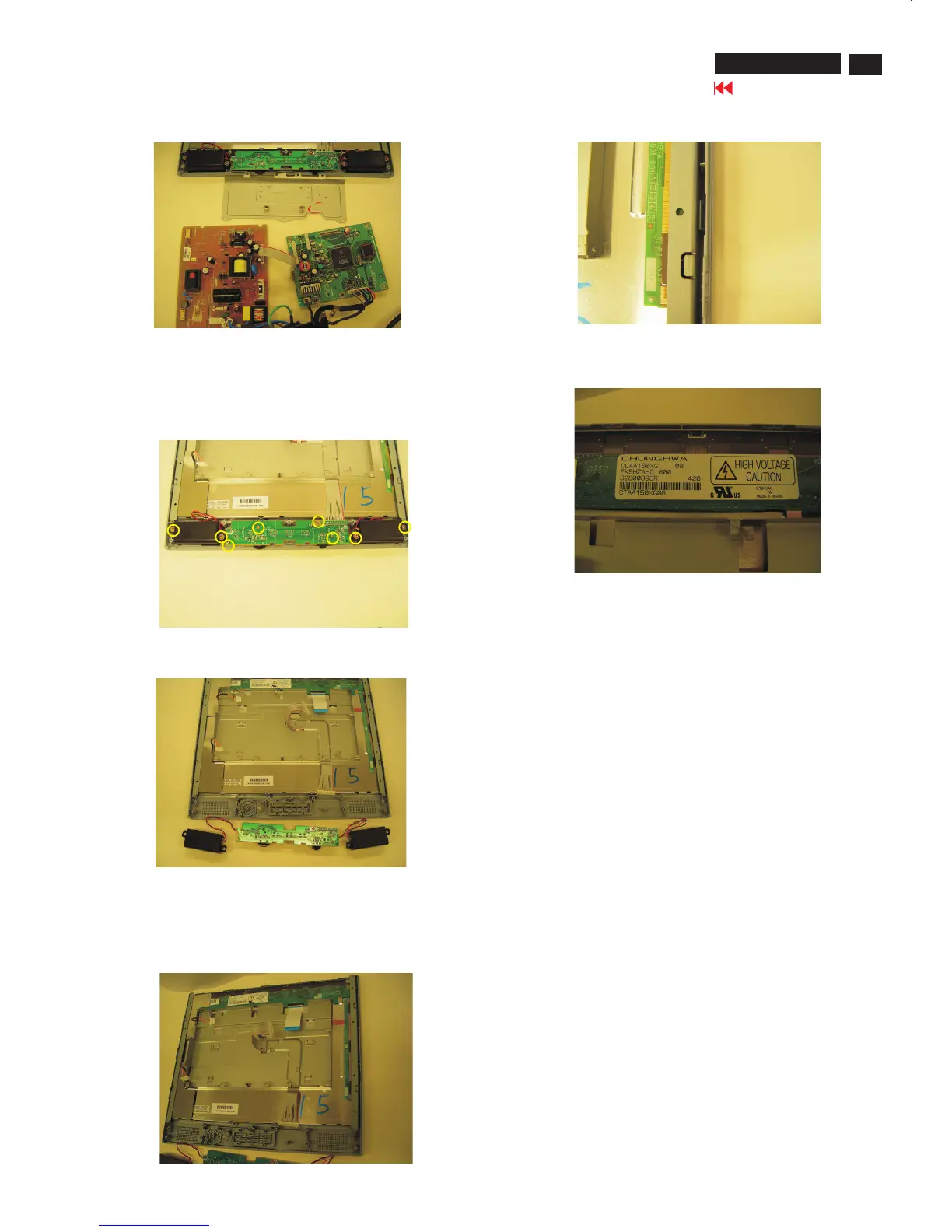
Remove the Scaler and Power board as Fig. 10.
Fig. 11
Fig. 12
Step 6. Remove the Front Bezel
Use the thin "I" type screw driver to open the clicks
as Fig.13 &14.
Fig. 10
Fig. 13
Fig. 15
***************************************************************************
In warranty, it is not allowed to disassembly the LCD panel, even the
backlight unit defect.
Out of warranty, the replacment of backlight unit is a correct way
when the defect is cused by backlight (CCFL,Lamp).
***************************************************************************
Step 5. Remove the control board
Remove the seven screws and cable as Fig. 11 & 12.
Scaler board
Power board
Cable
======>
Fig. 14
1050 9322 196 43682 TFT-LCD LS150X05 (LGPH)
1050 9322 195 10682 TFT-LCD CLAA150XG08 (CPT0)
======>
======>
======>
======>













 To Next Page