Step 6 : Power off,
After finished,entering factory mode to check CPU version
as shown in Fig. 5.
Troubleshooting :
Monitor : Monitor is on (LED is green.), or off,
but no display (black)
1. Make sure to disconnect the mains cord at Monitor ,
then connect it again.
2. EEPROM size may be not correct.
(Press " " and"+“and"POWER KNOB" at
the same time to access Factory mode.)
ISP CABLE for CPU GM2116AA
Fig. 5
Go to cover page
26
HP L1502
Step 1 : Make a folder in your PC as shown in Fig. 2.
For example : C:\HPL1502.
Step 2 : Copy ISP Software (HPL1502..zip) into your folder as
shown in Fig.2.
Step 3 : Unzip isp.zip into your folder as shown in Fig. 2.
Step 5 : Execute ISP Software in Monitor (A) on MS-DOS mode as shown in Fig. 4.
Step 5-1.=> C:\cd HPL1502 ( as shown in Fig. 4-1).
Press "Enter" key on keyboard, bring up Fig. 4-2.
Step 5-2.=> Key in “Gp2”, Press"Enter" key on keyboard, bring up Fig. 4-3.
Step 5-3.=> Key in “Batch Kevin.txt” ,Press "Enter" key on keyboard again,
bring up Fig.4-4.
Step 5-4.=> Key in “exit” ,Press "Enter" key on keyboard again, bring up
Fig.4-5.and successful will be bring up Fig.4-6.
Step 4 : Connect ISP cable and Mains cord to Monitor
as shown in Fig. 3.
Fig. 4
Configuration and procedure
ISP (In System Program) software
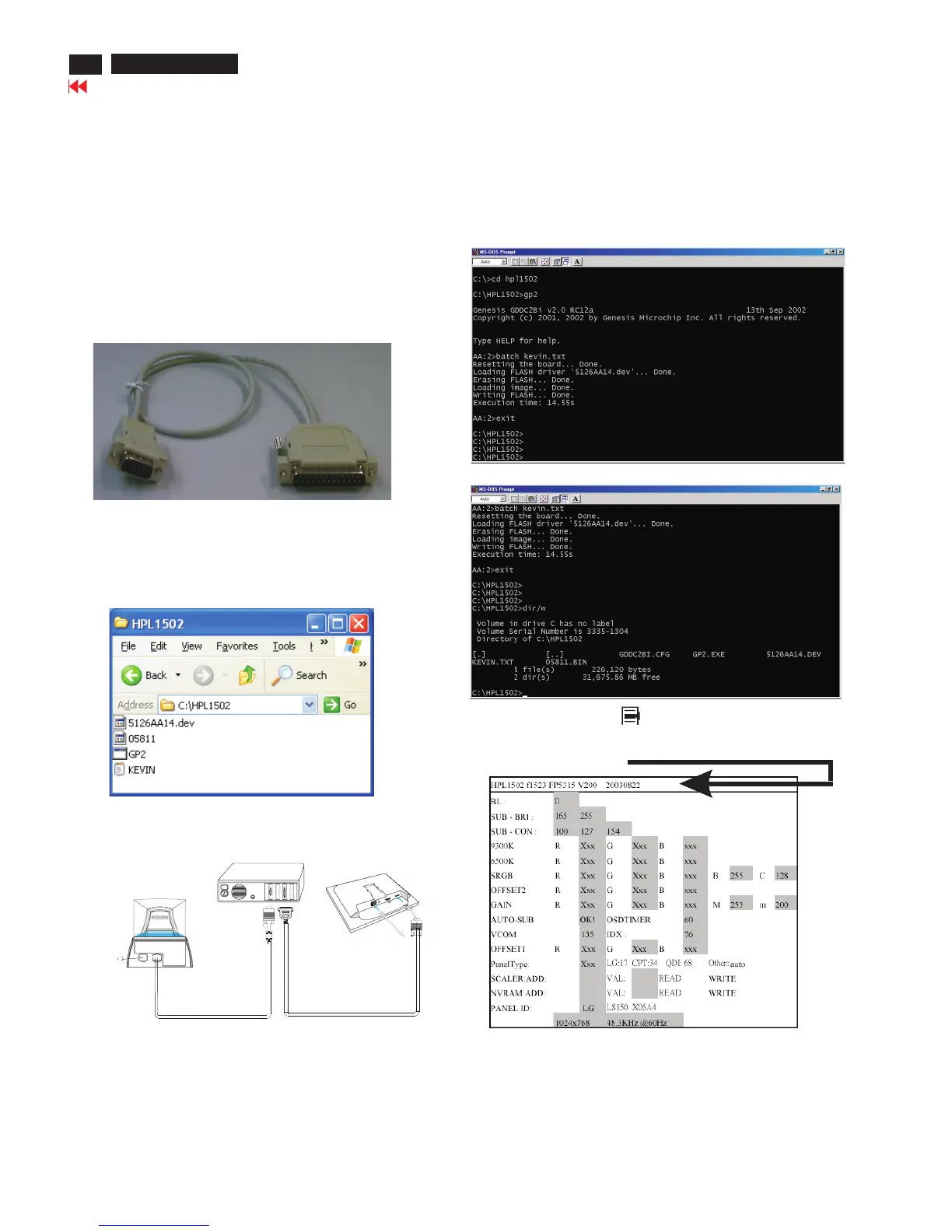
ISP cable
is provided by Motorola to upgrade
the firmware of CPU.
is for the interface between "Parallel Port of PC" and
"15 pin-D-SUB connector of Monitor".
It is a DOS-based program, which cannot be run in MS-Windows.
System and equipment requirements
1. An i486 (or above) personal computer or compatible.
2. Microsoft operation system Windows 95/98
=> .
4. ISP Cable (3138 106 10148) as shown in Fig. 1
DOS environment
3. ISP Software
Fig. 1 => ISP CABLE : 12nc is "3138 106 10148".
Fig.3
PC
To printer port (LTP1)
To video card
Video cable
Connect to
Mains cord
Monitor (A)
Monitor (B)
ISP cable
D-Sub
25 pins
Connect to Mains cord
at this moment.
------------------------------->
Fig. 2
Fig. 1
<== 4-1
<== 4-2
<== 4-3
<== 4-5
<== 4-4
--------------
--------------------------
-----------
<== 4-6













 To Next Page