HP L1502
7
Go to cover page
OSD Lock/Unlock, Aging & ,
Enable/Disable "warning message"
ATTENTION
OSD LOCK OUT
Check Video Cable
To Lock/Unlock OSD function (User Mode)
-
The OSD function can be locked by pressing " " button(3) for
more than 10 seconds, the screen shows following windows for 3
seconds. Everytime when you press " " or"+"button, this
message appears on the fly screen automatically.
To Enable/Disable "Warning message" on screen
(in User Mode)
Unlock OSD function:
Locked OSD function can be released by pressing" " button for
more than 10 seconds again.
Step 1: Turn off LCD monitor, and disconnect Interface Cable
between Monitor and PC.
Step 1: Turn on LCD monitor, and disconnect Interface Cable
between Monitor and PC. bring up
Fig. 2
Bring up
After 15 seconds, bring up :
After 15 seconds, bring up :
:
After 15 seconds, bring up :
----------
----------
repeatly
Connect signal cable again => go back to normal display.
Status 1.:
=> go back to Windows screen.
Connect signal cable again
Access Aging.. Mode
Step 2 :
[Push " " & " " buttons at the same time and hold it ] +
[Press power " " button untill comes out "AGING screen"
] => then release all buttons.
+
AGING...AGI N G ...
AGING...AGI N G ...
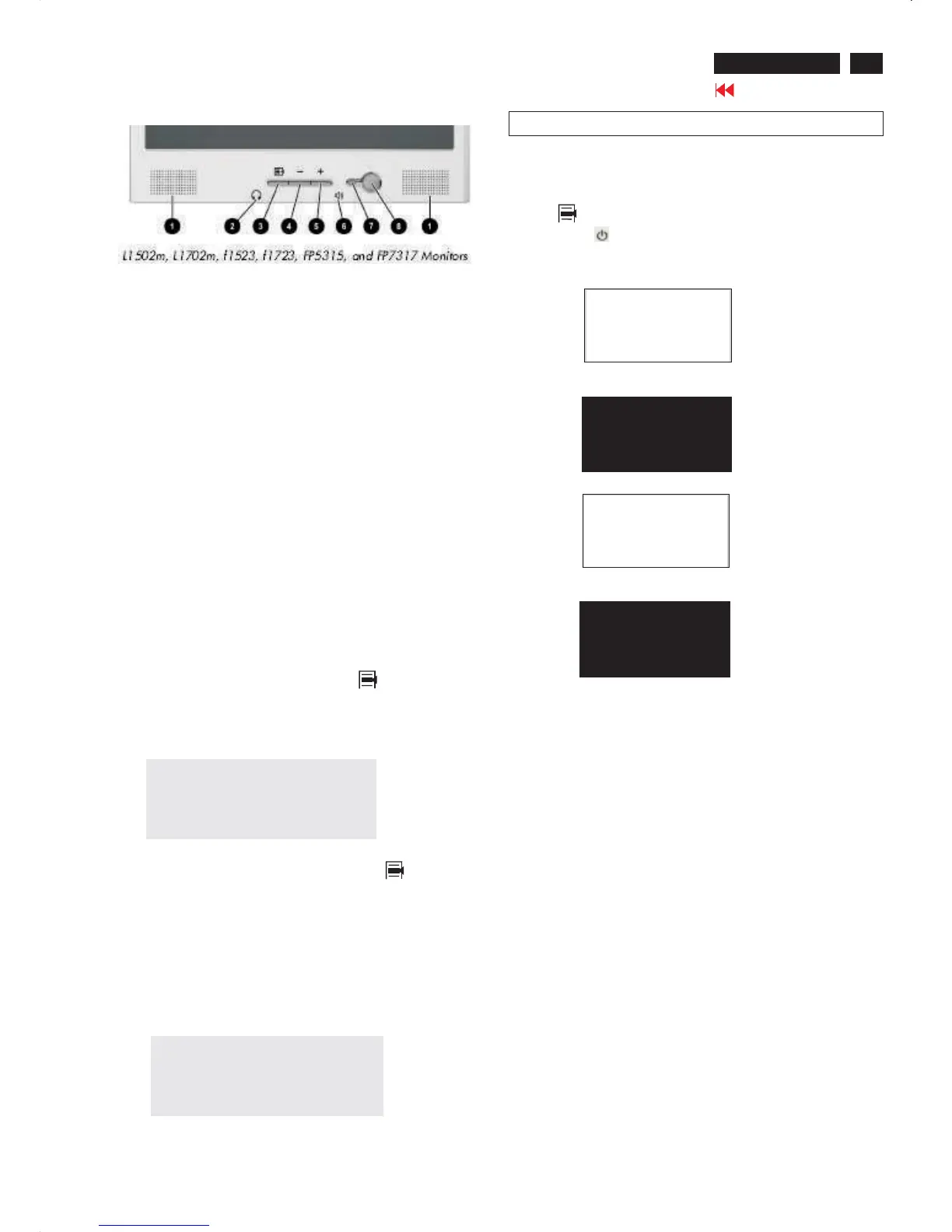
Front control panel
Fig. 1
1 Speakers Audio feature for music,alarms,etc.(multimedia models only)
2 (Headphone jack)Connects a headphone set to the monitor.
3 Menu button Launches the On-Screen Display (OSD) menu and
selects functions.
4 (Minus button) When OSD is inactive, auto-adjusts the screen
Image. When OSD is active, navigates in reverse through the OSD
and adjusts OSD scale settings.
5 + (Plus button) When the OSD is active, navigates through the OSD
and adjusts OSD scale settings.
6(Volume control)Controls the volume level of the monitor speakers.
7 Power LED Fully powered = Green.
Sleep mode = Amber.
Sleep Timer mode = Flashing Amber.
8 Power Switch Powers the monitor on and off.
No. Control Function
No. Control Function













 To Next Page