19
HP L1502
Display Adjustment
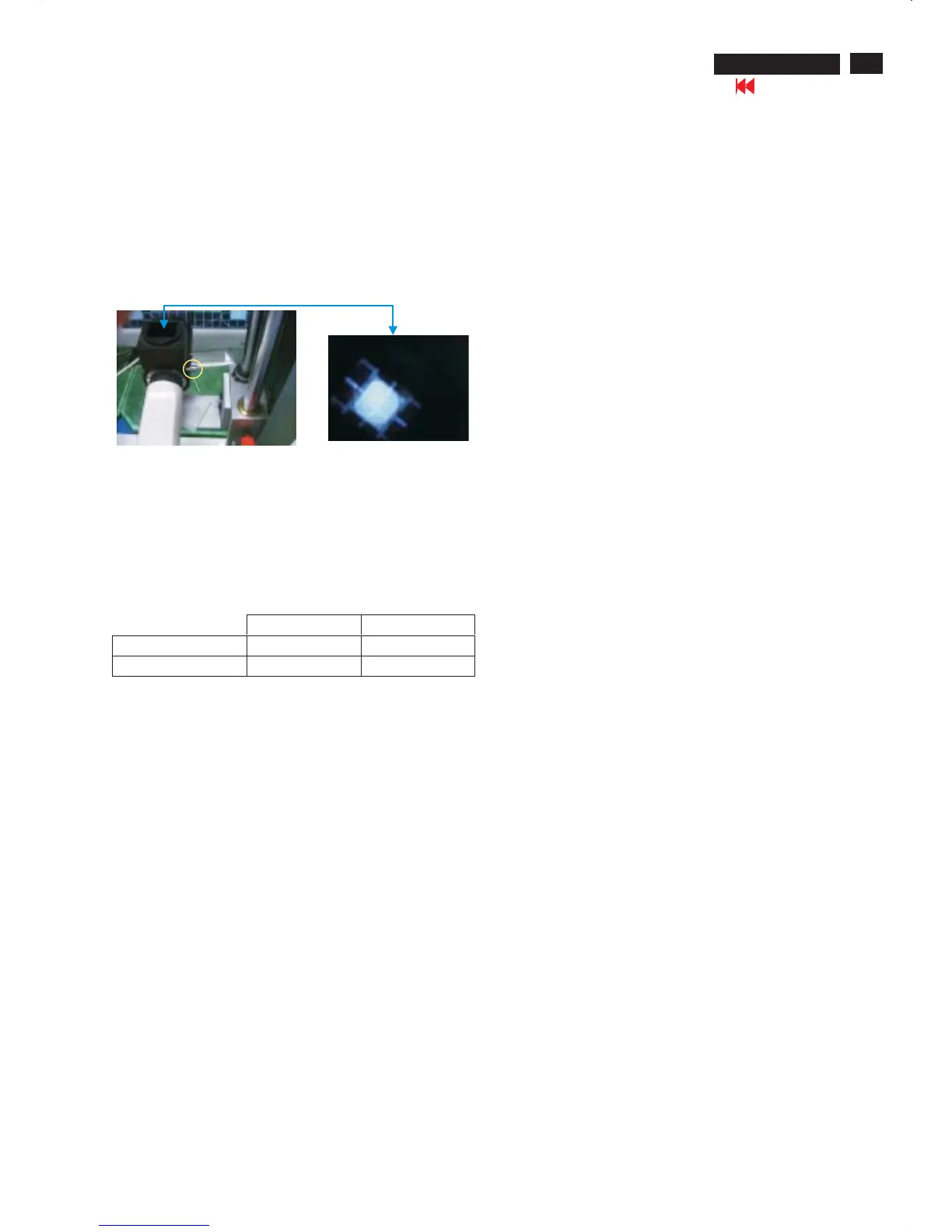
2.6 Switch light probe to Viewing position.
2.7 Move the Lens barrel forward or backward to get clear image as
shown in Fig. 4
2.8 Switch light probe to Measuring position. It should be able to
indicate colour value on the CA-110.
Measurement/viewing selectorMeasurement/viewing selector
Fig. 4
Clear image
2.9 Press buttons to selectRGBof9300 and 6500.
Increase / decrease value by press or buttons until the
1931 CIE chromaticity ( x,y)asbelow.
Menu
Up Down
Alignment hits:
1. R for x value , G for y value, B for Y value on the colour analyzer.
2. Must to select 9300 in user mode, then 9300 is available in factory
Mode.
3. Must to select 6500 in user mode, then 6500 is available in factory
Mode.
3. NVRAM(24C16) Default Values:
Sub_Bri: 165 255/LG 230/CPT 225/QDI
Sub_Con: 100 127 154
VCOM: 152
4. Factory Reset:
After finishing all the adjustment, select “Factory Reset” function
to recall:
Do an automatic Auto-Adjustment
Set Brightness = 100
Set Contrast = 50
Set Color = 6500K-sRGB
Set Custom Color (R.G.B) = 100
To leave factory mode by restart the monitor.
9300°K 6500°K
x (center) 0.283 ± 0.020 0.313 ± 0.020
y (center) 0.297 ± 0.020 0.329 ± 0.020
5. EEPROM Presetting:
6.Main Menu Factory Default Values
After finishing all the adjustment,Set:
Brightness control to 100%
Contrast control to 50%
OSD position at middle of screen.
Color Adjust to 6500K color.
When adjustment is finished,monitor should be set to 6500K.
The OSD shall have the following factory default values:
Language = English
OSD Cotrol:
Horizontal OSD position = 50
Vertical OSD position = 50
OSD timeout = 30s
Management:
Power Saver = ON
Power On Recall = ON
Mode display = OFF
Sleep Timer = OFF
Go to cover page













 To Next Page